
Commander Bingo Cards - Print Free or Customize
Print free Commander bingo cards or modify, unlimited prints! Pick from 42,200+ templates or use our bingo card generator. Add numbers, phrases, photos, or any combination. Play using printed PDF, digital bingo cards, and our digital bingo caller, or mix physical and digital.
About: This bingo card is perfect for a wild night of Commander, capturing all the quirky moments and iconic plays that make Magic: The Gathering’s most social format so memorable. It celebrates both epic moves and table banter, making it a great fit for game nights with friends, LGS events, or even a Commander party with seasoned Magic fans.
How To: To get a PDF to print, click the Print button. You can adjust the card count and other print settings on the Print tab. Grid items and free space content can be edited on the Basic tab. Appearance can be totally personalized on the corresponding tabs, or you can easily find any preference using the 🔍 tab.
How to play Commander Bingo Cards?
- Digital Players: Click on the Play button above, and then click on the 🎫 button.
- Printed Caller: Print PDF calling list & calling slips and manually select the slips.
- Printed Players: Print PDF bingo cards and manually cross off the cards.
- Digital Caller: Click on the Play button above.
- Combo Mode: Choose any combination above. For example, caller can be either Printed or Digital. And players can be Printed or Digital or a combo of both.
Step-By-Step:
- Start by downloading the Commander Bingo PDF by clicking on the "Print" button above.
- Open the PDF and print it.
- For random calling, you can print another copy of the call list, cut, fold and then draw them randomly at play time.
- Cut the bingo cards at the cut marks if there are more than 1 bingo cards per page.
- Give one card to each player. For marking, you can use markers. Crayons cost the least.
- Choose one person to be the caller. If you are playing in a small group, the caller may also play along with their own Bingo card.
- The caller begins the play by randomly picking an item from the call list and announcing it to all players.
- The players check their cards to see if they have the announced word. If they do, they mark that word.
- The first player to finish a horizontal, vertical, or a diagonal line of crossed items announces "Bingo!" and wins the game.
- The caller verifies that the items crossed off form a correct line according to the Bingo card and call list.
- You can play for multiple patterns or a full card blackout for a longer game.
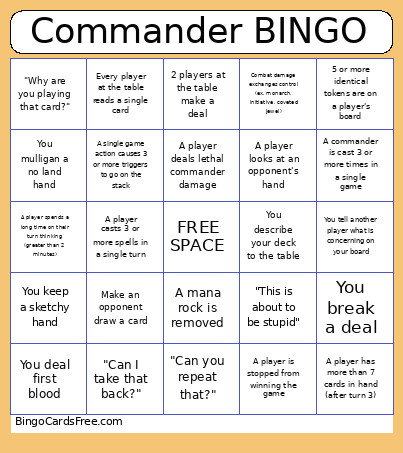 This Commander Bingo Cards Game contains following Words or Phrases: Turn 1 sol ring, "Huge tracks of land", A player demonstrates and infinite loop, A commander gets countered, A mana rock is removed, "Did you pay the __?", A player misses a trigger, 5 or more identical tokens are on a player's board, More than 6 +1/+1 counters are on a single creature, A player plays a card that says "win the game" (does not have to win), A player tutors for a nonland card, A commander is cast 3 or more times in a single game, The game ends with a player never casting their commander, A player presents 2 cards in the command zone, Combat damage exchanges control (ex. monarch, initiative, coveted jewel), Game becomes archenemy, A player points at another player as the threat, A player has more than 40 life, A player has exactly 1 life, A player has more than 7 cards in hand (after turn 3), A player is stopped from winning the game, A player deals lethal commander damage, A player casts 3 or more spells in a single turn, A player refers to a card by a well-accepted nickname (Bob Steve Mom Tim), A player goes to the restroom in the middle of a game, A player eats food between turns, A player asks about life outside the game, A player spends a long time on their turn thinking (greater than 2 minutes), A single game action causes 3 or more triggers to go on the stack, Game rules are referenced, A player plays a game changer, A player talks about a deck they want to build, Every player at the table reads a single card, A player reads the same card multiple times in a single turn, 0 mana is spent to cast a spell, A player stacks their lands to make space, 10 or more mana is spent to cast a spell, 2 players at the table make a deal, You mulligan a no land hand, You keep a sketchy hand, A player rolls a natural 20 to decide who goes first, 10 creatures on the board share a creature type, A player is on their phone in the middle of the game, "Can you repeat that?", "What is on your board?", You describe your deck to the table, You tell another player what is concerning on your board, You deal first blood, You receive first blood, A player looks at an opponent's hand, Make an opponent draw a card, Use a land for something other than mana (fetching counts), "Stop trying to make fetch happen" in response to a fetch land, "Why are you playing that card?", "This is about to be stupid", "Can I take that back?", You break a deal.