Computer Networking Bingo Cards - Print Free or Customize
Print free Computer Networking bingo cards or customize,
limitless prints! Pick from 42,200+ designs or use our bingo card generator.
Add numbers, phrases, pictures, or mix them all.
Play using PDF prints, digital bingo cards,
and our digital bingo caller, or mix physical and digital.
Similar Bingo Cards: Classroom, Virtuallearning, Teacherstudent
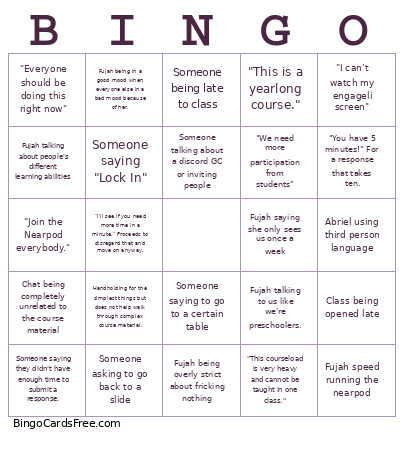
About: This bingo card perfectly captures the quirks and classic moments from an online class with Fujah and Abriel at the helm. Expect to spot familiar frustrations and inside jokes that any regular participant will recognize. It’s ideal for students looking to add a bit of fun to class sessions or virtual study groups.
How To: To get a PDF to print, click the Print button.
You can modify the card count and other
print settings on the Print tab.
Grid items and free space text can be added on the Basic tab.
Appearance can be fully personalized on the
relevant tabs, or you can easily locate any preference
using the 🔍 tab.
How to play Computer Networking Bingo Cards?
Digital Caller: Click on the Play button above.
Paper Caller: Print PDF calling list & calling slips and manually pick the slips.
Digital Players: Click on the Play button above, and then click on the 🎫 button.
Paper Players: Print PDF bingo cards and manually scratch the cards.
Hybrid Mode: Pick any combination above.
For instance, caller can be either Printed or Digital.
And players can be Printed or Digital or a combo of both.
Step-By-Step:
Start by saving the Computer Networking Bingo PDF by clicking on the "Print" button above.
Open the PDF and print a hard copy.
For random drawing, you can print another copy of the call list, cut, fold and then draw them randomly at play time.
Cut the bingo cards at the cut lines if there are more than 1 bingo cards per page.
Give one card to each player. For marking, you can use crayons. Crayons cost the least.
Pick one person to be the caller. If you are playing in a small group, the caller may as well play along with their own Bingo card.
The caller begins the play by randomly pulling an item from the call list and announcing it to all players.
The players check their cards to see if they have the announced word. If they do, they cross off that word.
The first player to complete a horizontal, vertical, or a diagonal line of crossed items announces "Bingo!" and wins the game.
The caller validates that the items crossed off form a proper line as per the Bingo card and call list.
You can play for different patterns or a full card blackout for an extended game.
This Computer Networking Bingo Cards Game contains following Words or Phrases: "I can't watch my engageli screen", Abriel using third person language, Fujah saying she only sees us once a week, Fujah being overly strict about fricking nothing, Someone saying "Lock In", Someone talking about a discord GC or inviting people, Someone being late to class, Someone saying to go to a certain table, Class being opened late, Chat being completely unrelated to the course material, Fujah speed running the nearpod, Someone saying they didn't have enough time to submit a response., Fujah talking to us like we're preschoolers., Someone asking to go back to a slide, Fujah talking about people's different learning abilities, "Everyone should be doing this right now", "This courseload is very heavy and cannot be taught in one class.", "This is a yearlong course.", "Join the Nearpod everybody.", "We need more participation from students", "You have 5 minutes!" For a response that takes ten., "I'll see if you need more time in a minute." Proceeds to disregard that and move on anyway., Handholding for the simplest things but does not help walk through complex course material., Fujah being in a good mood when everyone else in a bad mood because of her..

 This Computer Networking Bingo Cards Game contains following Words or Phrases: "I can't watch my engageli screen", Abriel using third person language, Fujah saying she only sees us once a week, Fujah being overly strict about fricking nothing, Someone saying "Lock In", Someone talking about a discord GC or inviting people, Someone being late to class, Someone saying to go to a certain table, Class being opened late, Chat being completely unrelated to the course material, Fujah speed running the nearpod, Someone saying they didn't have enough time to submit a response., Fujah talking to us like we're preschoolers., Someone asking to go back to a slide, Fujah talking about people's different learning abilities, "Everyone should be doing this right now", "This courseload is very heavy and cannot be taught in one class.", "This is a yearlong course.", "Join the Nearpod everybody.", "We need more participation from students", "You have 5 minutes!" For a response that takes ten., "I'll see if you need more time in a minute." Proceeds to disregard that and move on anyway., Handholding for the simplest things but does not help walk through complex course material., Fujah being in a good mood when everyone else in a bad mood because of her..