COMPUTER SCIENCE BINGO Cards - Print Free or Customize
Print free COMPUTER SCIENCE BINGO cards or personalize,
limitless cards! Select from 41,500+ designs or use the bingo card generator.
Add numbers, words, pictures, or any combination.
Play using printable PDF, online bingo cards,
and the online bingo caller, or combine all formats.
About: This bingo card is perfect for a tech-savvy crowd, especially at youth coding camps, gaming clubs, or school computer science events. With a fun mix of video game favorites, programming know-how, and digital habits, it encourages friendly conversation about shared interests and skills in the world of gaming and technology.
How To: To download a printable PDF, click the Print button.
You can modify the number of cards and other
print options on the Print tab.
Grid items and free space content can be added on the Basic tab.
Appearance can be exactly customized on the
corresponding tabs, or you can easily locate any preference
using the 🔍 tab.
How to play COMPUTER SCIENCE BINGO Cards?
Virtual Players: Click on the Play button above, and then click on the 🎫 button.
Printed Players: Print PDF bingo cards and physically mark the cards.
Printed Caller: Print PDF calling list & calling slips and physically choose the slips.
Virtual Caller: Click on the Play button above.
Combo Play: Pick any combination above.
For instance, caller can be either Printed or Virtual.
And players can be Printed or Virtual or a combo of both.
Step-By-Step:
Start by downloading the COMPUTER SCIENCE BINGO PDF by clicking on the "Print" button above.
Open the PDF and print it.
For random calling, you can print another copy of the call list, cut, fold and then pull them randomly at play time.
Cut the bingo cards at the cut lines if there are more than 1 bingo cards per page.
Give one card to each player. For marking, you can use markers. Crayons are the cheapest.
Pick one person to be the caller. If you are playing in a small group, the caller can as well play along with their own Bingo card.
The caller initiates the play by randomly pulling an item from the call list and announcing it to all players.
The players scan their cards to see if they have the called word. If they do, they dab that word.
The first player to complete a horizontal, vertical, or a diagonal line of crossed items shouts "Bingo!" and wins the game.
The caller checks that the items marked form a correct line according to the Bingo card and call list.
You can play for varied patterns or a full card blackout for a longer game.
This COMPUTER SCIENCE BINGO Cards Game contains following Words or Phrases: FAVORITE GAME IS FORTNITE, FAVORITE GAME IS ROBLOX, FAVORITE GAME IS CALL OF DUTY, HAS EXPERIENCE CODING, HAS NEVER CODED, HAS AN XBOX, HAS A PLAYSTATION, HAS A NINTENDO SWITCH, PLAYS RETRO GAMES, KNOWS 2 PROGRAMMING LANGUAGES, WANTS TO BE A PROGRAMMER, HAS A PROGRAMMER IN THEIR FAMILY, USES ARTIFICIAL INTELLIGENCE, HAS HAD A COMPUTER SCIENCE CLASS BEFORE, HAS THEIR OWN COMPUTER, HAS A RETRO CONSOLE, PLAYS GAMES ON THEIR PHONE, FAVORITE GAME IS MINECRAFT, MAKES THEIR OWN GAMES ON ROBLOX, KNOWS 3 KEYBOARD SHORTCUTS, KNOWS HOW TO 3D MODEL, MAKES ART ON THE COMPUTER, USES SMART DEVICES AT HOME, HAS A PASSWORD WITH AT LEAST 12 CHARACTERS, CAN COUNT IN BINARY, CAN CONVERT A NUMBER TO HEXADECIMAL, CAN USE MINECRAFT COMMAND BLOCKS, HAS WRITTEN A ROBLOX SCRIPT, HAS USED SCRATCH BEFORE, HAS USED PYTHON BEFORE, CAN TYPE FASTER THAN 40 WPM, CAN NAME 3+ PARTS OF A COMPUTER, HAS A MOUSE OR KEYBOARD THAT GLOWS, HAS MORE THAN 10 TABS OPEN ON THEIR PC, HAS USED MORE THAN 100 GB ON A DEVICE, USES DARK MODE ON THEIR DEVICES, USES GOOGLE DRIVE TO KEEP BACKUPS, HAS USED GITHUB BEFORE, KNOWS HOW TO RESTART A ROUTER, CREATES FOLDERS ON THEIR DEVICES, USES APPS TO EDIT THEIR OWN VIDEOS, CAN NAME 3+ INPUT DEVICES, HAS 10+ BOOKMARKS ON THEIR WEB BROWSER, HAS CREATED PIXEL ART BEFORE, HAS FOUND A GLITCH IN A VIDEO GAME, HAS MADE THEIR OWN GAME, HAS FOLLOWED A RECIPE BEFORE, HAS MADE THEIR OWN ALGORITHM, USES FACEID OR FINGERPRINT TO LOG IN, USES AN AD-BLOCKER.

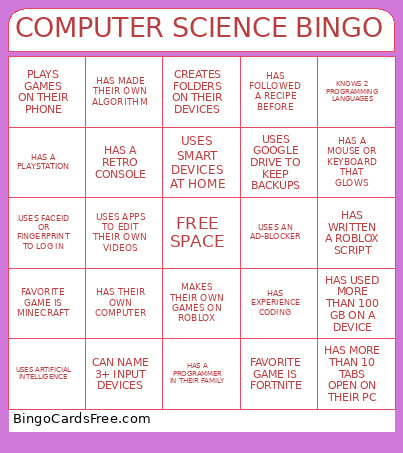 This COMPUTER SCIENCE BINGO Cards Game contains following Words or Phrases: FAVORITE GAME IS FORTNITE, FAVORITE GAME IS ROBLOX, FAVORITE GAME IS CALL OF DUTY, HAS EXPERIENCE CODING, HAS NEVER CODED, HAS AN XBOX, HAS A PLAYSTATION, HAS A NINTENDO SWITCH, PLAYS RETRO GAMES, KNOWS 2 PROGRAMMING LANGUAGES, WANTS TO BE A PROGRAMMER, HAS A PROGRAMMER IN THEIR FAMILY, USES ARTIFICIAL INTELLIGENCE, HAS HAD A COMPUTER SCIENCE CLASS BEFORE, HAS THEIR OWN COMPUTER, HAS A RETRO CONSOLE, PLAYS GAMES ON THEIR PHONE, FAVORITE GAME IS MINECRAFT, MAKES THEIR OWN GAMES ON ROBLOX, KNOWS 3 KEYBOARD SHORTCUTS, KNOWS HOW TO 3D MODEL, MAKES ART ON THE COMPUTER, USES SMART DEVICES AT HOME, HAS A PASSWORD WITH AT LEAST 12 CHARACTERS, CAN COUNT IN BINARY, CAN CONVERT A NUMBER TO HEXADECIMAL, CAN USE MINECRAFT COMMAND BLOCKS, HAS WRITTEN A ROBLOX SCRIPT, HAS USED SCRATCH BEFORE, HAS USED PYTHON BEFORE, CAN TYPE FASTER THAN 40 WPM, CAN NAME 3+ PARTS OF A COMPUTER, HAS A MOUSE OR KEYBOARD THAT GLOWS, HAS MORE THAN 10 TABS OPEN ON THEIR PC, HAS USED MORE THAN 100 GB ON A DEVICE, USES DARK MODE ON THEIR DEVICES, USES GOOGLE DRIVE TO KEEP BACKUPS, HAS USED GITHUB BEFORE, KNOWS HOW TO RESTART A ROUTER, CREATES FOLDERS ON THEIR DEVICES, USES APPS TO EDIT THEIR OWN VIDEOS, CAN NAME 3+ INPUT DEVICES, HAS 10+ BOOKMARKS ON THEIR WEB BROWSER, HAS CREATED PIXEL ART BEFORE, HAS FOUND A GLITCH IN A VIDEO GAME, HAS MADE THEIR OWN GAME, HAS FOLLOWED A RECIPE BEFORE, HAS MADE THEIR OWN ALGORITHM, USES FACEID OR FINGERPRINT TO LOG IN, USES AN AD-BLOCKER.