Print free Conferencia bingo cards or adjust them,
unlimited prints! Select from 42,200+ designs or use the bingo card generator.
Add numbers, words, photos, or any combination.
Play using printable PDF, online bingo cards,
and the online bingo caller, or mix physical and digital.
How To: To get a printable PDF, click the Print button.
You can adjust the card quantity and other
print options on the Print tab.
Grid items and free space content can be changed on the Basic tab.
Appearance can be exactly personalized on the
relevant tabs, or you can quickly locate any setting
on the 🔍 tab.
How to play Conferencia bingo Cards?
Online Caller: Click on the Play button above.
Paper Caller: Print PDF calling list & calling slips and physically pick the slips.
Paper Players: Print PDF bingo cards and physically write on the cards.
Online Players: Click on the Play button above, and then click on the 🎫 button.
Hybrid Play: Pick any combination above.
For example, caller can be either Offline or Online.
And players can be Offline or Online or a combination of both.
Step-By-Step:
Start by downloading the Conferencia bingo PDF by clicking on the "Print" button above.
Open the PDF and print a hard copy.
For random drawing, you can print another copy of the call list, cut, fold and then pick them randomly at play time.
Cut the bingo cards at the cut marks if there are greater than 1 bingo cards per page.
Give one card to each player. For marking, you can use markers. Crayons are the cheapest.
Pick one person to be the caller. If you are playing in a small group, the caller may also play along with their own Bingo card.
The caller starts the game by randomly picking an item from the call list and calling out it to everyone.
The players look at their cards to see if they have the announced word. If they do, they mark that word.
The first player to complete a horizontal, vertical, or a diagonal line of crossed items announces "Bingo!" and wins the play.
The caller verifies that the items marked form a correct line as per the Bingo card and call list.
You can play for varied patterns or a full card blackout for an extended play.
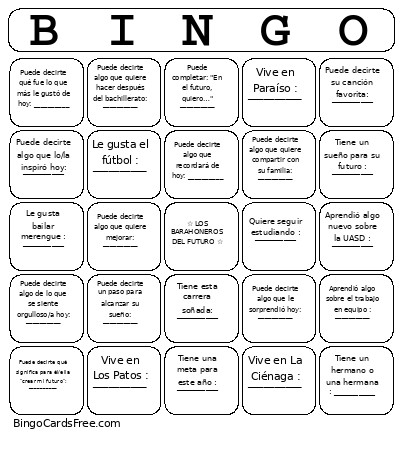
This Conferencia bingo Cards Game contains following Words or Phrases: Vive en La Ciénaga : __________, Vive en Los Patos : __________, Vive en Paraíso : __________, Vive en Jaquimeyes : __________, Vive en Fundación : __________, No conocías antes de hoy : __________, Hizo un nuevo amigo hoy : __________, Tiene un hermano o una hermana : __________, Le gusta el béisbol : __________, Le gusta el fútbol : __________, Le gusta bailar bachata : __________, Le gusta bailar merengue : __________, Tiene esta carrera soñada: __________, Quiere seguir estudiando : __________, Tiene una meta para este año : __________, Tiene un sueño para su futuro : __________, Quiere aportar a su comunidad : __________, Puede decirte una de sus fortalezas: : __________, Quiere aprender algo nuevo : __________, Tiene una persona que lo/la inspira : __________, Puede decirte una cualidad de un buen compañero: __________, Quiere ayudar a otros jóvenes : __________, Puede decirte una forma de cuidarse: __________, Aprendió algo sobre el trabajo en equipo : __________, Aprendió algo nuevo sobre la UASD : __________, Aprendió algo nuevo hoy: __________, Puede decirte qué fue lo que más le gustó de hoy: __________, Puede decirte algo que lo/la inspiró hoy: __________, Puede decirte algo de lo que se siente orgulloso/a hoy: __________, Puede darte un consejo para el futuro: __________, Puede decirte algo que quiere compartir con su familia: __________, Puede completar: "En el futuro, quiero…" __________, Puede decirte un paso para alcanzar su sueño: __________, Puede decirte qué significa para él/ella "crear mi futuro": __________, Puede decirte algo que quiere mejorar: __________, Puede decirte su canción favorita: __________, Tiene tu mismo color favorito, Tiene un pasatiempo que nunca has probado, Puede decirte cuál fue su sesión favorita: __________, Puede decirte algo que le sorprendió hoy: __________, Puede decirte algo que recordará de hoy: __________, Puede decirte algo que quiere hacer después del bachillerato: __________.

 This Conferencia bingo Cards Game contains following Words or Phrases: Vive en La Ciénaga : __________, Vive en Los Patos : __________, Vive en Paraíso : __________, Vive en Jaquimeyes : __________, Vive en Fundación : __________, No conocías antes de hoy : __________, Hizo un nuevo amigo hoy : __________, Tiene un hermano o una hermana : __________, Le gusta el béisbol : __________, Le gusta el fútbol : __________, Le gusta bailar bachata : __________, Le gusta bailar merengue : __________, Tiene esta carrera soñada: __________, Quiere seguir estudiando : __________, Tiene una meta para este año : __________, Tiene un sueño para su futuro : __________, Quiere aportar a su comunidad : __________, Puede decirte una de sus fortalezas: : __________, Quiere aprender algo nuevo : __________, Tiene una persona que lo/la inspira : __________, Puede decirte una cualidad de un buen compañero: __________, Quiere ayudar a otros jóvenes : __________, Puede decirte una forma de cuidarse: __________, Aprendió algo sobre el trabajo en equipo : __________, Aprendió algo nuevo sobre la UASD : __________, Aprendió algo nuevo hoy: __________, Puede decirte qué fue lo que más le gustó de hoy: __________, Puede decirte algo que lo/la inspiró hoy: __________, Puede decirte algo de lo que se siente orgulloso/a hoy: __________, Puede darte un consejo para el futuro: __________, Puede decirte algo que quiere compartir con su familia: __________, Puede completar: "En el futuro, quiero…" __________, Puede decirte un paso para alcanzar su sueño: __________, Puede decirte qué significa para él/ella "crear mi futuro": __________, Puede decirte algo que quiere mejorar: __________, Puede decirte su canción favorita: __________, Tiene tu mismo color favorito, Tiene un pasatiempo que nunca has probado, Puede decirte cuál fue su sesión favorita: __________, Puede decirte algo que le sorprendió hoy: __________, Puede decirte algo que recordará de hoy: __________, Puede decirte algo que quiere hacer después del bachillerato: __________.