Print free ICC bingo cards or modify,
limitless prints! Pick from 42,200+ designs or use the bingo card generator.
Add numbers, words, images, or any combination.
Play using PDF prints, digital bingo cards,
and the digital bingo caller, or mix physical and digital.
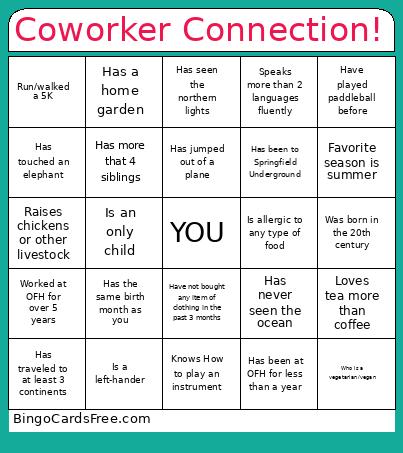
About: This bingo card is perfect for breaking the ice at a staff gathering or team-building event, especially for groups connected to OFH. The prompts focus on personal quirks, unique experiences, and fun facts that spark conversation. It's an engaging way to get people laughing, sharing stories, and learning new things about colleagues in a relaxed atmosphere.
How To: To download a printable PDF, click the Print button.
You can modify the card quantity and other
print options on the Print tab.
Grid items and free space text can be added on the Basic tab.
Appearance can be fully customized on the
corresponding tabs, or you can quickly find any setting
using the 🔍 tab.
How to play ICC Bingo Cards?
Paper Players: Print PDF bingo cards and physically scratch the cards.
Paper Caller: Print PDF calling list & calling slips and physically draw the slips.
Digital Players: Click on the Play button above, and then click on the 🎫 button.
Digital Caller: Click on the Play button above.
Mixed Play: Choose any combination above.
For example, caller can be either Paper or Digital.
And players can be Paper or Digital or a combination of both.
Step-By-Step:
Start by saving the ICC Bingo PDF by clicking on the "Print" button above.
Open the PDF and print a hard copy.
For random drawing, you can print another copy of the call list, cut, fold and then draw them randomly at play time.
Cut the bingo cards at the cut marks if there are greater than 1 bingo cards per page.
Distribute one card per player. For marking, you can use crayons. Crayons are the cheapest.
Choose one person to be the caller. If you are playing in a small group, the caller may as well play along with their own Bingo card.
The caller starts the game by randomly picking an item from the call list and saying it to everyone.
The players look at their cards to see if they have the called word. If they do, they mark that word.
The first player to finish a horizontal, vertical, or a diagonal line of crossed items shouts "Bingo!" and wins the game.
The caller verifies that the items marked form a proper line as per the Bingo card and call list.
You can play for different patterns or a full card blackout for an extended game.
This ICC Bingo Cards Game contains following Words or Phrases: Worked at OFH for over 5 years, Speaks more than 2 languages fluently, Has traveled to at least 3 continents, Who is a vegetarian/vegan, Is on a sport league, Has the same birth month as you, Knows How to play an instrument, Loves tea more than coffee, Has a home garden, Was born in the 20th century, Is an only child, Run/walked a 5K, Who cannot take spices or chilli, Can do a handstand, Has never seen the ocean, Plays a musical instrument, Is a left-hander, Grew up in Springfield, Has more that 4 siblings, Owns their home, Has jumped out of a plane, Has been to Springfield Underground, Raises chickens or other livestock, Have only sisters in their family, Have played paddleball before, Has seen the northern lights, Have not bought any item of clothing in the past 3 months, Has touched an elephant, Have more than 10 pairs of shoes at home (personally owned), Is allergic to any type of food, Have researched your ancestry (and can tell you about it), Has been at OFH for less than a year, Favorite season is summer, Favorite season is winter.

 This ICC Bingo Cards Game contains following Words or Phrases: Worked at OFH for over 5 years, Speaks more than 2 languages fluently, Has traveled to at least 3 continents, Who is a vegetarian/vegan, Is on a sport league, Has the same birth month as you, Knows How to play an instrument, Loves tea more than coffee, Has a home garden, Was born in the 20th century, Is an only child, Run/walked a 5K, Who cannot take spices or chilli, Can do a handstand, Has never seen the ocean, Plays a musical instrument, Is a left-hander, Grew up in Springfield, Has more that 4 siblings, Owns their home, Has jumped out of a plane, Has been to Springfield Underground, Raises chickens or other livestock, Have only sisters in their family, Have played paddleball before, Has seen the northern lights, Have not bought any item of clothing in the past 3 months, Has touched an elephant, Have more than 10 pairs of shoes at home (personally owned), Is allergic to any type of food, Have researched your ancestry (and can tell you about it), Has been at OFH for less than a year, Favorite season is summer, Favorite season is winter.