
CRBINGO Cards - Print Free or Customize
Print free CRBINGO cards or modify, unlimited prints! Select from 42,200+ designs or use our bingo card generator. Add numbers, words, images, or mix them all. Play using PDF prints, online bingo cards, and our online bingo caller, or mix physical and digital.
About: This bingo card is perfect for Clash Royale fans, packed with all your favorite cards and their evolved versions. The tone is energetic and fun, making it a great fit for tournaments, watch parties, or community game nights. Players will love seeing popular troops, spells, and heroes pop up as they race to call “bingo!”
How To: To download a printable PDF, click the Print button. You can alter the card count and other printing preferences on the Print tab. Grid items and free space content can be changed on the Basic tab. Appearance can be exactly personalized on the corresponding tabs, or you can easily locate any setting using the 🔍 tab.
How to play CRBINGO Cards?
- Paper Caller: Print PDF calling list & calling slips and manually draw the slips.
- Digital Players: Click on the Play button above, and then click on the 🎫 button.
- Digital Caller: Click on the Play button above.
- Paper Players: Print PDF bingo cards and manually mark the cards.
- Combo Play: Choose any combination above. For instance, caller can be either Paper or Digital. And players can be Paper or Digital or a combo of both.
Step-By-Step:
- Start by downloading the CRBINGO PDF by clicking on the "Print" button above.
- Open the PDF and print it.
- For random calling, you can print another copy of the call list, cut, fold and then pick them randomly at play time.
- Cut the bingo cards at the cut lines if there are greater than 1 bingo cards per page.
- Distribute one card per player. For marking, you can use pencils. Crayons cost the least.
- Choose one person to be the caller. If you are playing in a small group, the caller may also play along with their own Bingo card.
- The caller initiates the play by randomly picking an item from the call list and calling out it to all players.
- The players check their cards to see if they have the called word. If they do, they cross off that word.
- The first player to complete a horizontal, vertical, or a diagonal line of marked items shouts "Bingo!" and wins the play.
- The caller confirms that the items marked form a proper line as per the Bingo card and call list.
- You can play for different patterns or a full card blackout for an extended play.
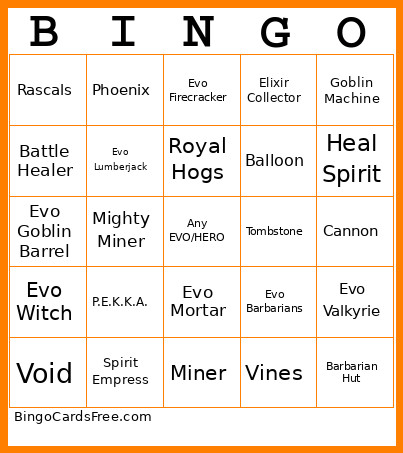 This CRBINGO Cards Game contains following Words or Phrases: Archer Queen, Archers, Arrows, Baby Dragon, Balloon, Bandit, Barbarian Barrel, Barbarian Hut, Barbarians, Bats, Battle Healer, Battle Ram, Berserker, Bomb Tower, Bomber, Boss Bandit, Bowler, Cannon, Cannon Cart, Clone, Dark Prince, Dart Goblin, Earthquake, Electro Dragon, Electro Giant, Electro Spirit, Electro Wizard, Elite Barbarians, Elixir Collector, Elixir Golem, Evo Archers, Evo Baby Dragon, Evo Barbarians, Evo Bats, Evo Battle Ram, Evo Bomber, Evo Cannon, Evo Dart Goblin, Evo Electro Dragon, Evo Executioner, Evo Firecracker, Evo Furnace, Evo Giant Snowball, Evo Goblin Barrel, Evo Goblin Cage, Evo Goblin Drill, Evo Goblin Giant, Evo Hunter, Evo Ice Spirit, Evo Inferno Dragon, Evo Knight, Evo Lumberjack, Evo Mega Knight, Evo Mortar, Evo Musketeer, Evo P.E.K.K.A., Evo Royal Ghost, Evo Royal Giant, Evo Royal Hogs, Evo Royal Recruits, Evo Skeleton Army, Evo Skeleton Barrel, Evo Skeletons, Evo Tesla, Evo Valkyrie, Evo Wall Breakers, Evo Witch, Evo Wizard, Evo Zap, Executioner, Fire Spirit, Fireball, Firecracker, Fisherman, Flying Machine, Freeze, Furnace, Giant, Giant Skeleton, Giant Snowball, Goblin Barrel, Goblin Cage, Goblin Curse, Goblin Demolisher, Goblin Drill, Goblin Gang, Goblin Giant, Goblin Hut, Goblin Machine, Goblins, Goblinstein, Golden Knight, Golem, Graveyard, Guards, Heal Spirit, Hero Giant, Hero Ice Golem, Hero Knight, Hero Mini P.E.K.K.A., Hero Musketeer, Hero Wizard, Hog Rider, Hunter, Ice Golem, Ice Spirit, Ice Wizard, Inferno Dragon, Inferno Tower, Knight, Lava Hound, Lightning, Little Prince, Lumberjack, Magic Archer, Mega Knight, Mega Minion, Mighty Miner, Miner, Mini P.E.K.K.A., Minion Horde, Minions, Mirror, Monk, Mortar, Mother Witch, Musketeer, Night Witch, P.E.K.K.A., Phoenix, Poison, Prince, Princess, Rage, Ram Rider, Rascals, Rocket, Royal Delivery, Royal Ghost, Royal Giant, Royal Hogs, Royal Recruits, Rune Giant, Skeleton Army, Skeleton Barrel, Skeleton Dragon, Skeleton King, Skeletons, Sparky, Spear Goblins, Spirit Empress, Suspicious Bush, Tesla, The Log, Three Musketeers, Tombstone, Tornado, Valkyrie, Vines, Void, Wall Breakers, Witch, Wizard, X-Bow, Zap, Zappies.