Cross Functional People Bingo Cards - Print Free or Customize
Print free Cross Functional People bingo cards or personalize,
unlimited prints! Pick from 41,500+ templates or use our bingo card generator.
Add numbers, phrases, photos, or mix them all.
Play using printed PDF, virtual bingo cards,
and our virtual bingo caller, or mix physical and digital.
About: This bingo card is the ultimate icebreaker for groups looking to get to know each other and have a few laughs. Packed with fun prompts about hidden talents, quirky interests, and surprising facts, it’s perfect for classrooms, team-building sessions, or social events where strangers become friends just by finding things they have in common.
How To: To get a PDF to print, click the Print button.
You can alter the number of cards and other
print settings on the Print tab.
Grid items and free space content can be added on the Basic tab.
Appearance can be fully customized on the
corresponding tabs, or you can easily find any setting
on the 🔍 tab.
How to play Cross Functional People Bingo Cards?
Printed Caller: Print PDF calling list & calling slips and manually draw the slips.
Digital Players: Click on the Play button above, and then click on the 🎫 button.
Digital Caller: Click on the Play button above.
Printed Players: Print PDF bingo cards and manually scratch the cards.
Combo Mode: Choose any combination above.
For instance, caller can be either Printed or Digital.
And players can be Printed or Digital or a combination of both.
Step-By-Step:
Start by downloading the Cross Functional People PDF by clicking on the "Print" button above.
Open the PDF and print a hard copy.
For random calling, you can print another copy of the call list, cut, fold and then pull them randomly at play time.
Cut the bingo cards at the cut lines if there are more than 1 bingo cards per page.
Distribute one card per player. For marking, you can use pens. Crayons are the cheapest.
Choose one person to be the caller. If you are playing in a small group, the caller can as well play along with their own Bingo card.
The caller opens the game by randomly drawing an item from the call list and announcing it to all players.
The players scan their cards to see if they have the announced word. If they do, they dab that word.
The first player to finish a horizontal, vertical, or a diagonal line of crossed items announces "Bingo!" and wins the play.
The caller confirms that the items crossed off form a correct line as per the Bingo card and call list.
You can play for varied patterns or a full card blackout for a longer play.
This Cross Functional People Bingo Cards Game contains following Words or Phrases: Find some-one who can juggle three objects, Find some-one who can speak sign language, Find some-one collects stickers, Find some-one who has written a poem, Find some-one who knows magic tricks, Find some-one who likes to cook or bake, Find some-one who loves roller coasters, Find some-one who sings in the shower, Find someone afraid of spiders or insects, Find someone born in the same month as you, Find someone shorter than you, Find someone taller than you, Find someone who can whistle loudly, Find someone who has a pet at home, Find someone who has met a famous person, Find someone who has ridden a horse before, Find someone who has run a race before, Find someone who has siblings, Find someone who has visited another country, Find someone who is wearing blue today, Find someone who knows how to swim, Find someone who likes to dance, Find someone who likes to read books, Find someone who loves pizza, Find someone with a unique hobby, Find someone with a younger brother or sister, Find someone with an older brother or sister, Find someone with curly hair, Find someone with glasses on today, Find someone with the same shoe size as you.

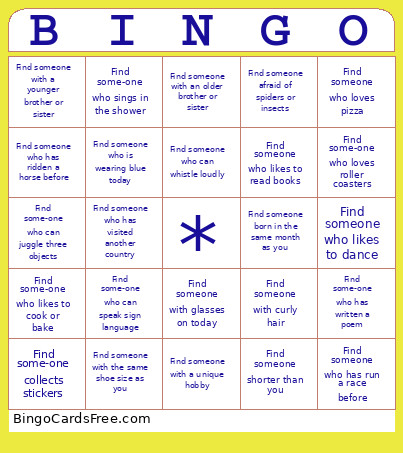 This Cross Functional People Bingo Cards Game contains following Words or Phrases: Find some-one who can juggle three objects, Find some-one who can speak sign language, Find some-one collects stickers, Find some-one who has written a poem, Find some-one who knows magic tricks, Find some-one who likes to cook or bake, Find some-one who loves roller coasters, Find some-one who sings in the shower, Find someone afraid of spiders or insects, Find someone born in the same month as you, Find someone shorter than you, Find someone taller than you, Find someone who can whistle loudly, Find someone who has a pet at home, Find someone who has met a famous person, Find someone who has ridden a horse before, Find someone who has run a race before, Find someone who has siblings, Find someone who has visited another country, Find someone who is wearing blue today, Find someone who knows how to swim, Find someone who likes to dance, Find someone who likes to read books, Find someone who loves pizza, Find someone with a unique hobby, Find someone with a younger brother or sister, Find someone with an older brother or sister, Find someone with curly hair, Find someone with glasses on today, Find someone with the same shoe size as you.