Print free CSC AGENT bingo cards or alter them,
unlimited prints! Pick from 41,500+ templates or use the bingo card generator.
Add numbers, phrases, images, or all of them.
Play using PDF printouts, digital bingo cards,
and the digital bingo caller, or mix physical and digital.
About: This bingo card is perfect for IT helpdesk teams or tech support professionals who want to add some fun to their day. Each square highlights those recognizable moments and classic mishaps that only happen on support calls, making it ideal for a team meeting icebreaker or as a lighthearted activity during a training session.
How To: To save a PDF to print, click the Print button.
You can change the number of cards and other
printing settings on the Print tab.
Grid items and free space text can be changed on the Basic tab.
Appearance can be entirely customized on the
relevant tabs, or you can quickly find any option
on the 🔍 tab.
How to play CSC AGENT Bingo Cards?
Printed Players: Print PDF bingo cards and manually mark the cards.
Printed Caller: Print PDF calling list & calling slips and manually select the slips.
Online Caller: Click on the Play button above.
Online Players: Click on the Play button above, and then click on the 🎫 button.
Hybrid Mode: Pick any combination above.
For example, caller can be either Printed or Online.
And players can be Printed or Online or a combo of both.
Step-By-Step:
Start by getting the CSC AGENT PDF by clicking on the "Print" button above.
Open the PDF and print a hard copy.
For random drawing, you can print another copy of the call list, cut, fold and then pull them randomly at play time.
Cut the bingo cards at the cut marks if there are more than 1 bingo cards per page.
Give one card to each player. For marking, you can use markers. Crayons cost the least.
Pick one person to be the caller. If you are playing in a small group, the caller may also play along with their own Bingo card.
The caller opens the play by randomly pulling an item from the call list and saying it to everyone.
The players look at their cards to see if they have the announced word. If they do, they dab that word.
The first player to complete a horizontal, vertical, or a diagonal line of marked items shouts "Bingo!" and wins the game.
The caller verifies that the items crossed off form a correct line as per the Bingo card and call list.
You can play for multiple patterns or a full card blackout for a longer game.
This CSC AGENT Bingo Cards Game contains following Words or Phrases: Putting in pin in the password box at sign in or vice versa, "Im connected to the internet" but they actually arent, "Im on the vpn" but they actually arent, Asking us to help with their job (how to use software or complete instructions from manager etc. etc.), Transfer from MDOS (8887676424), Milogin client calls on internal queue, Client says they have restarted their computer already but uptime says otherwise, Client reset password and then restarted computer while remote, Client talks about their beliefs to you., Client is signing in with their whole email at the log in screen, Client forgot password because they only use pin, Get a call with an AA, Getting called back from the same public client either the same or different day, Tries to plug mouse/keyboard into external monitor, Client entered PII into Scam message link, Client BitLocker's computer or Wipes phone while on call after Agent told them not to, Client eats while on the phone, Client asks "hello?" or "are you there?" after theres a small pause after their rant, Client calls for issue that is happening to a co-worker, but you need the co-worker on the phone to help them, Milogin client is at the wrong website, AR asking how to fill out a DTMB-0161 form, Loudly scrolling on their phone while on the call, MiLogin caller has over 10 duplicate accounts, Client asking if they were fired when they get locked out, Client is actively using the bathroom on the call.

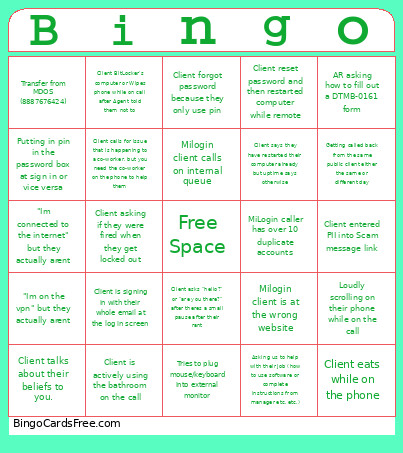 This CSC AGENT Bingo Cards Game contains following Words or Phrases: Putting in pin in the password box at sign in or vice versa, "Im connected to the internet" but they actually arent, "Im on the vpn" but they actually arent, Asking us to help with their job (how to use software or complete instructions from manager etc. etc.), Transfer from MDOS (8887676424), Milogin client calls on internal queue, Client says they have restarted their computer already but uptime says otherwise, Client reset password and then restarted computer while remote, Client talks about their beliefs to you., Client is signing in with their whole email at the log in screen, Client forgot password because they only use pin, Get a call with an AA, Getting called back from the same public client either the same or different day, Tries to plug mouse/keyboard into external monitor, Client entered PII into Scam message link, Client BitLocker's computer or Wipes phone while on call after Agent told them not to, Client eats while on the phone, Client asks "hello?" or "are you there?" after theres a small pause after their rant, Client calls for issue that is happening to a co-worker, but you need the co-worker on the phone to help them, Milogin client is at the wrong website, AR asking how to fill out a DTMB-0161 form, Loudly scrolling on their phone while on the call, MiLogin caller has over 10 duplicate accounts, Client asking if they were fired when they get locked out, Client is actively using the bathroom on the call.