Print free CUESO bingo cards or modify,
limitless prints! Choose from 41,500+ templates or use our bingo card generator.
Add numbers, phrases, pictures, or all of them.
Play using printed PDF, virtual bingo cards,
and our virtual bingo caller, or mix physical and digital.
About: This bingo card is perfect for anyone enduring a virtual conference, team meeting, or industry webinar packed with corporate jargon and buzzwords. Its playful tone pokes fun at the clichés and lingo that fill modern business conversations, making it ideal for professionals looking to add a bit of humor and camaraderie to otherwise routine meetings.
How To: To get a PDF to print, click the Print button.
You can adjust the card count and other
printing settings on the Print tab.
Grid items and free space content can be added on the Basic tab.
Appearance can be fully customized on the
corresponding tabs, or you can easily locate any option
on the 🔍 tab.
How to play CUESO Bingo Cards?
Paper Caller: Print PDF calling list & calling slips and manually select the slips.
Virtual Players: Click on the Play button above, and then click on the 🎫 button.
Virtual Caller: Click on the Play button above.
Paper Players: Print PDF bingo cards and manually cross off the cards.
Hybrid Mode: Choose any combination above.
For instance, caller can be either Offline or Virtual.
And players can be Offline or Virtual or a combination of both.
Step-By-Step:
Start by downloading the CUESO PDF by clicking on the "Print" button above.
Open the PDF and print it.
For random drawing, you can print another copy of the call list, cut, fold and then pick them randomly at play time.
Cut the bingo cards at the cut marks if there are greater than 1 bingo cards per page.
Give one card to each player. For marking, you can use pencils. Crayons cost the least.
Choose one person to be the caller. If you are playing in a small group, the caller can also play along with their own Bingo card.
The caller opens the play by randomly drawing an item from the call list and calling out it to everyone.
The players check their cards to see if they have the announced word. If they do, they mark that word.
The first player to complete a horizontal, vertical, or a diagonal line of marked items yells "Bingo!" and wins the game.
The caller checks that the items crossed off form a correct line according to the Bingo card and call list.
You can play for varied patterns or a full card blackout for a longer game.
This CUESO Bingo Cards Game contains following Words or Phrases: action item, circle back, follow-up, standard, industry-leading, think outside box, "yes, and...", devil's advocate, foot on the gas, member value, value proposition, scale up, silo, benchmark, scalable, bottom-up, ROI, Life cycle, "all boats rise", move the needle, "people helping people", disruptive, "the CU movement", [new project announced], top-down, "birds-eye view", [AI slop image for a PPT slide], touchbase, competencies, wow factor, stickiness, sunset (as a verb), incentivize, "intentionality", "the movement", [white savior complex], bandwidth, "we hear you" + doing it anyway, alignment, "Wrike wizard", "Lead the Way", [obviously AI-written slides], big picture, "zooming out", process improvement, "fail fast", frontier, [someone isn't on mute], [announce a new VP position], [announce a new (undeserved) promotion], cutting edge, "at the forefront", growth strategy, synergy, takeaways, "having/leading the conversation", "the money vs the mission" (or similar), best practices, [drawing inaccurate conclusions from "the data"], [obvious brown-nosing in the chat], [side chat jokes make someone break on-camera], ahead of the curve, ["small" update that entails extensive work for you].

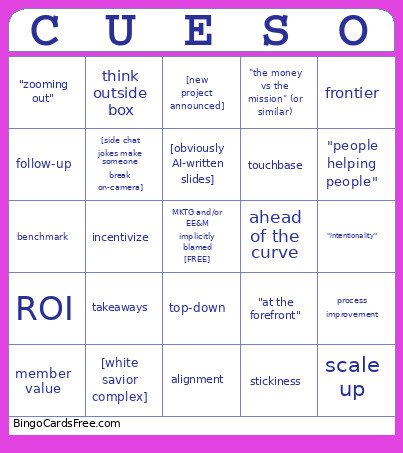 This CUESO Bingo Cards Game contains following Words or Phrases: action item, circle back, follow-up, standard, industry-leading, think outside box, "yes, and...", devil's advocate, foot on the gas, member value, value proposition, scale up, silo, benchmark, scalable, bottom-up, ROI, Life cycle, "all boats rise", move the needle, "people helping people", disruptive, "the CU movement", [new project announced], top-down, "birds-eye view", [AI slop image for a PPT slide], touchbase, competencies, wow factor, stickiness, sunset (as a verb), incentivize, "intentionality", "the movement", [white savior complex], bandwidth, "we hear you" + doing it anyway, alignment, "Wrike wizard", "Lead the Way", [obviously AI-written slides], big picture, "zooming out", process improvement, "fail fast", frontier, [someone isn't on mute], [announce a new VP position], [announce a new (undeserved) promotion], cutting edge, "at the forefront", growth strategy, synergy, takeaways, "having/leading the conversation", "the money vs the mission" (or similar), best practices, [drawing inaccurate conclusions from "the data"], [obvious brown-nosing in the chat], [side chat jokes make someone break on-camera], ahead of the curve, ["small" update that entails extensive work for you].