Print free Daniel bingo cards or personalize,
limitless cards! Choose from 42,200+ templates or use the bingo card generator.
Add numbers, phrases, pictures, or mix them all.
Play using PDF prints, virtual bingo cards,
and the virtual bingo caller, or mix physical and digital.
How To: To save a printable PDF, click the Print button.
You can modify the card count and other
printing preferences on the Print tab.
Grid items and free space content can be added on the Basic tab.
Appearance can be exactly personalized on the
relevant tabs, or you can easily search any option
using the 🔍 tab.
How to play Daniel Bingo Cards?
Online Caller: Click on the Play button above.
Paper Players: Print PDF bingo cards and manually cross off the cards.
Paper Caller: Print PDF calling list & calling slips and manually pick the slips.
Online Players: Click on the Play button above, and then click on the 🎫 button.
Mixed Mode: Select any combination above.
For instance, caller can be either Printed or Online.
And players can be Printed or Online or a mix of both.
Step-By-Step:
Start by downloading the Daniel PDF by clicking on the "Print" button above.
Open the PDF and print a hard copy.
For random calling, you can print another copy of the call list, cut, fold and then draw them randomly at play time.
Cut the bingo cards at the cut lines if there are greater than 1 bingo cards per page.
Distribute one card per player. For marking, you can use pens. Crayons are the cheapest.
Select one person to be the caller. If you are playing in a small group, the caller may as well play along with their own Bingo card.
The caller begins the play by randomly pulling an item from the call list and saying it to everyone.
The players scan their cards to see if they have the called word. If they do, they dab that word.
The first player to complete a horizontal, vertical, or a diagonal line of marked items yells "Bingo!" and wins the play.
The caller confirms that the items crossed off form a proper line according to the Bingo card and call list.
You can play for multiple patterns or a full card blackout for a longer play.
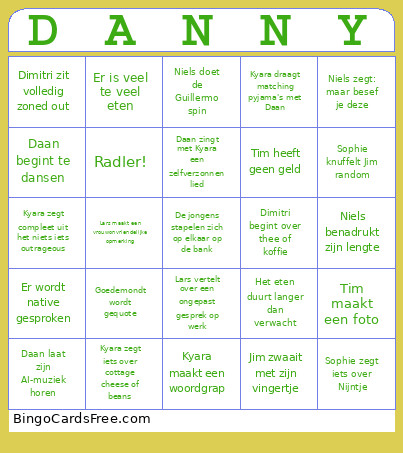
This Daniel Bingo Cards Game contains following Words or Phrases: Jim wil een huis kopen, Jim zegt woeshloem, Jim doet een flying kick, Jim vertelt een verhaal over de vrouwen van zijn vader, Jim zwaait met zijn vingertje, Jim lacht als Mickey Mouse, Jim drinkt alcohol, Jim wordt boos op Daniel vanwege cocktails, Niels benadrukt zijn lengte, Niels gaat in gremlin mode, Niels moet meer eten hebben, Niels zegt: maar besef je deze, Niels zegt iets over kikkertjes, Niels doet de Guillermo spin, Iemand praat met een Rotterdams of Limburgs accent, Sophie vertelt een onguur verhaal over een huidkliniek, Sophie stelt voor om samen een wietje te doen, Sophie zegt iets over Nijntje, Sophie knuffelt Jim random, Kyara maakt een woordgrap, Kyara zegt compleet uit het niets iets outrageous, Kyara draagt matching pyjama's met Daan, Kyara zegt iets over cottage cheese of beans, Lars maakt een discriminerende of rechtse opmerking, Lars jankt over het volwassen leven, Lars vertelt over een ongepast gesprek op werk, Lars klaagt over vega-stuff, Lars maakt een vrouwonvriendelijke opmerking, Lars drinkt meer dan drie bier, Lars zegt iets racistisch of over zijn algoritme, Lars praat over zijn gekochte appartement, Tim heeft geen geld, Tim maakt een foto, Tim houdt een betoog over een muziekartiest, Tim zegt iets over marino wol, Dimitri wil een huisdier, Dimitri zit volledig zoned out, Dimitri is overprikkeld, Dimitri begint over thee of koffie, Dimitri praat over muziek van crumpets, Daan doet een knorretje van enthousiasme, Daan laat zijn AI-muziek horen, Daan begint te dansen, Daan moet nog boodschappen doen in Enschede, Daan zingt met Kyara een zelfverzonnen lied, De jongens stapelen zich op elkaar op de bank, Het eten duurt langer dan verwacht, Het luchtbed werkt niet mee, De Top 2000 wordt geroast, Er is veel te veel eten, Er wordt Risk gespeeld, Iemand zegt focussy, De milkshake girlies maken plannen om milkshakes te halen, Goedemondt wordt gequote, Er wordt native gesproken, Radler!.

 This Daniel Bingo Cards Game contains following Words or Phrases: Jim wil een huis kopen, Jim zegt woeshloem, Jim doet een flying kick, Jim vertelt een verhaal over de vrouwen van zijn vader, Jim zwaait met zijn vingertje, Jim lacht als Mickey Mouse, Jim drinkt alcohol, Jim wordt boos op Daniel vanwege cocktails, Niels benadrukt zijn lengte, Niels gaat in gremlin mode, Niels moet meer eten hebben, Niels zegt: maar besef je deze, Niels zegt iets over kikkertjes, Niels doet de Guillermo spin, Iemand praat met een Rotterdams of Limburgs accent, Sophie vertelt een onguur verhaal over een huidkliniek, Sophie stelt voor om samen een wietje te doen, Sophie zegt iets over Nijntje, Sophie knuffelt Jim random, Kyara maakt een woordgrap, Kyara zegt compleet uit het niets iets outrageous, Kyara draagt matching pyjama's met Daan, Kyara zegt iets over cottage cheese of beans, Lars maakt een discriminerende of rechtse opmerking, Lars jankt over het volwassen leven, Lars vertelt over een ongepast gesprek op werk, Lars klaagt over vega-stuff, Lars maakt een vrouwonvriendelijke opmerking, Lars drinkt meer dan drie bier, Lars zegt iets racistisch of over zijn algoritme, Lars praat over zijn gekochte appartement, Tim heeft geen geld, Tim maakt een foto, Tim houdt een betoog over een muziekartiest, Tim zegt iets over marino wol, Dimitri wil een huisdier, Dimitri zit volledig zoned out, Dimitri is overprikkeld, Dimitri begint over thee of koffie, Dimitri praat over muziek van crumpets, Daan doet een knorretje van enthousiasme, Daan laat zijn AI-muziek horen, Daan begint te dansen, Daan moet nog boodschappen doen in Enschede, Daan zingt met Kyara een zelfverzonnen lied, De jongens stapelen zich op elkaar op de bank, Het eten duurt langer dan verwacht, Het luchtbed werkt niet mee, De Top 2000 wordt geroast, Er is veel te veel eten, Er wordt Risk gespeeld, Iemand zegt focussy, De milkshake girlies maken plannen om milkshakes te halen, Goedemondt wordt gequote, Er wordt native gesproken, Radler!.