
DAR PINGO 2025 Bingo Cards - Print Free or Customize
Print free DAR PINGO 2025 bingo cards or alter them, unlimited prints! Select from 42,600+ designs or use our bingo card generator. Add numbers, phrases, pictures, or any combination. Play using printable PDF, digital bingo cards, and our digital bingo caller, or mix physical and digital.
How To: To download a PDF to print, click the Print button. You can modify the card count and other printing preferences on the Print tab. Grid items and free space text can be added on the Basic tab. Appearance can be completely personalized on the relevant tabs, or you can easily find any option on the 🔍 tab.
How to play DAR PINGO 2025 Bingo Cards?
- Paper Players: Print PDF bingo cards and physically mark the cards.
- Paper Caller: Print PDF calling list & calling slips and physically pick the slips.
- Digital Caller: Click on the Play button above.
- Digital Players: Click on the Play button above, and then click on the 🎫 button.
- Mixed Mode: Select any combination above. For example, caller can be either Offline or Digital. And players can be Offline or Digital or a combination of both.
Step-By-Step:
- Start by saving the DAR PINGO 2025 PDF by clicking on the "Print" button above.
- Open the PDF and print a hard copy.
- For random calling, you can print another copy of the call list, cut, fold and then pick them randomly at play time.
- Cut the bingo cards at the cut lines if there are greater than 1 bingo cards per page.
- Distribute one card per player. For marking, you can use pencils. Crayons cost the least.
- Select one person to be the caller. If you are playing in a small group, the caller may as well play along with their own Bingo card.
- The caller starts the play by randomly drawing an item from the call list and calling out it to all players.
- The players look at their cards to see if they have the called word. If they do, they cross off that word.
- The first player to finish a horizontal, vertical, or a diagonal line of crossed items announces "Bingo!" and wins the play.
- The caller verifies that the items marked form a correct line as per the Bingo card and call list.
- You can play for multiple patterns or a full card blackout for an extended play.
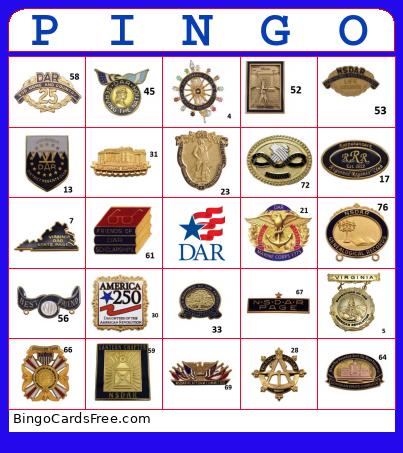 This DAR PINGO 2025 Bingo Cards Game contains following Images: Mini Insginia, Screen Shot 2022 04 16 At 4 32 04 PM, Screen Shot 2022 04 16 At 4 33 22 PM, Screen Shot 2022 04 16 At 4 33 47 PM, Screen Shot 2022 04 16 At 4 34 08 PM, Screen Shot 2022 04 16 At 4 34 14 PM, Screen Shot 2022 04 16 At 4 34 26 PM, Screen Shot 2022 04 16 At 4 35 08 PM, Screen Shot 2022 04 16 At 4 35 16 PM, Screen Shot 2022 04 16 At 4 35 27 PM, Screen Shot 2022 04 16 At 4 36 22 PM, Screen Shot 2022 04 16 At 4 44 57 PM, Screen Shot 2022 04 16 At 4 48 02 PM, Screen Shot 2022 04 16 At 4 50 27 PM, Screen Shot 2022 04 16 At 4 50 34 PM, Screen Shot 2022 04 16 At 4 50 45 PM, Screen Shot 2022 04 16 At 4 50 55 PM, Screen Shot 2022 04 16 At 4 51 06 PM, Screen Shot 2022 04 16 At 4 51 41 PM, Screen Shot 2022 04 16 At 4 52 54 PM, Screen Shot 2022 04 16 At 4 53 05 PM, Screen Shot 2022 04 16 At 5 00 15 PM, Screen Shot 2022 04 16 At 5 01 01 PM, Screen Shot 2022 04 16 At 5 03 42 PM, Screenshot 2025 07 06 110124, Screenshot 2025 07 06 110238, Screenshot 2025 07 06 110347, Screenshot 2025 07 06 110532, Screenshot 2025 07 06 113135, Screenshot 2025 07 06 113239, Screenshot 2025 07 06 113311, Screenshot 2025 07 06 113418, Screenshot 2025 07 06 113454, Screenshot 2025 07 06 113553, Screenshot 2025 07 06 113620, Screenshot 2025 07 06 113646, Screenshot 2025 07 06 113711, Screenshot 2025 07 06 113748, Screenshot 2025 07 06 113829, Screenshot 2025 07 06 113922, Screenshot 2025 07 06 114608, Screenshot 2025 07 06 114717, Screenshot 2025 07 06 114743, Screenshot 2025 07 06 114847, Screenshot 2025 07 06 114927, Screenshot 2025 07 06 115006, Screenshot 2025 07 06 115047, Screenshot 2025 07 06 115114, Screenshot 2025 07 06 115213, Screenshot 2025 07 06 115241, Screenshot 2025 07 06 115333, Screenshot 2025 07 06 115400, Screenshot 2025 07 06 115607, Screenshot 2025 07 06 121125, Screenshot 2025 07 06 122427, Screenshot 2025 07 06 122506, Screenshot 2025 07 06 122556, Screenshot 2025 07 06 122737, Screenshot 2025 07 06 122807, Screenshot 2025 07 06 123433, Screenshot 2025 07 06 123551, Screenshot 2025 07 06 123609, Screenshot 2025 07 06 123649, Screenshot 2025 07 06 123736, Screenshot 2025 07 06 123803, Screenshot 2025 07 06 123847, Screenshot 2025 07 06 123925, Screenshot 2025 07 06 124013, Screenshot 2025 07 06 124054, Screenshot 2025 07 06 124116, Screenshot 2025 07 06 124159, Screenshot 2025 07 06 124250, Screenshot 2025 07 06 124314, Screenshot 2025 07 06 124657, Screenshot 2025 07 06 125227.