
Dingo Bingo Cards - Print Free or Customize
Print free Dingo bingo cards or adjust them, unlimited cards! Pick from 42,200+ designs or use the bingo card generator. Add numbers, words, pictures, or any combination. Play using PDF prints, online bingo cards, and the online bingo caller, or go hybrid.
About: This bingo card perfectly captures the lively chaos and inside jokes of a close-knit tabletop RPG group, making it ideal for Dungeons & Dragons or Pathfinder nights. It’s full of memorable mishaps, running gags, and quirky player habits that turn game sessions into unforgettable adventures. Great for veteran party members or as an icebreaker at RPG events, it celebrates everything unpredictable and hilarious about collaborative storytelling.
How To: To download a PDF to print, click the Print button. You can change the card count and other printing options on the Print tab. Grid items and free space text can be added on the Basic tab. Appearance can be fully customized on the corresponding tabs, or you can quickly find any setting using the 🔍 tab.
How to play Dingo Bingo Cards?
- Online Players: Click on the Play button above, and then click on the 🎫 button.
- Online Caller: Click on the Play button above.
- Printed Players: Print PDF bingo cards and physically cross off the cards.
- Printed Caller: Print PDF calling list & calling slips and physically draw the slips.
- Mixed Play: Pick any combination above. For instance, caller can be either Offline or Online. And players can be Offline or Online or a mix of both.
Step-By-Step:
- Start by downloading the Dingo PDF by clicking on the "Print" button above.
- Open the PDF and print a hard copy.
- For random calling, you can print another copy of the call list, cut, fold and then draw them randomly at play time.
- Cut the bingo cards at the cut lines if there are more than 1 bingo cards per page.
- Give one card to each player. For marking, you can use markers. Crayons are the cheapest.
- Pick one person to be the caller. If you are playing in a small group, the caller can as well play along with their own Bingo card.
- The caller opens the play by randomly picking an item from the call list and announcing it to everyone.
- The players check their cards to see if they have the called word. If they do, they dab that word.
- The first player to finish a horizontal, vertical, or a diagonal line of marked items shouts "Bingo!" and wins the play.
- The caller confirms that the items crossed off form a proper line as per the Bingo card and call list.
- You can play for multiple patterns or a full card blackout for an extended play.
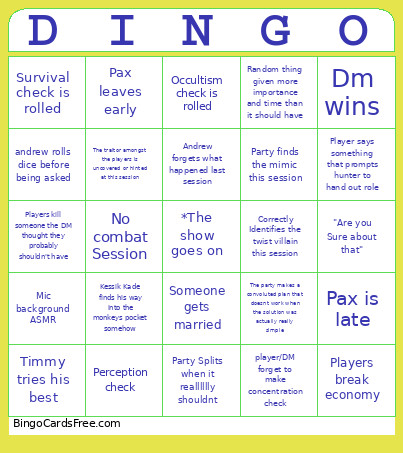 This Dingo Bingo Cards Game contains following Words or Phrases: Cant tell players voice from his character, DM fucking dies, Dm wins, PC dies, crit fail on a saving throw, Church Burns, Dm doesn't gives out inspiration, party forgets to loot corpse, poison resistance comes up, You rolled a Nat 20, andrew rolls dice before being asked, Friendly fire happens, tpk almost happens, Timmy tries his best, Kurt describes something he does as catlike despite being a cat and therefore everything he is catlike, Waterdeep is brought up for some reason, Gambling??!?, Kurt, andrew, or hunter rants for 30 minutes about an unrelated topic, Someone gets married, Andrew forgets what happened last session, A character's backstory comes up, The party makes a convoluted plan that doesnt work when the solution was actually really simple, Dm Rectons something or skips a combat, Phillip goes quiet for 30min(nice), "Are you Sure about that", Two crits in a row, You rolled a NAT 1, Party Splits when it realllllly shouldnt, Someone was talking with their mic muted for like a good 10-15 minutes, No combat Session, Cool Boss battle, DOC turns a woman into fruit, BOATING, Occultism check is rolled, Crafting check is rolled, Survival check is rolled, Correctly Identifies the twist villain this session, Game mechanic is live patched, Kurt corrects DM on a statblock, Party commits war crime, Player says something that prompts hunter to hand out role, Jack provides legal advice, Lira doesn't do anything illegal this session, Peter takes at least 40 damage, Pax is late, Pax leaves early, Kurt reminds timmy he has a spell, Party finds the mimic this session, Someone asks a question that was just answered, Mic background ASMR, Party stuck at door, Enemy gets Ashbabied, Players kill someone the DM thought they probably shouldn't have, player/DM forget to make concentration check, Random thing given more importance and time than it should have, Players break economy, Session starts late, Doc makes player roll for something stupid they shouldn't need to roll for, Party does stealth successfully, Gunsliger is referred to as a ranger, Rule of cool, Hunter tells Andrew that he would need to say something to him in character, but Andrew instead simply says my character tells you that instead of saying it in character., The monkey steals something, Kurt writes another questlog, Kessik Kade finds his way into the monkeys pocket somehow, The traitor amongst the players is uncovered or hinted at this session, Perception check.