
Disney Bingo Cards - Print Free or Customize
Print free Disney bingo cards or personalize, unlimited prints! Choose from 41,500+ designs or use the bingo card generator. Add numbers, phrases, photos, or any combination. Play using PDF prints, digital bingo cards, and the digital bingo caller, or combine all formats.
About: This bingo card is a celebration of unforgettable Disney songs, perfect for a movie night, musical marathon, or kids’ party. With beloved tunes from animated classics and live-action favorites alike, it brings together generations of fans. Whether you’re young or just young at heart, this game adds a fun twist to any Disney-themed gathering.
How To: To save a printable PDF, click the Print button. You can change the card count and other printing preferences on the Print tab. Grid items and free space text can be changed on the Basic tab. Appearance can be highly customized on the corresponding tabs, or you can quickly search any setting on the 🔍 tab.
How to play Disney Bingo Cards?
- Paper Players: Print PDF bingo cards and manually mark the cards.
- Virtual Players: Click on the Play button above, and then click on the 🎫 button.
- Virtual Caller: Click on the Play button above.
- Paper Caller: Print PDF calling list & calling slips and manually draw the slips.
- Combo Play: Select any combination above. For example, caller can be either Printed or Virtual. And players can be Printed or Virtual or a combo of both.
Step-By-Step:
- Start by saving the Disney Bingo PDF by clicking on the "Print" button above.
- Open the PDF and print a hard copy.
- For random drawing, you can print another copy of the call list, cut, fold and then pick them randomly at play time.
- Cut the bingo cards at the cut lines if there are greater than 1 bingo cards per page.
- Give one card to each player. For marking, you can use pens. Crayons cost the least.
- Select one person to be the caller. If you are playing in a small group, the caller may also play along with their own Bingo card.
- The caller begins the play by randomly picking an item from the call list and calling out it to all players.
- The players check their cards to see if they have the called word. If they do, they cross off that word.
- The first player to complete a horizontal, vertical, or a diagonal line of marked items shouts "Bingo!" and wins the play.
- The caller checks that the items crossed off form a correct line as per the Bingo card and call list.
- You can play for different patterns or a full card blackout for an extended play.
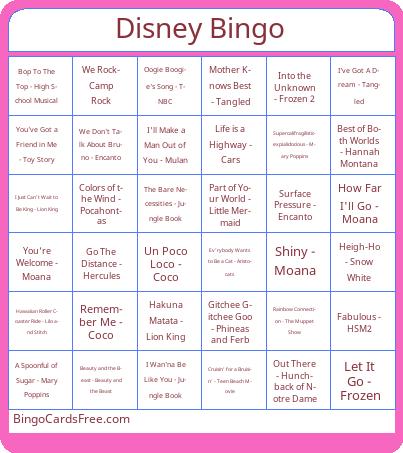 This Disney Bingo Cards Game contains following Words or Phrases: A Spoonful of Sugar - Mary Poppins, A Whole New World - Aladdin, Be Our Guest - Beauty and The Beast, Beauty and the Beast - Beauty and the Beast, Best of Both Worlds - Hannah Montana, Bibbidi-Bobbidi-Boo - Cinderella, Bop To The Top - High School Musical, Breaking Free - High School Musical, Can You Feel The Love Tonight - Lion King, Chim Chim Cher-ee - Mary Poppins, Colors of the Wind - Pocahontas, Cruisin' for a Bruisin' - Teen Beach Movie, Dig a Little Deeper - Princess and the Frog, Do You Want To Build a Snowman? - Frozen, Ev'rybody Wants to Be a Cat - Aristocats, Fabulous - HSM2, Friends on the Other Side - Princess and the Frog, Gitchee Gitchee Goo - Phineas and Ferb, Go The Distance - Hercules, Hakuna Matata - Lion King, Hawaiian Roller Coaster Ride - Lilo and Stitch, Heigh-Ho - Snow White, How Far I'll Go - Moana, I Just Can't Wait to Be King - Lion King, I See the Light - Tangled, I Wan'na Be Like You - Jungle Book, I Won't Say (I'm In Love) - Hercules, I'll Make a Man Out of You - Mulan, I've Got A Dream - Tangled, Into the Unknown - Frozen 2, Just Around The Riverbend - Pocahontas, Kiss The Girl - Little Mermaid, Let It Go - Frozen, Life is a Highway - Cars, Love Is An Open Door - Frozen, Man or Muppet - The Muppets, Mother Knows Best - Tangled, On My Way - Brother Bear, Oogie Boogie's Song - TNBC, Out There - Hunchback of Notre Dame, Part of Your World - Little Mermaid, Poor Unfortunate Souls - Little Mermaid, Rainbow Connection - The Muppet Show, Remember Me - Coco, Shiny - Moana, Supercalifragilisticexpialidocious - Mary Poppins, Surface Pressure - Encanto, The Bare Necessities - Jungle Book, Un Poco Loco - Coco, Under The Sea - Little Mermaid, We Don't Talk About Bruno - Encanto, We Rock- Camp Rock, We're All In This Together - HSM, What's This? - TNBC, Whistle While You Work - Snow White, You're Welcome - Moana, You've Got a Friend in Me - Toy Story, Zero To Hero - Hercules.