
WDW vacation bingo Cards - Print Free or Customize
Print free WDW vacation bingo cards or customize, unlimited cards! Select from 42,200+ designs or use the bingo card generator. Add numbers, phrases, pictures, or all of them. Play using PDF printouts, online bingo cards, and the online bingo caller, or go hybrid.
About: This bingo card is perfect for Disney park enthusiasts or groups heading out for an epic day across the parks. It blends must-do experiences, fun character encounters, foodie adventures, and quirky people-watching moments that only a theme park can offer. Great for adding an extra layer of excitement to your visit with friends or family.
How To: To download a printable PDF, click the Print button. You can change the card quantity and other printing preferences on the Print tab. Grid items and free space text can be edited on the Basic tab. Appearance can be completely customized on the corresponding tabs, or you can quickly find any preference on the 🔍 tab.
How to play WDW vacation bingo Cards?
- Digital Caller: Click on the Play button above.
- Digital Players: Click on the Play button above, and then click on the 🎫 button.
- Printed Players: Print PDF bingo cards and physically mark the cards.
- Printed Caller: Print PDF calling list & calling slips and physically select the slips.
- Mixed Mode: Pick any combination above. For example, caller can be either Offline or Digital. And players can be Offline or Digital or a mix of both.
Step-By-Step:
- Start by getting the WDW vacation bingo PDF by clicking on the "Print" button above.
- Open the PDF and print a hard copy.
- For random calling, you can print another copy of the call list, cut, fold and then draw them randomly at play time.
- Cut the bingo cards at the cut lines if there are greater than 1 bingo cards per page.
- Give one card to each player. For marking, you can use markers. Crayons are the cheapest.
- Pick one person to be the caller. If you are playing in a small group, the caller may as well play along with their own Bingo card.
- The caller initiates the play by randomly picking an item from the call list and announcing it to everyone.
- The players scan their cards to see if they have the announced word. If they do, they cross off that word.
- The first player to complete a horizontal, vertical, or a diagonal line of marked items shouts "Bingo!" and wins the game.
- The caller confirms that the items marked form a correct line as per the Bingo card and call list.
- You can play for different patterns or a full card blackout for a longer game.
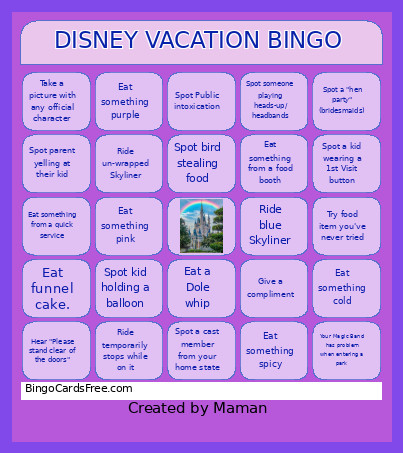 This WDW vacation bingo Cards Game contains following Words or Phrases: Ride lime monorail, Ride blue monorail, Ride red monorail, Ride silver monorail, Ride peach monorail, Ride purple Skyliner, Ride red Skyliner, Ride green Skyliner, Ride teal Skyliner, Ride blue Skyliner, Ride wrapped Skyliner, Ride un-wrapped Skyliner, Spot cast member singing, Spot child sleeping in a stroller, Spot a kid wearing a 1st Visit button, Spot man carrying a woman's purse, Spot someone wearing socks with sandals, Spot someone eating a Mickey shaped food, Spot 4+ family members wearing matching t-shirts, Ride any ride twice in a row, Spot someone eating a turkey leg, Eat funnel cake., Drink a beer or a chocolate milk, Eat/drink something chocolate, Eat/drink something glittery/ shimmery, Eat something hot, Eat something cold, Eat/drink something sour, Eat something spicy, Eat something sweet, Eat something blue, Eat something pink, Eat something purple, Eat something black, Eat something red, See a show, Ride a roller coaster, Ride a "kids" ride, Spot a duck, Spot a bunny, Swim in a pool, Spot someone playing heads-up/ headbands, Interact with cast member who is in character, Spot child dressed as a princess wearing a crown, Spot a Disney bounding adult, Spot somebody wearing a shirt you also own, Spot kid begging parent to buy them something, Spot an adult wearing Disney ears (not dad), Take a magic shot, Spot a line out the door for bathrooms, Spot Mandalorian walking with Grogu, Ride a ride three times in a row, Take a picture with any official character, Eat a Dole whip, Spot someone eating a Dole whip, Rope drop a park, Close out a park, Visit three parks in one day, Visit four parks in one day, Spot adult taking a nap in the park, Find a hidden Mickey, Ride three different types of Disney transportation in one day, Ride a water ride and do not get wet, Get wet on a water ride, Wear something Disney themed, Do something kind for someone, Someone does something kind for you, Spot a cast member from your home state, Spot Public meltdown of a kid, Spot Public meltdown/fight of a family, Spot Public intoxication, Spot someone fall down or trip, Receive a compliment, Give a compliment, Spot a child on a leash, Spot someone in a Universal Studios t-shirt, Spot someone eating on top of a garbage can, Spot stroller full of merchandise, Spot someone in a poncho, Spot an ECV scooter, Spot an EVC scooter roll over toes/bump someone, Try to pull up the sorcerer's sword, Ride the carousel in Magic Kingdom, Ride Tron, Ride Pandora's flight, Ride Space Mountain, Walk over 8 miles in a day, Walk over 10 miles in a day, Spot a VIP tour group, Spot a service animal, Buy souvenir for someone else, Eat something from a food booth, Person blogging/ tic-toc ing, Someone speaking different language, Bird begging for food, Spot kid using a bubble wand, Spot kid holding a balloon, Spot someone with a bad sunburn, Spot someone smoking, Hear some use the "F" word, Spot bird stealing food, Your Magic Band has problem when entering a park, Buy a souvenir, Watch part of parade/ cavalcade, Spot a squirrel (Judy!), Eat a spring roll, Hear "Fill in all available space", Use standby line for a ride/show, Hear someone laughing, Hear someone say "Cinderella", Hear "Please stand clear of the doors", Try food item you've never tried, Spot someone wearing any celebration button, Spot someone throwing up after/on a ride, Spot a marriage proposal, Spot a "hen party" (bridesmaids), Spot parent yelling at their kid, Spot scared kid crying on Tower of Terror, Drink a Starbucks drink, Drink a Joffrey's drink, Drink free sample at Club Cool (EPCOT), Spot a lizard, Spot someone in an orthopedic boot, Spot someone sitting on a curb, Pay with your Magic Band, Ride temporarily stops while on it, See some fireworks, Eat something from a quick service, Do something nice for someone in your group, Ride a slow boat ride.