Print free school trip bingo cards or customize,
limitless cards! Pick from 42,200+ templates or use the bingo card generator.
Add numbers, words, photos, or mix them all.
Play using printable PDF, virtual bingo cards,
and the virtual bingo caller, or mix physical and digital.
About: This bingo card is perfect for a chaotic and memorable school trip or student travel experience, especially with teachers and chaperones in tow. It's filled with all the real-life mishaps, drama, and unforgettable moments that tend to happen when a big group of students hits the road together. Great for keeping everyone entertained and bringing some lighthearted competition to the journey!
How To: To download a printable PDF, click the Print button.
You can change the card count and other
print preferences on the Print tab.
Grid items and free space content can be added on the Basic tab.
Appearance can be fully personalized on the
relevant tabs, or you can easily find any option
on the 🔍 tab.
How to play school trip Bingo Cards?
Paper Players: Print PDF bingo cards and manually cross off the cards.
Online Caller: Click on the Play button above.
Paper Caller: Print PDF calling list & calling slips and manually draw the slips.
Online Players: Click on the Play button above, and then click on the 🎫 button.
Hybrid Mode: Select any combination above.
For example, caller can be either Paper or Online.
And players can be Paper or Online or a combo of both.
Step-By-Step:
Start by downloading the school trip PDF by clicking on the "Print" button above.
Open the PDF and print it.
For random drawing, you can print another copy of the call list, cut, fold and then pull them randomly at play time.
Cut the bingo cards at the cut lines if there are more than 1 bingo cards per page.
Distribute one card per player. For marking, you can use crayons. Crayons cost the least.
Select one person to be the caller. If you are playing in a small group, the caller may as well play along with their own Bingo card.
The caller starts the play by randomly drawing an item from the call list and saying it to everyone.
The players check their cards to see if they have the called word. If they do, they cross off that word.
The first player to finish a horizontal, vertical, or a diagonal line of crossed items announces "Bingo!" and wins the game.
The caller confirms that the items crossed off form a correct line as per the Bingo card and call list.
You can play for varied patterns or a full card blackout for an extended game.
This school trip Bingo Cards Game contains following Words or Phrases: Someone forgets something important, Someone loses something important (bonus if it's an electronic), Teacher MASSIVE crash out, Someone throws up, People punch each other (fist fight), Someone complains about roommates, Emergency store run, Friend argument, Big injury (bonus if go to the doctor), Public embarrassment (bonus if its a teacher), Someone comes sick, Transportation issue, Sleep issues, Someone sneaks out of their room, Separation anxiety, Person tweaking outside, Someone steals, Parents are called, Someone falls asleep in public, TSA issue, Someone gets pat down, Someone gets pantsed, Inside joke is formed, Someone gets extremely caffeinated, Someone walks into traffic, Teacher takes phone, Big spill, Someone feeds a wild animal, Someone claps during landing, Someone gets lost, Everyone gets sick, Deep talk, Weather troubles, Flight delayed (bonus if more than a day), Someone cries over something stupid, Someone uses the snack bar, Someone breaks something expensive, Teacher cries, Intercom funny (plane), Someone stinks up the bathroom (bonus if plane), Someone door dashes, Someone doesn't shower for 2+ days (bonus if full trip), Someone gets locked out of room (bonus if they lose key), Someone runs out of money, Bag is overweight, Bathroom horrors, Someone oversleeps, Someone gets constipated, Boys get a makeover, Rooms get reassigned, Someone gets sent home, Spooky occurrence, Unidentified undergarment, Someone asks for a necessity, Someone gets a blister, Someone can't name an important monument, Speech about respect, Unplanned restroom stops, Noise complaint (bonus if its in the hotel), Someone snores, Alarm issues, Hoarding snacks, "Are we there yet", Someone spends $35+ in a day on food, Someone outside of school gets asked out, Someone's parent shows up for no reason.

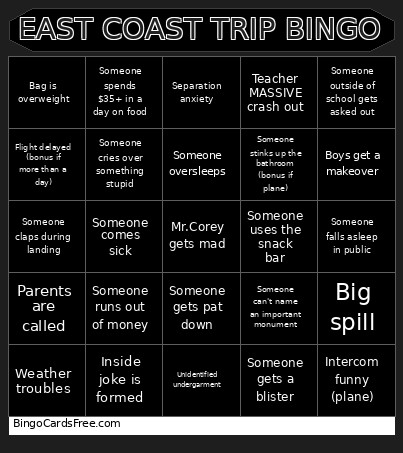 This school trip Bingo Cards Game contains following Words or Phrases: Someone forgets something important, Someone loses something important (bonus if it's an electronic), Teacher MASSIVE crash out, Someone throws up, People punch each other (fist fight), Someone complains about roommates, Emergency store run, Friend argument, Big injury (bonus if go to the doctor), Public embarrassment (bonus if its a teacher), Someone comes sick, Transportation issue, Sleep issues, Someone sneaks out of their room, Separation anxiety, Person tweaking outside, Someone steals, Parents are called, Someone falls asleep in public, TSA issue, Someone gets pat down, Someone gets pantsed, Inside joke is formed, Someone gets extremely caffeinated, Someone walks into traffic, Teacher takes phone, Big spill, Someone feeds a wild animal, Someone claps during landing, Someone gets lost, Everyone gets sick, Deep talk, Weather troubles, Flight delayed (bonus if more than a day), Someone cries over something stupid, Someone uses the snack bar, Someone breaks something expensive, Teacher cries, Intercom funny (plane), Someone stinks up the bathroom (bonus if plane), Someone door dashes, Someone doesn't shower for 2+ days (bonus if full trip), Someone gets locked out of room (bonus if they lose key), Someone runs out of money, Bag is overweight, Bathroom horrors, Someone oversleeps, Someone gets constipated, Boys get a makeover, Rooms get reassigned, Someone gets sent home, Spooky occurrence, Unidentified undergarment, Someone asks for a necessity, Someone gets a blister, Someone can't name an important monument, Speech about respect, Unplanned restroom stops, Noise complaint (bonus if its in the hotel), Someone snores, Alarm issues, Hoarding snacks, "Are we there yet", Someone spends $35+ in a day on food, Someone outside of school gets asked out, Someone's parent shows up for no reason.