
Easy Rockin' V01 Bingo Cards - Print Free or Customize
Print free Easy Rockin' V01 bingo cards or modify, unlimited prints! Select from 41,500+ templates or use the bingo card generator. Add numbers, words, images, or any combination. Play using printable PDF, virtual bingo cards, and the virtual bingo caller, or go hybrid.
About: This bingo card is a celebration of classic rock and soft rock hits from the 70s, 80s, and early 90s, perfect for music lovers who appreciate timeless tunes and legendary artists. The vibe is nostalgic yet upbeat, making it a great addition to themed parties, reunion events, or trivia nights with friends and family who know their way around a playlist.
How To: To save a PDF to print, click the Print button. You can alter the card count and other printing options on the Print tab. Grid items and free space content can be changed on the Basic tab. Appearance can be highly personalized on the corresponding tabs, or you can easily search any setting on the 🔍 tab.
How to play Easy Rockin' V01 Bingo Cards?
- Printed Players: Print PDF bingo cards and manually write on the cards.
- Online Players: Click on the Play button above, and then click on the 🎫 button.
- Printed Caller: Print PDF calling list & calling slips and manually pick the slips.
- Online Caller: Click on the Play button above.
- Mixed Mode: Pick any combination above. For example, caller can be either Paper or Online. And players can be Paper or Online or a combo of both.
Step-By-Step:
- Start by getting the Easy Rockin' V01 PDF by clicking on the "Print" button above.
- Open the PDF and print it.
- For random drawing, you can print another copy of the call list, cut, fold and then pull them randomly at play time.
- Cut the bingo cards at the cut marks if there are more than 1 bingo cards per page.
- Distribute one card per player. For marking, you can use markers. Crayons cost the least.
- Pick one person to be the caller. If you are playing in a small group, the caller may also play along with their own Bingo card.
- The caller begins the game by randomly picking an item from the call list and calling out it to everyone.
- The players check their cards to see if they have the called word. If they do, they cross off that word.
- The first player to finish a horizontal, vertical, or a diagonal line of marked items yells "Bingo!" and wins the game.
- The caller verifies that the items marked form a proper line according to the Bingo card and call list.
- You can play for different patterns or a full card blackout for an extended game.
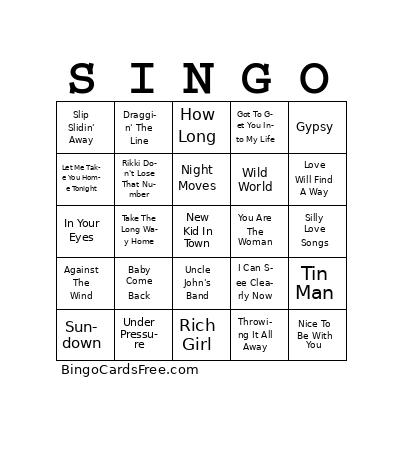 This Easy Rockin' V01 Bingo Cards Game contains following Words or Phrases: Toto --- Africa, Bob Seger --- Against The Wind, Heart --- Alone, Player --- Baby Come Back, Bon Jovi --- Bed Of Roses, Three Dog Night --- Black & White, Mr. Mister --- Broken Wings, Europe --- Carrie, Sammy Johns --- Chevy Van, Jefferson Starship --- Count On Me, Neil Diamond --- Cracklin' Rosie, Poco --- Crazy Love, Styx --- Crystal Ball, Jackson Brown --- Doctor My Eyes, Tommy James & The Shondells --- Draggin' The Line, Dobie Gray --- Drift Away, Kansas --- Dust In The Wind, The Babys --- Every Time I Think Of You, R.E.M. --- Everybody Hurts, Genesis --- Follow You Follow Me, Fleetwood Mac --- Go Your Own Way, Wings --- Got To Get You Into My Life, Fleetwood Mac --- Gypsy, Little River Band --- Happy Anniversary, Todd Rundgren --- Hello It's Me, Joni Mitchell --- Help Me, The Eagles --- Hotel California, Ace --- How Long, Johnny Nash --- I Can See Clearly Now, Hall & Oates --- I Can't Go For That, Peter Gabriel --- In Your Eyes, Whitesnake --- Is This Love, Little River Band --- It's A Long Way There, Ozark Mountain Daredevils --- Jackie Blue, REO Speedwagon --- Keep On Loving You, Bob Dylan --- Lay Lady Lay, Boston --- Let Me Take You Home Tonight, The Doobie Brothers --- Listen To The Music, Elton John --- Little Jeannie, Gary Wright --- Love Is Alive, Pablo Cruise --- Love Will Find A Way, Walter Egan --- Magnet And Steel, Bread --- Make It With You, Extreme --- More Than Words, The Eagles --- New Kid In Town, Gallery --- Nice To Be With You, Bob Seger --- Night Moves, Neil Young --- Old Man, The Motels --- Only The Lonely, Journey --- Open Arms, Billy Joel --- Piano Man, Hall & Oates --- Rich Girl, Steely Dan --- Rikki Don't Lose That Number, Elton John --- Rocket Man, Peter Frampton --- Show Me The Way, Wings --- Silly Love Songs, America --- Sister Golden Hair, Paul Simon --- Slip Slidin' Away, Gordon Lightfoot --- Sundown, Talking Heads --- Take Me To The River, Supertramp --- Take The Long Way Home, Electric Light Orchestra --- Telephone Line, Bruce Hornsby --- The Way It Is, Genesis --- Throwing It All Away, America --- Tin Man, Grateful Dead --- Uncle John's Band, Rolling Stones --- Under My Thumb, Freddie Mercury & David Bowie --- Under Pressure, Foreigner --- Waiting For A Girl Like You, Bad English --- When I See You Smile, Cat Stevens --- Wild World, Pink Floyd --- Wish You Were Here, The Eagles --- Witchy Woman, Firefall --- You Are The Woman, Queen --- You're My Best Friend.