
EB Staff Bingo Spring 2026 Cards - Print Free or Customize
Print free EB Staff bingo Spring 2026 cards or customize, unlimited cards! Pick from 41,500+ templates or use our bingo card generator. Add numbers, phrases, photos, or any combination. Play using printable PDF, digital bingo cards, and our digital bingo caller, or go hybrid.
About: This bingo card captures the lively spirit of a close-knit education or camp staff community, filled with inside jokes, quirky traditions, and everyday moments. Perfect for onboarding, team-building retreats, or staff celebrations, it encourages connection and laughter as participants spot familiar personalities and memorable encounters from their unique workplace culture.
How To: To save a printable PDF, click the Print button. You can change the card quantity and other print settings on the Print tab. Grid items and free space text can be changed on the Basic tab. Appearance can be fully personalized on the relevant tabs, or you can easily locate any option using the 🔍 tab.
How to play EB Staff Bingo Spring 2026 Cards?
- Online Caller: Click on the Play button above.
- Online Players: Click on the Play button above, and then click on the 🎫 button.
- Printed Players: Print PDF bingo cards and physically mark the cards.
- Printed Caller: Print PDF calling list & calling slips and physically pick the slips.
- Mixed Mode: Select any combination above. For instance, caller can be either Offline or Online. And players can be Offline or Online or a mix of both.
Step-By-Step:
- Start by getting the EB Staff Bingo Spring 2026 PDF by clicking on the "Print" button above.
- Open the PDF and print it.
- For random calling, you can print another copy of the call list, cut, fold and then pull them randomly at play time.
- Cut the bingo cards at the cut marks if there are more than 1 bingo cards per page.
- Distribute one card per player. For marking, you can use pens. Crayons cost the least.
- Select one person to be the caller. If you are playing in a small group, the caller can also play along with their own Bingo card.
- The caller starts the play by randomly picking an item from the call list and saying it to everyone.
- The players look at their cards to see if they have the announced word. If they do, they cross off that word.
- The first player to complete a horizontal, vertical, or a diagonal line of crossed items yells "Bingo!" and wins the play.
- The caller validates that the items marked form a proper line as per the Bingo card and call list.
- You can play for multiple patterns or a full card blackout for a longer play.
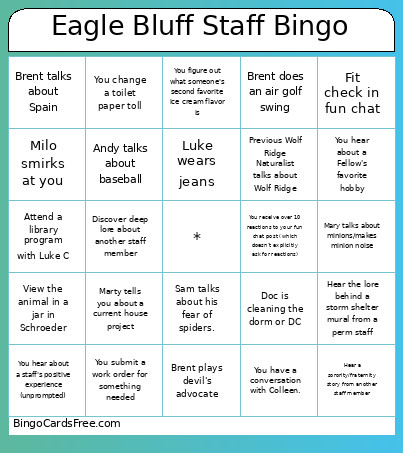 This EB Staff Bingo Spring 2026 Cards Game contains following Words or Phrases: A perm staff talks about previous jobs, Previous Wolf Ridge Naturalist talks about Wolf Ridge, See Sheila talking dog for walk, See Colleen on the e-bike, Andy talks about baseball, 3 Fellows do the hokey pokey, Mary talks about minions/makes minion noise, Natalie talks about Ultimate Frisbee, A fellow shows you a knitting project, Brent talks about Trinona, Doc is cleaning the dorm or DC, You change a toilet paper toll, You change a paper towel roll, You change soap in a dispenser, Another staff tells you about a group they gave 5 EE sticks, A kid names the owl after the instructor, Jenna tells you about one of Pippa's injury, Luke wears jeans, You ask Luke a "dumb" summer camp question, View the animal in a jar in Schroeder, Hear the lore behind a storm shelter mural from a perm staff, You submit a request for an office item that we actually need to Cheryl, You submit a work order for something needed, Determine what is in the CTeam office pigs' mouths, You figure out what someone's second favorite ice cream flavor is, Wade tells you unprompted joke, Marty tells you about a current house project, You hear a funny story about someone's pet, Someone tells you about a recent vacation, You figure out who has tipped over the canoe trailer twice, Tell Luke you are getting an outdoor cat and ask for his opinion, Learn new piece of MJI childhood lore, Find a prairie plant that Mady cannot ID, You see Kat put on sunscreen/aquaphor (unprompted), Take a selfie with 5 staff and send in fun chat, Fit check in fun chat, You receive over 10 reactions to your fun chat post (which doesn't explicitly ask for reactions), You hear about a Fellow's favorite hobby, Fellow dyes their hair, You hear about a staff's positive experience (unprompted), Go on a state land hike, Ask someone with a crafty hobby what they are currently working on, Play a board game with coworkers, > 6 staff are wearing Chacos in the same place (unprompted), Someone complains about Mike, Get a CTeam member to share a curriculum horror story, One of Erinn's spawn is sick, Milo smirks at you, Preschoolers say something unhinged, You witness Andy taking recycling to Preston, Brent talks about Spain, Brent does an air golf swing, Brent plays devil's advocate, You see a staff member get excited about lunch (unprompted), Someone walks out of the DH because of the lunch menu (umprompted), Get someone to do a CF activity outside of a CF, Alexis talks about marching band, Katherine makes a joke, You have been/end up in one of Rachel's vlogs, Visit Alanna at the Pub, Discover deep lore about another staff member, Hear a sorority/fraternity story from another staff member, Hear one of Kat's dreams about EB, Katie tells you something about Athena (without direct prompting), Sara tells you about something that happened "back in the day", Sam talks about his fear of spiders., You have a conversation with Colleen., Attend a library program with Luke C, You hear lore about the last time Bluff-sassin happened.