Print free EC camp bingo cards or adjust them,
unlimited prints! Choose from 41,500+ templates or use the bingo card generator.
Add numbers, words, images, or all of them.
Play using PDF prints, virtual bingo cards,
and the virtual bingo caller, or combine all formats.
About: This bingo card is perfect for a lively youth group event or a fun church camp gathering, encouraging everyone to mingle and connect. The prompts celebrate diversity, unique talents, and quirky achievements, all while sparking conversations. It’s designed to break the ice, build friendships, and get everyone moving and having a good laugh together.
How To: To get a PDF to print, click the Print button.
You can modify the number of cards and other
print preferences on the Print tab.
Grid items and free space content can be changed on the Basic tab.
Appearance can be exactly customized on the
corresponding tabs, or you can easily find any setting
using the 🔍 tab.
How to play EC camp Bingo Cards?
Printed Players: Print PDF bingo cards and physically cross off the cards.
Printed Caller: Print PDF calling list & calling slips and physically pick the slips.
Virtual Caller: Click on the Play button above.
Virtual Players: Click on the Play button above, and then click on the 🎫 button.
Mixed Play: Pick any combination above.
For instance, caller can be either Printed or Virtual.
And players can be Printed or Virtual or a combo of both.
Step-By-Step:
Start by getting the EC camp PDF by clicking on the "Print" button above.
Open the PDF and print a hard copy.
For random calling, you can print another copy of the call list, cut, fold and then draw them randomly at play time.
Cut the bingo cards at the cut lines if there are greater than 1 bingo cards per page.
Give one card to each player. For marking, you can use pencils. Crayons cost the least.
Pick one person to be the caller. If you are playing in a small group, the caller may as well play along with their own Bingo card.
The caller begins the play by randomly drawing an item from the call list and calling out it to everyone.
The players check their cards to see if they have the called word. If they do, they dab that word.
The first player to complete a horizontal, vertical, or a diagonal line of crossed items yells "Bingo!" and wins the game.
The caller confirms that the items marked form a proper line according to the Bingo card and call list.
You can play for varied patterns or a full card blackout for a longer game.
This EC camp Bingo Cards Game contains following Words or Phrases: Green or blue coloured hair, Someone in overalls, Someone with a rubix cube, Someone with a broken bone, Someone wearing a Warriors shirt, Someone who can do a backflip, Someone who ran a marathon, Someone with more than 4 siblings, Someone named Matthew, Someone named Benjamin, Someone named Ruth, Someone named Rebecca, Someone playing an instrument, Someone who owns a horse, A vegetarian, Someone who has used a typewriter, Someone from, Someone wearing the same shoes as you, Someone in a onesie, Someone wearing the same outfit as you, Someone wearing purple, Someone in a suit, Someone holding/wearing an inflatable, Someone dressed as a superhero, Someone from the worship team, Someone who goes to your school, People playing Uno, People playing chess, Someone in an oodie, Someone wearing gumboots, Someone with an ice block, Someone from Hamilton, Someone from Whangarei, Someone who speaks fluent Te reo, Someone who has a pet fish., Someone who speaks fluent French, Someone doing an arm wrestle, Someone doing at least 10 push-ups, Someone who is muddy., Someone born in Australia, Someone from Bethlehem Baptist, Someone from Northgate Baptist Church, Someone from Glendowie Presbyterian Church, Someone from the salvation army, Someone holding 2 coffees, Someone with a balloon, Someone with a glowstick, Twins.

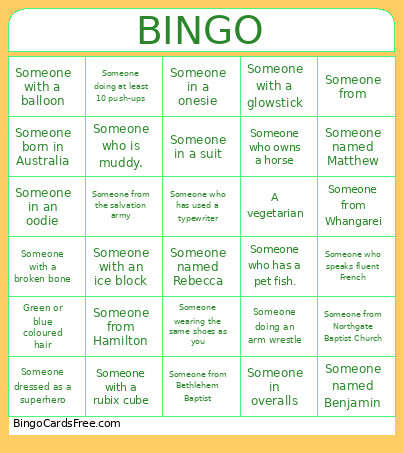 This EC camp Bingo Cards Game contains following Words or Phrases: Green or blue coloured hair, Someone in overalls, Someone with a rubix cube, Someone with a broken bone, Someone wearing a Warriors shirt, Someone who can do a backflip, Someone who ran a marathon, Someone with more than 4 siblings, Someone named Matthew, Someone named Benjamin, Someone named Ruth, Someone named Rebecca, Someone playing an instrument, Someone who owns a horse, A vegetarian, Someone who has used a typewriter, Someone from, Someone wearing the same shoes as you, Someone in a onesie, Someone wearing the same outfit as you, Someone wearing purple, Someone in a suit, Someone holding/wearing an inflatable, Someone dressed as a superhero, Someone from the worship team, Someone who goes to your school, People playing Uno, People playing chess, Someone in an oodie, Someone wearing gumboots, Someone with an ice block, Someone from Hamilton, Someone from Whangarei, Someone who speaks fluent Te reo, Someone who has a pet fish., Someone who speaks fluent French, Someone doing an arm wrestle, Someone doing at least 10 push-ups, Someone who is muddy., Someone born in Australia, Someone from Bethlehem Baptist, Someone from Northgate Baptist Church, Someone from Glendowie Presbyterian Church, Someone from the salvation army, Someone holding 2 coffees, Someone with a balloon, Someone with a glowstick, Twins.