Print free EDC Synergy bingo cards or adjust them,
unlimited cards! Pick from 42,200+ templates or use the bingo card generator.
Add numbers, words, photos, or all of them.
Play using printed PDF, virtual bingo cards,
and the virtual bingo caller, or mix physical and digital.
About: This bingo card captures all the familiar moments and phrases from corporate workshops and virtual business meetings. It’s perfect for team-building sessions, conference calls, or training events where a little humor can help keep things lively. Use it to turn those predictable presentation hiccups into a fun, shared experience for coworkers or attendees.
How To: To get a printable PDF, click the Print button.
You can adjust the card count and other
printing options on the Print tab.
Grid items and free space content can be changed on the Basic tab.
Appearance can be highly personalized on the
corresponding tabs, or you can quickly find any setting
using the 🔍 tab.
How to play EDC Synergy Bingo Cards?
Paper Caller: Print PDF calling list & calling slips and physically choose the slips.
Online Players: Click on the Play button above, and then click on the 🎫 button.
Online Caller: Click on the Play button above.
Paper Players: Print PDF bingo cards and physically cross off the cards.
Combo Mode: Select any combination above.
For instance, caller can be either Printed or Online.
And players can be Printed or Online or a combination of both.
Step-By-Step:
Start by getting the EDC Synergy PDF by clicking on the "Print" button above.
Open the PDF and print it.
For random calling, you can print another copy of the call list, cut, fold and then draw them randomly at play time.
Cut the bingo cards at the cut marks if there are greater than 1 bingo cards per page.
Give one card to each player. For marking, you can use crayons. Crayons cost the least.
Select one person to be the caller. If you are playing in a small group, the caller may also play along with their own Bingo card.
The caller starts the game by randomly drawing an item from the call list and announcing it to all players.
The players scan their cards to see if they have the announced word. If they do, they cross off that word.
The first player to finish a horizontal, vertical, or a diagonal line of crossed items shouts "Bingo!" and wins the play.
The caller confirms that the items marked form a proper line as per the Bingo card and call list.
You can play for multiple patterns or a full card blackout for an extended play.
This EDC Synergy Bingo Cards Game contains following Words or Phrases: "Can you see my screen?", "Fun" activity, 20+ slide deck, "Action item", Agenda never referenced, Any questions, Apologizes for slides, Audience laughter, AV issue occurs, Best practice mentioned, Breakout discussion happens, Chart unreadable, Circle back, Clarification questions, Competency, Customer experience, Customer-centric, Deep dive mentioned, Digital transformation, Interrupting participant, End-to-end approach, Evaluations, Facilitator repetition of participant comment, Font too small to read, Group activity, Group confusion during activity, Group discussion, Key takeaway, KPI mentioned, Let's align, Let's break this down, Let's build on that, Let's make this interactive, Let's unpack that, Misunderstanding clarified, Move the needle, Next steps.., No agenda slide, Our partners, Participant asks for slides, Side discussion, Presenter loses place, Presenter reads slides verbatim, Quick win mentioned, Real-world example, ROI mentioned, Runs out of time, Scalable solution, Screen share error, Selfie taken, Slide advancement doesn't work, Someone interrupts speaker, Someone on their phone, Spreadsheet pasted as image, Stakeholder alignment, Stock photo handshake, Strategic alignment, Take it offline, Technical interruption, Too many bullet points, Unexpected tangent, Unreadable slide contrast, Video fails to play, We'll come back to that, We'll park that, We're behind schedule, What I'm hearing is, What the field wants, Wrong slide shown briefly.

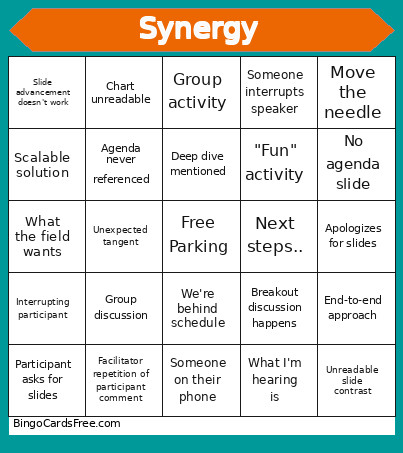 This EDC Synergy Bingo Cards Game contains following Words or Phrases: "Can you see my screen?", "Fun" activity, 20+ slide deck, "Action item", Agenda never referenced, Any questions, Apologizes for slides, Audience laughter, AV issue occurs, Best practice mentioned, Breakout discussion happens, Chart unreadable, Circle back, Clarification questions, Competency, Customer experience, Customer-centric, Deep dive mentioned, Digital transformation, Interrupting participant, End-to-end approach, Evaluations, Facilitator repetition of participant comment, Font too small to read, Group activity, Group confusion during activity, Group discussion, Key takeaway, KPI mentioned, Let's align, Let's break this down, Let's build on that, Let's make this interactive, Let's unpack that, Misunderstanding clarified, Move the needle, Next steps.., No agenda slide, Our partners, Participant asks for slides, Side discussion, Presenter loses place, Presenter reads slides verbatim, Quick win mentioned, Real-world example, ROI mentioned, Runs out of time, Scalable solution, Screen share error, Selfie taken, Slide advancement doesn't work, Someone interrupts speaker, Someone on their phone, Spreadsheet pasted as image, Stakeholder alignment, Stock photo handshake, Strategic alignment, Take it offline, Technical interruption, Too many bullet points, Unexpected tangent, Unreadable slide contrast, Video fails to play, We'll come back to that, We'll park that, We're behind schedule, What I'm hearing is, What the field wants, Wrong slide shown briefly.