Print free eff bingo cards or personalize,
limitless prints! Select from 42,200+ templates or use our bingo card generator.
Add numbers, words, photos, or mix them all.
Play using PDF printouts, online bingo cards,
and our online bingo caller, or mix physical and digital.
About: This bingo card is perfect for a fun, interactive gathering like a festival or community event, especially one with an artsy or alternative vibe. With its quirky fruit-themed tasks and challenges to meet interesting people, it’s designed to spark conversations and help attendees break the ice in creative ways. Expect lots of laughter and surprising discoveries as players connect!
How To: To get a printable PDF, click the Print button.
You can adjust the number of cards and other
printing options on the Print tab.
Grid items and free space text can be edited on the Basic tab.
Appearance can be completely personalized on the
relevant tabs, or you can easily search any option
using the 🔍 tab.
How to play eff bingo Cards?
Virtual Players: Click on the Play button above, and then click on the 🎫 button.
Printed Players: Print PDF bingo cards and physically mark the cards.
Printed Caller: Print PDF calling list & calling slips and physically choose the slips.
Virtual Caller: Click on the Play button above.
Hybrid Play: Pick any combination above.
For example, caller can be either Printed or Virtual.
And players can be Printed or Virtual or a mix of both.
Step-By-Step:
Start by downloading the eff bingo PDF by clicking on the "Print" button above.
Open the PDF and print a hard copy.
For random calling, you can print another copy of the call list, cut, fold and then pull them randomly at play time.
Cut the bingo cards at the cut lines if there are greater than 1 bingo cards per page.
Distribute one card per player. For marking, you can use crayons. Crayons cost the least.
Pick one person to be the caller. If you are playing in a small group, the caller can as well play along with their own Bingo card.
The caller initiates the game by randomly picking an item from the call list and calling out it to all players.
The players scan their cards to see if they have the called word. If they do, they dab that word.
The first player to finish a horizontal, vertical, or a diagonal line of marked items shouts "Bingo!" and wins the play.
The caller checks that the items marked form a proper line according to the Bingo card and call list.
You can play for multiple patterns or a full card blackout for a longer play.
This eff bingo Cards Game contains following Words or Phrases: Compliment someone who is wearing a fruity outfit, Get your fruit tattoo, Draw yourself on the "draw yourself" wall, Draw fruit at the painting station, Find someone who is allergic to fruit (any kind), Find someone who got married in the last year, Find someone who travelled from abroad to come to EFF, Find someone who works for the government, Find someone who can recite a poem by heart, Find a dungeon master, Find someone who can dance salsa and dance with them, Find someone who has never broken a bone, Find someone who has spent more than 500 hours on one specific game, Find someone who has read more than 10 books in 2026, Find someone who will DJ at EFF, Find someone who has ever written a song, Find someone who has submitted their PhD but not defended yet, Find someone who is growing fruit in their house/balcony/garden, Find someone who has ever made a piece of clothing, Find someone who has climbed a mountain that is >5000m above sea level, Find someone who is single, Find someone who as installed a chess app on their phone, Find someone with a Duolingo streak of >200 days, Find someone who knows how to roll a cigarette, Find someone who worked/works for a political party, Find someone who has been to a Bluegrass festival, Find someone who was an essential worker during the pandemic, Find two people who have the same birthday (different year is fine), Find someone who has seen a royal in person.

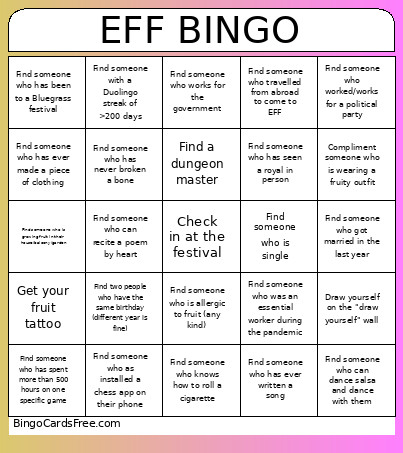 This eff bingo Cards Game contains following Words or Phrases: Compliment someone who is wearing a fruity outfit, Get your fruit tattoo, Draw yourself on the "draw yourself" wall, Draw fruit at the painting station, Find someone who is allergic to fruit (any kind), Find someone who got married in the last year, Find someone who travelled from abroad to come to EFF, Find someone who works for the government, Find someone who can recite a poem by heart, Find a dungeon master, Find someone who can dance salsa and dance with them, Find someone who has never broken a bone, Find someone who has spent more than 500 hours on one specific game, Find someone who has read more than 10 books in 2026, Find someone who will DJ at EFF, Find someone who has ever written a song, Find someone who has submitted their PhD but not defended yet, Find someone who is growing fruit in their house/balcony/garden, Find someone who has ever made a piece of clothing, Find someone who has climbed a mountain that is >5000m above sea level, Find someone who is single, Find someone who as installed a chess app on their phone, Find someone with a Duolingo streak of >200 days, Find someone who knows how to roll a cigarette, Find someone who worked/works for a political party, Find someone who has been to a Bluegrass festival, Find someone who was an essential worker during the pandemic, Find two people who have the same birthday (different year is fine), Find someone who has seen a royal in person.