Print free Emergency Preparedness bingo Winter Edition cards or customize,
unlimited prints! Choose from 40,600+ designs or use the bingo card generator.
Add numbers, phrases, images, or mix them all.
Play using printable PDF, virtual bingo cards,
and the virtual bingo caller, or mix physical and digital.
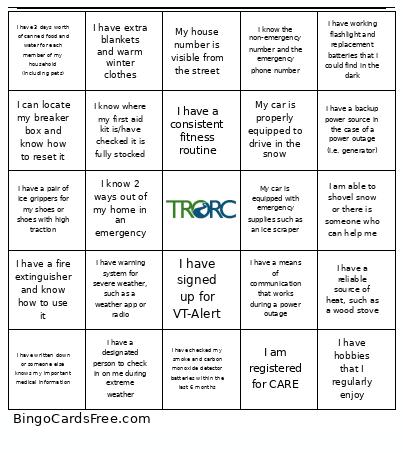
About: This bingo card is all about winter emergency preparedness, perfect for community safety workshops, neighborhood meetings, or family readiness nights. The items encourage you to check key supplies, review safety routines, and stay connected during harsh weather. It’s an engaging way to remind everyone about practical steps for staying safe and comfortable all season long.
How To: To download a printable PDF, click the Print button.
You can adjust the card quantity and other
print settings on the Print tab.
Grid items and free space text can be added on the Basic tab.
Appearance can be exactly customized on the
corresponding tabs, or you can easily locate any setting
using the 🔍 tab.
How to play Emergency Preparedness Bingo Winter Edition Cards?
Printed Caller: Print PDF calling list & calling slips and physically select the slips.
Online Players: Click on the Play button above, and then click on the 🎫 button.
Online Caller: Click on the Play button above.
Printed Players: Print PDF bingo cards and physically mark the cards.
Hybrid Mode: Choose any combination above.
For example, caller can be either Printed or Online.
And players can be Printed or Online or a combo of both.
Step-By-Step:
Start by downloading the Emergency Preparedness Bingo Winter Edition PDF by clicking on the "Print" button above.
Open the PDF and print a hard copy.
For random calling, you can print another copy of the call list, cut, fold and then pull them randomly at play time.
Cut the bingo cards at the cut lines if there are greater than 1 bingo cards per page.
Distribute one card per player. For marking, you can use markers. Crayons are the cheapest.
Choose one person to be the caller. If you are playing in a small group, the caller may as well play along with their own Bingo card.
The caller opens the game by randomly picking an item from the call list and announcing it to everyone.
The players scan their cards to see if they have the announced word. If they do, they cross off that word.
The first player to finish a horizontal, vertical, or a diagonal line of marked items shouts "Bingo!" and wins the game.
The caller verifies that the items crossed off form a correct line according to the Bingo card and call list.
You can play for multiple patterns or a full card blackout for a longer game.
This Emergency Preparedness Bingo Winter Edition Cards Game contains following Words or Phrases: I have working flashlight and replacement batteries that I could find in the dark, I am able to shovel snow or there is someone who can help me, My car is equipped with emergency supplies such as an ice scraper, I have checked my smoke and carbon monoxide detector batteries within the last 6 months, I know where my first aid kit is/have checked it is fully stocked, I have a consistent fitness routine, My house number is visible from the street, I have signed up for VT-Alert, I have a reliable source of heat, such as a wood stove, I have a fire extinguisher and know how to use it, I have hobbies that I regularly enjoy, I have written down or someone else knows my important medical information, I have a means of communication that works during a power outage, I have a designated person to check in on me during extreme weather, I can locate my breaker box and know how to reset it, I have 3 days worth of canned food and water for each member of my household (including pets), I am registered for CARE, I know the non-emergency number and the emergency phone number, I have a pair of ice grippers for my shoes or shoes with high traction, My car is properly equipped to drive in the snow, I have a backup power source in the case of a power outage (i.e. generator), I know 2 ways out of my home in an emergency, I have warning system for severe weather, such as a weather app or radio, I have extra blankets and warm winter clothes.

 This Emergency Preparedness Bingo Winter Edition Cards Game contains following Words or Phrases: I have working flashlight and replacement batteries that I could find in the dark, I am able to shovel snow or there is someone who can help me, My car is equipped with emergency supplies such as an ice scraper, I have checked my smoke and carbon monoxide detector batteries within the last 6 months, I know where my first aid kit is/have checked it is fully stocked, I have a consistent fitness routine, My house number is visible from the street, I have signed up for VT-Alert, I have a reliable source of heat, such as a wood stove, I have a fire extinguisher and know how to use it, I have hobbies that I regularly enjoy, I have written down or someone else knows my important medical information, I have a means of communication that works during a power outage, I have a designated person to check in on me during extreme weather, I can locate my breaker box and know how to reset it, I have 3 days worth of canned food and water for each member of my household (including pets), I am registered for CARE, I know the non-emergency number and the emergency phone number, I have a pair of ice grippers for my shoes or shoes with high traction, My car is properly equipped to drive in the snow, I have a backup power source in the case of a power outage (i.e. generator), I know 2 ways out of my home in an emergency, I have warning system for severe weather, such as a weather app or radio, I have extra blankets and warm winter clothes.