
CREVAWC (FRENCH) Bingo Cards - Print Free or Customize
Print free CREVAWC (FRENCH) bingo cards or modify, unlimited cards! Choose from 41,500+ designs or use our bingo card generator. Add numbers, phrases, photos, or mix them all. Play using PDF printouts, online bingo cards, and our online bingo caller, or combine all formats.
How To: To save a PDF to print, click the Print button. You can modify the number of cards and other printing preferences on the Print tab. Grid items and free space text can be changed on the Basic tab. Appearance can be highly personalized on the corresponding tabs, or you can easily find any preference on the 🔍 tab.
How to play CREVAWC (FRENCH) Bingo Cards?
- Printed Caller: Print PDF calling list & calling slips and physically choose the slips.
- Digital Caller: Click on the Play button above.
- Digital Players: Click on the Play button above, and then click on the 🎫 button.
- Printed Players: Print PDF bingo cards and physically cross off the cards.
- Combo Mode: Choose any combination above. For instance, caller can be either Paper or Digital. And players can be Paper or Digital or a combination of both.
Step-By-Step:
- Start by getting the CREVAWC (FRENCH) PDF by clicking on the "Print" button above.
- Open the PDF and print it.
- For random calling, you can print another copy of the call list, cut, fold and then pull them randomly at play time.
- Cut the bingo cards at the cut lines if there are more than 1 bingo cards per page.
- Give one card to each player. For marking, you can use pencils. Crayons are the cheapest.
- Choose one person to be the caller. If you are playing in a small group, the caller may also play along with their own Bingo card.
- The caller initiates the game by randomly pulling an item from the call list and saying it to everyone.
- The players check their cards to see if they have the called word. If they do, they mark that word.
- The first player to complete a horizontal, vertical, or a diagonal line of crossed items announces "Bingo!" and wins the game.
- The caller verifies that the items crossed off form a proper line as per the Bingo card and call list.
- You can play for multiple patterns or a full card blackout for a longer game.
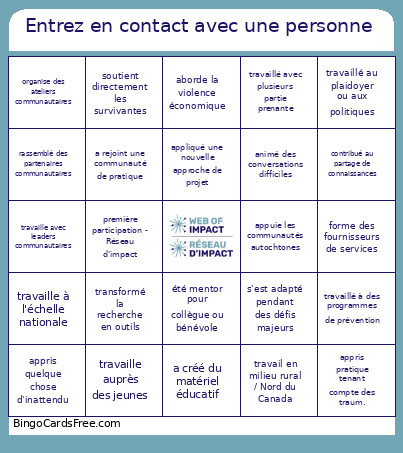 This CREVAWC (FRENCH) Bingo Cards Game contains following Words or Phrases: travaille à la prévention de la VFS, améliore l'accès à la justice, travaille auprès des jeunes, appuie communautés réfugiées/immigrantes, appuie les communautés autochtones, aborde la traite des personnes, mobilise des hommes et des garçons, organise des ateliers communautaires, crée des ressources de formation, travaille dans écoles ou en éducation, utilise prévention fondée sur les arts, appuie navigation dans système juridique, soutient directement les survivantes, cible politiques /changement systémique, cible la famille ou sécurité des enfants, travail en milieu rural / Nord du Canada, personne/projet basé en Ontario, personne/projet basé en C.-B., personne/projet basé dans l'Atlantique, travaille à l'échelle nationale, développe partenariats communautaires, collabore avec le système judiciaire, crée des trousses d'outils ou guides, met l'accent sur la prévention, utilise des approches intersectionnelles, aborde la violence économique, enseigne le consentement, intègre le leadership des jeunes, forme des fournisseurs de services, appuie travailleur.e.s du secteur VFS, utilise des pratiques réparatrices, aborde les préjudices numériques, travaille à l'intervention de témoins, a lancé projet pilote de nouv. programme, partage les connaissances au national, travaille avec leaders communautaires, accent- guérison ou rétablissement, a créé du matériel éducatif, s'est adapté pendant des défis majeurs, se poursuit au-delà du financement, est basé dans les Prairies, est basé dans le Nord du Canada, est basé au Québec, est bilingue (anglais/français), est offert en ligne, est guidé par des Aînés, soutient des communautés 2ELGBTQIAA+, aborde la traite et l'exploitation, s'est élargi à de nouvelles communautés, appris une nouv. compétence dans projet, appris un outil de conception, ex. Canva, animé des ateliers communautaires, travaillé directement avec survivantes, mené de la recherche ou de l'évaluation, créé du matériel de formation, travaillé avec des jeunes participant.es, développé partenariats communautaires, contribué à rédiger rapports ou articles, planifié des événements ou conférences, développé des ressources éducatives, travaillé dans plusieurs régions, collaboré avec des organismes, appris quelque chose d'inattendu, présenté son travail en public, découvert une nouvelle culture, recueilli des récits communautaires, fait de la sensibilisation communautaire, co-conçu des progr. avec la communauté, contribué au partage de connaissances, formé nouveau partenariat communautaire, contribué au projet pilote de programme, travaillé au plaidoyer ou aux politiques, renforcé les capacités du secteur VFS, travaillé à des programmes de prévention, appris pratique tenant compte des traum., travaillé avec des bénévoles, adapté le projet pendant des défis, créé des infographies ou contenu visuel, utilisé la narration dans son travail, travaillé avec plusieurs partie prenante, formé d'autres personnes dans le projet, première participation - Réseau d'impact, prévoit poursuivre le travail, assumé un rôle de leadership, travaillé en coulisses, rassemblé des partenaires communautaires, trouvé une passion neuve dans ce secteur, espère élargir le projet, déjà participé à un événement du CREVAWC, a rejoint une communauté de pratique, animé des conversations difficiles, coconçu des activités avec la communauté, travaillé dans différents secteurs, transformé la recherche en outils, acquis une nouvelle perspective, été mentor pour collègue ou bénévole, appliqué une nouvelle approche de projet.