
Erick's Buck Bingo Cards - Print Free or Customize
Print free Erick's Buck bingo cards or personalize, unlimited prints! Pick from 42,200+ templates or use our bingo card generator. Add numbers, phrases, pictures, or mix them all. Play using printed PDF, digital bingo cards, and our digital bingo caller, or go hybrid.
About: This bingo card is perfect for a wild and memorable bachelor party, especially one hitting multiple venues or taking over the city with a group of friends. With hilarious dares, cheeky social challenges, and quirky photo ops, it encourages everyone to break the ice, get silly, and celebrate together. Expect loads of laughs, unpredictable moments, and some great stories by the end of the night.
How To: To download a printable PDF, click the Print button. You can modify the number of cards and other printing settings on the Print tab. Grid items and free space text can be edited on the Basic tab. Appearance can be entirely personalized on the corresponding tabs, or you can easily search any option on the 🔍 tab.
How to play Erick's Buck Bingo Cards?
- Digital Caller: Click on the Play button above.
- Digital Players: Click on the Play button above, and then click on the 🎫 button.
- Paper Caller: Print PDF calling list & calling slips and manually select the slips.
- Paper Players: Print PDF bingo cards and manually mark the cards.
- Hybrid Play: Choose any combination above. For instance, caller can be either Printed or Digital. And players can be Printed or Digital or a combination of both.
Step-By-Step:
- Start by saving the Erick's Buck PDF by clicking on the "Print" button above.
- Open the PDF and print a hard copy.
- For random drawing, you can print another copy of the call list, cut, fold and then pick them randomly at play time.
- Cut the bingo cards at the cut marks if there are greater than 1 bingo cards per page.
- Distribute one card per player. For marking, you can use pencils. Crayons are the cheapest.
- Choose one person to be the caller. If you are playing in a small group, the caller can as well play along with their own Bingo card.
- The caller initiates the game by randomly picking an item from the call list and calling out it to everyone.
- The players scan their cards to see if they have the announced word. If they do, they cross off that word.
- The first player to finish a horizontal, vertical, or a diagonal line of marked items shouts "Bingo!" and wins the game.
- The caller checks that the items marked form a proper line as per the Bingo card and call list.
- You can play for different patterns or a full card blackout for a longer game.
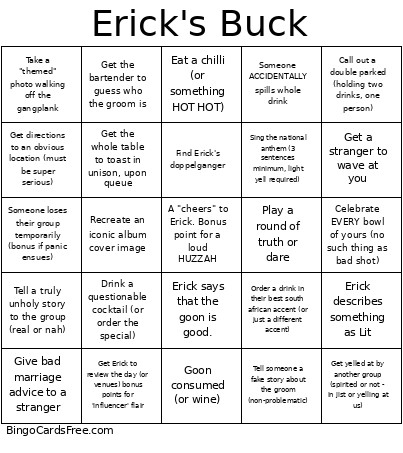 This Erick's Buck Bingo Cards Game contains following Words or Phrases: Erick describes something as Lit, Erick says that the goon is good., Someone ACCIDENTALLY spills whole drink, Get yelled at by another group (spirited or not - in jist or yelling at us), Photo bomb a stranger (bonus points for multiple bombs, multiple groups), Get Marriage Advice from a stranger, Give bad marriage advice to a stranger, Get a drink for free from a stranger, Tell someone a fake story about the groom (non-problematic), Play a round of truth or dare, Eat a chilli (or something HOT HOT), Order a drink in their best south african accent (or just a different accent), Sing the national anthem (3 sentences minimum, light yell required), Drink a questionable cocktail (or order the special), Do the 'i'm flying Jack' on the City Cat. Pics required or didnt happen, Get a souvenir from each location, Recreate an iconic album cover image, Do a whole trendy tiktok dance, have it filmed (purely for humiliation), Invent a 2-step handshake with a stranger, Toast Erick in poem, rhyme, or song (2 sentence minimum, whole verse if song), Get a stranger to wave at you, Get directions to an obvious location (must be super serious), Share a sip of a drink (with a stranger?), Call out a double parked (holding two drinks, one person), Get the bartender to guess who the groom is, Get the whole table to toast in unison, upon queue, Convince a stranger on the City Cat you're a tour guide (give them a "fact"), Celebrate EVERY bowl of yours (no such thing as bad shot), Someone loses their group temporarily (bonus if panic ensues), Get Erick to review the day (or venues) bonus points for 'influencer' flair, Take a "themed" photo walking off the gangplank, Find Erick's doppelganger, Take a picture in the MOST Awkward (out of place) setting (this will be voted on by group - at least 4 members), Buy Erick a fancy drink (or wine) and cheers the drink, Hit a group member with a water balloon (ask Ed for 1), Lead a prayer before doing something unholy, Tell a truly unholy story to the group (real or nah), Goon consumed (or wine).