ES Relay Bingo 2025 Cards - Print Free or Customize
Print free ES Relay bingo 2025 cards or personalize,
unlimited cards! Choose from 41,500+ templates or use our bingo card generator.
Add numbers, phrases, photos, or all of them.
Play using printed PDF, online bingo cards,
and our online bingo caller, or combine all formats.
About: This bingo card is all about boosting involvement and fun at a Relay For Life event. It encourages team-building, fundraising, meeting new people, and celebrating cancer survivors and caregivers. Perfect for relay participants and volunteers, this card adds extra excitement to the event while promoting community spirit and supporting a great cause.
How To: To download a PDF to print, click the Print button.
You can alter the number of cards and other
print settings on the Print tab.
Grid items and free space content can be added on the Basic tab.
Appearance can be entirely personalized on the
relevant tabs, or you can easily search any option
on the 🔍 tab.
How to play ES Relay Bingo 2025 Cards?
Digital Caller: Click on the Play button above.
Printed Caller: Print PDF calling list & calling slips and physically pick the slips.
Digital Players: Click on the Play button above, and then click on the 🎫 button.
Printed Players: Print PDF bingo cards and physically write on the cards.
Combo Play: Choose any combination above.
For instance, caller can be either Paper or Digital.
And players can be Paper or Digital or a combo of both.
Step-By-Step:
Start by saving the ES Relay Bingo 2025 PDF by clicking on the "Print" button above.
Open the PDF and print a hard copy.
For random drawing, you can print another copy of the call list, cut, fold and then draw them randomly at play time.
Cut the bingo cards at the cut lines if there are greater than 1 bingo cards per page.
Give one card to each player. For marking, you can use markers. Crayons cost the least.
Choose one person to be the caller. If you are playing in a small group, the caller can also play along with their own Bingo card.
The caller starts the play by randomly pulling an item from the call list and announcing it to everyone.
The players check their cards to see if they have the announced word. If they do, they mark that word.
The first player to finish a horizontal, vertical, or a diagonal line of crossed items shouts "Bingo!" and wins the game.
The caller verifies that the items crossed off form a proper line according to the Bingo card and call list.
You can play for varied patterns or a full card blackout for a longer game.
This ES Relay Bingo 2025 Cards Game contains following Words or Phrases: Register a team of 7 members, Visit a sponsor tent at relay, Participate in activity at Relay, Raise $100.00, Support Papas Pizza Fundraiser, Bring Someone New to Relay, Follow the Facebook Group, Sell a Trackside Sign, Sign Up for a Volunteer Shift at Relay, Make a Donation, Get a Survivor Registered on a Team, Bring Someone New to a Meeting, Recruit a New Relay Team, Participate in Curbing Cancer, Attend a Team Fundraiser, Turn in $$$ at a Meeting, Meet ACS Staff, I'm a Caregiver, Talk to someone who's been Relaying for 10+ years, I'm a Survivor, Dedicate a Luminaria Bag, Download the FUNdraising App, Secure a Silent Auction Item or Basket, Shout Out Your Team Captain, Meet an Executive Board Member, Join the Event Leadership Team, Become a Relay All-Star ($2500.00), Become a $1000 Club Member, Sell Drifters tickets, Attend Kick Off, Attend Wrap Up, Attend March Relay Meeting, Attend April Relay Meeting, Attend May Relay Meeting, Attend June Relay Meeting, Attend July Relay Meeting, Attend August Relay Meeting, Find someone who has NEVER Relayed Before, Find someone who has reached the rising star fundraising level ($100), Become an ACS CAN Member, Post about Relay on Social Media, Fundraiser at Relay, Send an email through the Relay Website,, Facebook Fundraiser, Cancer Screening in last 6 months, Incorporate Relay Theme into Campsite, Applied Sunscreen at Relay, Visit the Silent Auction Tent, Check In at Relay, Have a Team Fundraiser during the year, Use the FUNdraising app.

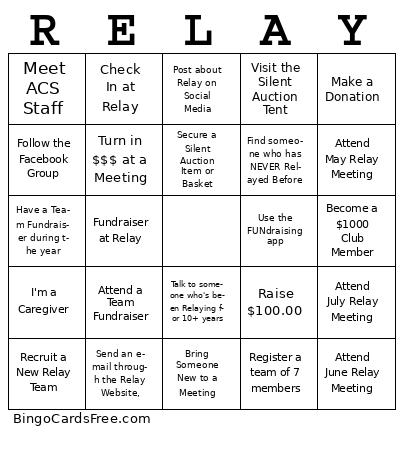 This ES Relay Bingo 2025 Cards Game contains following Words or Phrases: Register a team of 7 members, Visit a sponsor tent at relay, Participate in activity at Relay, Raise $100.00, Support Papas Pizza Fundraiser, Bring Someone New to Relay, Follow the Facebook Group, Sell a Trackside Sign, Sign Up for a Volunteer Shift at Relay, Make a Donation, Get a Survivor Registered on a Team, Bring Someone New to a Meeting, Recruit a New Relay Team, Participate in Curbing Cancer, Attend a Team Fundraiser, Turn in $$$ at a Meeting, Meet ACS Staff, I'm a Caregiver, Talk to someone who's been Relaying for 10+ years, I'm a Survivor, Dedicate a Luminaria Bag, Download the FUNdraising App, Secure a Silent Auction Item or Basket, Shout Out Your Team Captain, Meet an Executive Board Member, Join the Event Leadership Team, Become a Relay All-Star ($2500.00), Become a $1000 Club Member, Sell Drifters tickets, Attend Kick Off, Attend Wrap Up, Attend March Relay Meeting, Attend April Relay Meeting, Attend May Relay Meeting, Attend June Relay Meeting, Attend July Relay Meeting, Attend August Relay Meeting, Find someone who has NEVER Relayed Before, Find someone who has reached the rising star fundraising level ($100), Become an ACS CAN Member, Post about Relay on Social Media, Fundraiser at Relay, Send an email through the Relay Website,, Facebook Fundraiser, Cancer Screening in last 6 months, Incorporate Relay Theme into Campsite, Applied Sunscreen at Relay, Visit the Silent Auction Tent, Check In at Relay, Have a Team Fundraiser during the year, Use the FUNdraising app.