eurovision 2026 Bingo Cards - Print Free or Customize
Print free eurovision 2026 bingo cards or customize,
limitless cards! Select from 41,500+ designs or use our bingo card generator.
Add numbers, phrases, photos, or all of them.
Play using printable PDF, online bingo cards,
and our online bingo caller, or mix physical and digital.
About: This bingo card captures the unforgettable energy, drama, and playful chaos that define Eurovision. With nods to outrageous performances, awkward host moments, and iconic on-stage surprises, it’s perfect for a watch party with friends or fans of the contest. Expect big personalities, wild visuals, and plenty of lighthearted fun as you play along.
How To: To save a printable PDF, click the Print button.
You can change the number of cards and other
printing settings on the Print tab.
Grid items and free space content can be changed on the Basic tab.
Appearance can be fully customized on the
corresponding tabs, or you can quickly locate any preference
using the 🔍 tab.
How to play eurovision 2026 Bingo Cards?
Printed Caller: Print PDF calling list & calling slips and manually draw the slips.
Online Caller: Click on the Play button above.
Printed Players: Print PDF bingo cards and manually mark the cards.
Online Players: Click on the Play button above, and then click on the 🎫 button.
Mixed Mode: Select any combination above.
For example, caller can be either Paper or Online.
And players can be Paper or Online or a combination of both.
Step-By-Step:
Start by downloading the eurovision 2026 PDF by clicking on the "Print" button above.
Open the PDF and print a hard copy.
For random drawing, you can print another copy of the call list, cut, fold and then pull them randomly at play time.
Cut the bingo cards at the cut lines if there are more than 1 bingo cards per page.
Distribute one card per player. For marking, you can use pencils. Crayons cost the least.
Select one person to be the caller. If you are playing in a small group, the caller may as well play along with their own Bingo card.
The caller initiates the play by randomly pulling an item from the call list and calling out it to everyone.
The players scan their cards to see if they have the announced word. If they do, they cross off that word.
The first player to finish a horizontal, vertical, or a diagonal line of crossed items yells "Bingo!" and wins the game.
The caller checks that the items crossed off form a proper line according to the Bingo card and call list.
You can play for multiple patterns or a full card blackout for an extended game.
This eurovision 2026 Bingo Cards Game contains following Words or Phrases: "Europe, are you ready?", Space Imagery, It's raining!, Fire!, ABBA Reference, Announcers do a Cringe Skit, Awkward Green Room Interview, Awkward Host Banter, Backdancers appearing out of darkness., Barefoot Performer, Booing at Israel, Comparing Austria and Australia, Costume Change Mid Song, Crying in the Green Room, Dance Break!, Did not hit the high note, Eating in the Green Room, Everyone freezes on stage at the end, Facepaint, Flag of a country not participating, Flying through the sky, Green Room Group Hug, Guy mopping the floor between acts, Heart Hands at the Camera, Host Flirts with Audience, Host Outfit Change, Hosts Make a Cringe Joke, Lava imagery, Light Show, Loong High Note, Mentioning Queer Representation, Ocean imagery, On Stage Witchcraft, Performer Holds the Camera, Piano, Queer Flag, Ropes Attached to Singer, Singer turns into an angel, Shadows, Shakey Cam, Shirtless Performer, Singer back and forth, Singer floating in the air, Singer holds the camera, Singer Lifted in the Air by Dancers, Slow motion Running, Smoke Machine, Someone holding a flag upside down, Someone Thanks All of Europe, Song has more than 2 languages in it., Spinning Camera, Technical Difficulty, That is Someone's Kink, Video Game Theming, Violin appears!, Violin Bowstring Breaks, Wind Machine.

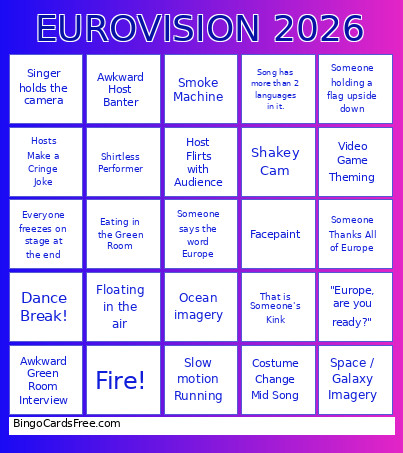 This eurovision 2026 Bingo Cards Game contains following Words or Phrases: "Europe, are you ready?", Space Imagery, It's raining!, Fire!, ABBA Reference, Announcers do a Cringe Skit, Awkward Green Room Interview, Awkward Host Banter, Backdancers appearing out of darkness., Barefoot Performer, Booing at Israel, Comparing Austria and Australia, Costume Change Mid Song, Crying in the Green Room, Dance Break!, Did not hit the high note, Eating in the Green Room, Everyone freezes on stage at the end, Facepaint, Flag of a country not participating, Flying through the sky, Green Room Group Hug, Guy mopping the floor between acts, Heart Hands at the Camera, Host Flirts with Audience, Host Outfit Change, Hosts Make a Cringe Joke, Lava imagery, Light Show, Loong High Note, Mentioning Queer Representation, Ocean imagery, On Stage Witchcraft, Performer Holds the Camera, Piano, Queer Flag, Ropes Attached to Singer, Singer turns into an angel, Shadows, Shakey Cam, Shirtless Performer, Singer back and forth, Singer floating in the air, Singer holds the camera, Singer Lifted in the Air by Dancers, Slow motion Running, Smoke Machine, Someone holding a flag upside down, Someone Thanks All of Europe, Song has more than 2 languages in it., Spinning Camera, Technical Difficulty, That is Someone's Kink, Video Game Theming, Violin appears!, Violin Bowstring Breaks, Wind Machine.