Print free Eurovision bingo cards or modify,
unlimited cards! Select from 41,500+ templates or use the bingo card generator.
Add numbers, phrases, photos, or mix them all.
Play using printable PDF, online bingo cards,
and the online bingo caller, or go hybrid.
About: This bingo card is perfect for Eurovision fans who love to spot all the wild, quirky, and unforgettable moments that make the contest such a spectacle. Bursting with references to outrageous performances, cheeky presenters, and classic Eurovision clichés, it's a great way to engage a party or viewing group throughout the show. Expect plenty of laughs and friendly competition!
How To: To get a PDF to print, click the Print button.
You can modify the number of cards and other
print settings on the Print tab.
Grid items and free space content can be edited on the Basic tab.
Appearance can be highly personalized on the
corresponding tabs, or you can easily search any option
using the 🔍 tab.
How to play Eurovision Bingo Cards?
Online Caller: Click on the Play button above.
Printed Players: Print PDF bingo cards and physically scratch the cards.
Printed Caller: Print PDF calling list & calling slips and physically select the slips.
Online Players: Click on the Play button above, and then click on the 🎫 button.
Combo Mode: Choose any combination above.
For example, caller can be either Offline or Online.
And players can be Offline or Online or a mix of both.
Step-By-Step:
Start by getting the Eurovision PDF by clicking on the "Print" button above.
Open the PDF and print a hard copy.
For random calling, you can print another copy of the call list, cut, fold and then pull them randomly at play time.
Cut the bingo cards at the cut lines if there are greater than 1 bingo cards per page.
Give one card to each player. For marking, you can use markers. Crayons cost the least.
Choose one person to be the caller. If you are playing in a small group, the caller may also play along with their own Bingo card.
The caller opens the play by randomly pulling an item from the call list and saying it to everyone.
The players scan their cards to see if they have the announced word. If they do, they mark that word.
The first player to finish a horizontal, vertical, or a diagonal line of crossed items announces "Bingo!" and wins the play.
The caller verifies that the items marked form a correct line as per the Bingo card and call list.
You can play for different patterns or a full card blackout for an extended play.
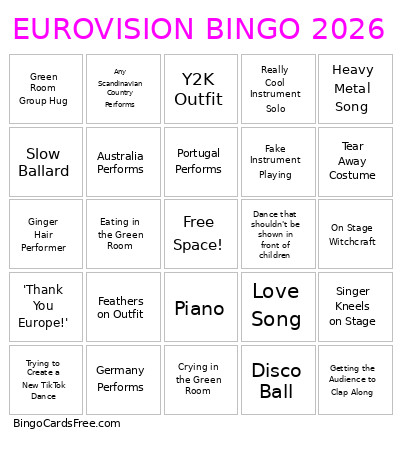
This Eurovision Bingo Cards Game contains following Words or Phrases: ABBA Reference, Graham Norton Risque Comment, Barefoot Performer, Dance Break!, Eating in the Green Room, Fire, Green Room Group Hug, Heart Hands at the Camera, Key Change!, Off-key Singing, On Stage Witchcraft, Performer Holds the Camera, Shirtless Performer, Someone Gets 0 Televote Points, Crying in the Green Room, Singer Lifted in the Air, Smoke Machine, Fake Rain, Trying to Create a New TikTok Dance, UK Finishes Bottom 5, Wind Machine, Getting the Audience to Clap Along, Love Song, Dance that shouldn't be shown in front of children, Performer Wears Traditional Clothing, Some form of Rap, Breakdancing, Fake Instrument Playing, Slow Ballard, Heavy Metal Song, Non-European Country, Shirtless Performer, Technical Issues, Tear Away Costume, Booing, Audience Face Paint, Really Cool Instrument Solo, Synchronised Dance Routine, Y2K Outfit, Lead Singer Doesn't Move During Performance, Feathers on Outfit, Sam Ryder/Space Man Reference, Man with Bleached Hair, Sunglasses, Disco Ball, Ginger Hair Performer, Piano, 'Thank You Europe!', Germany Performs, France Performs, Portugal Performs, Any Scandinavian Country Performs, Sparkly Costume, Stupid Dance (Need 3 Others to Agree), Acoustic Guitar, Singer Kneels on Stage, Australia Performs, Denmark Performs.

 This Eurovision Bingo Cards Game contains following Words or Phrases: ABBA Reference, Graham Norton Risque Comment, Barefoot Performer, Dance Break!, Eating in the Green Room, Fire, Green Room Group Hug, Heart Hands at the Camera, Key Change!, Off-key Singing, On Stage Witchcraft, Performer Holds the Camera, Shirtless Performer, Someone Gets 0 Televote Points, Crying in the Green Room, Singer Lifted in the Air, Smoke Machine, Fake Rain, Trying to Create a New TikTok Dance, UK Finishes Bottom 5, Wind Machine, Getting the Audience to Clap Along, Love Song, Dance that shouldn't be shown in front of children, Performer Wears Traditional Clothing, Some form of Rap, Breakdancing, Fake Instrument Playing, Slow Ballard, Heavy Metal Song, Non-European Country, Shirtless Performer, Technical Issues, Tear Away Costume, Booing, Audience Face Paint, Really Cool Instrument Solo, Synchronised Dance Routine, Y2K Outfit, Lead Singer Doesn't Move During Performance, Feathers on Outfit, Sam Ryder/Space Man Reference, Man with Bleached Hair, Sunglasses, Disco Ball, Ginger Hair Performer, Piano, 'Thank You Europe!', Germany Performs, France Performs, Portugal Performs, Any Scandinavian Country Performs, Sparkly Costume, Stupid Dance (Need 3 Others to Agree), Acoustic Guitar, Singer Kneels on Stage, Australia Performs, Denmark Performs.