Print free Du Farewell bingo cards or customize,
limitless prints! Select from 41,500+ designs or use the bingo card generator.
Add numbers, words, images, or mix them all.
Play using printed PDF, online bingo cards,
and the online bingo caller, or mix physical and digital.
About: This bingo card perfectly captures the quirky and heartfelt moments you’d expect at a tech team farewell or offsite, especially one celebrating a legendary colleague like Du. With inside jokes, memorable team references, and nods to shared culture, it’s a fun and relatable way for coworkers to connect and laugh during a farewell or team-building event.
How To: To download a PDF to print, click the Print button.
You can alter the card quantity and other
printing settings on the Print tab.
Grid items and free space content can be added on the Basic tab.
Appearance can be entirely customized on the
relevant tabs, or you can quickly find any preference
on the 🔍 tab.
How to play Du Farewell Bingo Cards?
Online Players: Click on the Play button above, and then click on the 🎫 button.
Online Caller: Click on the Play button above.
Printed Caller: Print PDF calling list & calling slips and manually pick the slips.
Printed Players: Print PDF bingo cards and manually write on the cards.
Mixed Mode: Select any combination above.
For instance, caller can be either Printed or Online.
And players can be Printed or Online or a combination of both.
Step-By-Step:
Start by saving the Du Farewell PDF by clicking on the "Print" button above.
Open the PDF and print a hard copy.
For random calling, you can print another copy of the call list, cut, fold and then pick them randomly at play time.
Cut the bingo cards at the cut lines if there are more than 1 bingo cards per page.
Give one card to each player. For marking, you can use pencils. Crayons cost the least.
Select one person to be the caller. If you are playing in a small group, the caller may as well play along with their own Bingo card.
The caller begins the game by randomly pulling an item from the call list and saying it to everyone.
The players check their cards to see if they have the announced word. If they do, they cross off that word.
The first player to complete a horizontal, vertical, or a diagonal line of crossed items announces "Bingo!" and wins the game.
The caller verifies that the items marked form a proper line according to the Bingo card and call list.
You can play for different patterns or a full card blackout for an extended game.
This Du Farewell Bingo Cards Game contains following Words or Phrases: Jacob makes a joke, Du makes a joke, Du's memes are referenced, The Live Hack is mentioned, Jess laughs as the only person in the room, Steven catches a stray, Jacob says Du's jokes are bad, Someone references raisins, Security Team is mentioned, Identity Team is mentioned, Du is mistaken for Wook or Dwayne, Helena/Legal is mentioned, Fintech is mentioned, SYS is mentioned, Du's comedy is mentioned, A heartfelt moment happens, Du's walk on the PCT is mentioned, Du's sidequests are mentioned, Slite is mentioned, Jira is mentioned, Du arranging hackathon is mentioned, Jacob gives Du a hat, Jacob gives Du something wildly impractical to move to France, Jacob gives Du something that really is just about Jacob, A joke bombs, Du says "Cool", "It's about the people", Someone will make a last minute unplanned speech, Knut participates in the chat, Du's candy bowl is mentioned, "How can we ever replace you", A French stereotype is mentioned, Our Datadog bill is mentioned, Du makes a sales pitch for Datadog, Crazy idea will be proposed to a PM/leader who will nervously say no, Carlos will mention sparkling water (Pedras), Someone rolls up a slide deck, Du makes a self-deprecating remark on his own joke, An AI-generated image appears, Nuno (Security) feels the cringe, Someone says that Du has been their best ever manager, Security and Identity teams are being praised, Someone from Sales will ask for SSO, Sara from UX will laugh very loudly, Katrine from UX will shake her head disapprovingly, Someone online will drop the crab emoji, Steven mentions Vietnam, Aletria is mentioned, Someone will allude to Du breaking the Porto office, A dad joke is told, Du refers to himself as something else than his actual job title, A wild plot twist appears, Du provides a nugget of wisdom, Someone has a quiz.

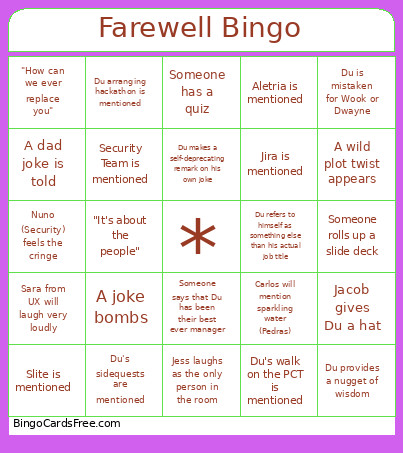 This Du Farewell Bingo Cards Game contains following Words or Phrases: Jacob makes a joke, Du makes a joke, Du's memes are referenced, The Live Hack is mentioned, Jess laughs as the only person in the room, Steven catches a stray, Jacob says Du's jokes are bad, Someone references raisins, Security Team is mentioned, Identity Team is mentioned, Du is mistaken for Wook or Dwayne, Helena/Legal is mentioned, Fintech is mentioned, SYS is mentioned, Du's comedy is mentioned, A heartfelt moment happens, Du's walk on the PCT is mentioned, Du's sidequests are mentioned, Slite is mentioned, Jira is mentioned, Du arranging hackathon is mentioned, Jacob gives Du a hat, Jacob gives Du something wildly impractical to move to France, Jacob gives Du something that really is just about Jacob, A joke bombs, Du says "Cool", "It's about the people", Someone will make a last minute unplanned speech, Knut participates in the chat, Du's candy bowl is mentioned, "How can we ever replace you", A French stereotype is mentioned, Our Datadog bill is mentioned, Du makes a sales pitch for Datadog, Crazy idea will be proposed to a PM/leader who will nervously say no, Carlos will mention sparkling water (Pedras), Someone rolls up a slide deck, Du makes a self-deprecating remark on his own joke, An AI-generated image appears, Nuno (Security) feels the cringe, Someone says that Du has been their best ever manager, Security and Identity teams are being praised, Someone from Sales will ask for SSO, Sara from UX will laugh very loudly, Katrine from UX will shake her head disapprovingly, Someone online will drop the crab emoji, Steven mentions Vietnam, Aletria is mentioned, Someone will allude to Du breaking the Porto office, A dad joke is told, Du refers to himself as something else than his actual job title, A wild plot twist appears, Du provides a nugget of wisdom, Someone has a quiz.