
S&R Bingo Cards - Print Free or Customize
Print free S&R bingo cards or modify, unlimited cards! Choose from 42,200+ designs or use the bingo card generator. Add numbers, phrases, images, or any combination. Play using printed PDF, digital bingo cards, and the digital bingo caller, or go hybrid.
About: This bingo card perfectly captures the fun and lively chaos of a big-box store shopping spree, especially during the holiday season. With a mix of festive finds, food sampling, people-watching, quirky product hunts, and social moments, it’s ideal for a group outing or team-building event where friends, colleagues, or family members want to turn routine shopping into an entertaining challenge.
How To: To save a PDF to print, click the Print button. You can adjust the number of cards and other print preferences on the Print tab. Grid items and free space text can be changed on the Basic tab. Appearance can be completely customized on the relevant tabs, or you can quickly locate any option using the 🔍 tab.
How to play S&R Bingo Cards?
- Paper Players: Print PDF bingo cards and manually cross off the cards.
- Online Caller: Click on the Play button above.
- Online Players: Click on the Play button above, and then click on the 🎫 button.
- Paper Caller: Print PDF calling list & calling slips and manually draw the slips.
- Mixed Play: Select any combination above. For example, caller can be either Printed or Online. And players can be Printed or Online or a combination of both.
Step-By-Step:
- Start by saving the S&R Bingo PDF by clicking on the "Print" button above.
- Open the PDF and print it.
- For random calling, you can print another copy of the call list, cut, fold and then pick them randomly at play time.
- Cut the bingo cards at the cut lines if there are more than 1 bingo cards per page.
- Distribute one card per player. For marking, you can use crayons. Crayons cost the least.
- Select one person to be the caller. If you are playing in a small group, the caller may also play along with their own Bingo card.
- The caller initiates the play by randomly drawing an item from the call list and calling out it to all players.
- The players scan their cards to see if they have the announced word. If they do, they mark that word.
- The first player to complete a horizontal, vertical, or a diagonal line of crossed items announces "Bingo!" and wins the play.
- The caller validates that the items marked form a proper line according to the Bingo card and call list.
- You can play for multiple patterns or a full card blackout for a longer play.
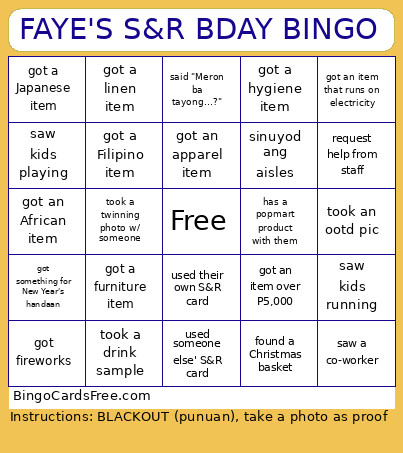 This S&R Bingo Cards Game contains following Words or Phrases: singing videoke in store, took an alcohol sample, took a food sample, took a drink sample, took a health product sample, found a Christmas basket, saw a Christmas sale/discount, saw Christmas themed products, say hi to random stranger, took a twinning photo w/ someone, said thanks to random stranger, said excuse me to random stranger, mmelled the rotisserie chicken, saw kids running, saw kids riding on cart, saw kids wearing pjs, saw kids playing, found some magnesium, found some collagen peptides, found some fish oil, ask something from staff, request help from staff, said thank you to the staff, shop w/ other party attendees, took a selfie, did a "What's in my cart" video, took an ootd pic, sinuyod ang aisles, said "Kailangan ba natin ng…?", said "Meron ba tayong…?", said "Bilhan natin si _ ng _", got an item that runs on electricity, got an item under P100, got an item under P500, got an item under P1,000, got an item over P2,000, got an item over P5,000, got an item over P10,000, returned an item on the shelf, Team Birkenstocks, Team Crocs, has a tote bag, wearing a hat, has a labubu with them, has a popmart product with them, has a Sanrio product with them, wearing a face mask, has more than 1 pair of glasses, got an apparel item, got a linen item, got a furniture item, got an appliance item, got a cleaning item, got a drink item, got a food item, got a pet item, got a hygiene item, got a health item, got an American item, got a Filipino item, got a Chinese item, got a Japanese item, got a Korean item, got a Taiwanese item, got a Thai item, got a Latino item, got an African item, got a European item, bought a Kirkland signature item, bought a Member's Mark item, bought a Member's Value item, used their own S&R card, used someone else' S&R card, saw an acquaintance, saw a friend, saw a family member, saw a co-worker, got a New Year's item, got a bilog-bilog fruit, got fireworks, got something for New Year's handaan.