🔍
Advertisement

FHAC Bingo Cards - Print Free or Customize

Print free FHAC bingo cards or personalize, unlimited prints! Choose from 38,500+ designs or use the bingo card generator. Add numbers, words, images, or all of them. Play using printable PDF, virtual bingo cards, and the virtual bingo caller, or mix physical and digital.

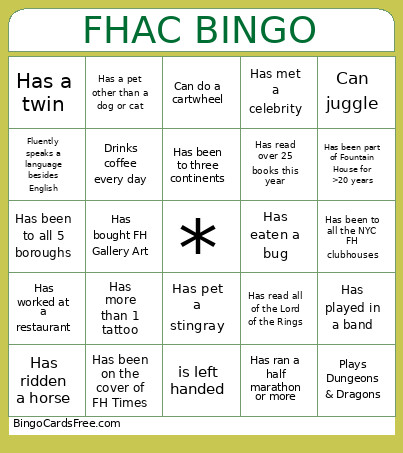
FHAC BINGO
Has been to all 5 boroughsHas more than 1 tattooHas ridden a horseHas played in a bandHas been on a roller coaster in the past year
Has worked at a restaurantHas been part of Fountain House for >20 yearsHas a pet other than a dog or catHas met a celebrityHas eaten a bug
Has ran a half marathon or moreIs a native New YorkerHas been to three continentsHas climbed a mountainCan drive stick-shift
Fluently speaks a language besides EnglishPlays Dungeons & DragonsPlays an instrumentHas bought FH Gallery ArtDrinks coffee every day
Has been to all 4 FH clubhousesHas been to all the NYC FH clubhousesHas read over 25 books this yearCan juggleis left handed
This is shown at the top of the template and game pages.
Optional. If this template makes to the front page, you will be credited for creating it.
Shown at the top of each bingo card.

This can be text or an image. Images larger than 50 KB may be compressed and may lose transparency.
If words on a line are separated by this text, then:
  • Bingo card will only show the text on the right side of the separator.
  • The PDF call list will show the full text.
  • To disable this feature, clear this field.
Quiz Mode ON
Select which side of the quiz separator to show on the card preview on this page. When printing or playing, calling cards always show the right side only.
If words on a line are separated by this text, then:
  • The text on the right side of the separator will be spoken by the online game play.
  • Bingo card will only show the text on the left side of the separator.
  • The PDF call list will show the full text.
  • To disable this feature, clear this field.
Audio Mode ON
Use separate item lists for each column. This is useful for american traditional 75 ball number bingo or cards where each column should draw from a different set of items.
Enter numbers, words or phrases, each one on a new line. Up to 255 items are supported.

Items Per Column:
To specify items per column, eg for 75 ball bingo, turn ON the "Items Per Column" setting.
Sort   |   No Dups
Supports:
  1. Up to 99 images.
  2. Single or multiple image uploads.
  3. Up to 5 MB file size per image.
  4. You can use both Grid Items and Grid Images.
  5. Click an image or label to edit the label or delete the image.
  6. If an image background changes to white, remove transparency or reduce the image size to < 10KB.
    Choose whether image labels appear on bingo cards. Image labels are always shown on the calling card.
    Grid size in Columns x Rows format.
    Free space is usually the center square of the card. It is like a joker or a wild square, and counts towards the winning pattern.
    • Shows text or an image in the Free Space cell.
    • Make sure Free Space Cell is not set to "None".
    • To show text, enter text.
    • To show an image, click the button on the right and select an image.
    • If the image background changes to white, remove transparency or reduce the image size to < 10KB.
    Select Yes to generate unique random cards.

    If No is selected, all cards will have the same text in the same order, which might be useful in educational or quiz settings.
    Text is automatically resized to fit inside each cell. Shorter text may appear very large. Choose a smaller maximum font size to limit how large the text can get.
    Title text color.

    * Applicable when Card Title is text.
    Title background shape.

    * Requires Title Back Opacity to be > 0%.
    Title background opacity.

    * Requires Title Back Shape.
    Title background shape color.

    * Requires Title Back Shape.
    * Requires Title Back Opacity to be > 0%.
    Title background border color.

    * Requires Title Back Shape.
    * Requires Title Back Opacity to be > 0%.
    Grid Text color.
    Grid background color.
    Grid line color.
    • Background shape for cells.
    • Select a stock image or upload your own custom image.
    • You can use Cell Transparency setting to change how prominently the background shape shows.
    • If you select a shape other than Grid, you may have to increase Cell Padding if you want to fit the text inside the shape.
    • Don't see the selected image?
      Set Cell Transparency <50.
    Empty space inside each cell between border and text.
    Space between any 2 cells.
    0% makes grid background opaque. Higher setting makes grid background transparent allowing card background image or card background color to show.
    Outside border width.
    Card outside border color.

    * Requires Card Border Width > 0%
    Yes makes the card corners rounded.
    Empty space between card border and card contents.
    Card background color.
    • Background image for the whole card.
    • Select a stock image or upload your own custom image.
    • Use Card Transparency and Cell Transparency to control how much of the image shows through.
    Don't see the selected image?
    • Set Card Transparency >50.
    • Set Card Border Width >0 or Card Padding >0.
    • Set Cell Transparency >50.
    Select how the background image covers the whole card. You can also choose to repeat the image.
    Controls the transparency of the card background color. Higher values make the card background more transparent, allowing the card background image or outer background to show through.
    This mode uses rapid animations. It may cause dizziness, nausea, or trigger sensitive individuals. Please use responsibly.
    Warning! 
    Public: Anyone can see your card template, including search engines

    Private: Only you can see and edit the card template. You will need to be signed in.

    Click to Sign-Up « Free!!!

    Click to Sign-In
    Number of cards to generate and include in the Full PDF. The Preview button will always generate only 1 card.
    Choose whether to include a call list in the Full PDF. Grid prints the call list as a grid; List prints it as a text list.
    Printer paper size.
    Paper orientation for printing. Some card layouts may look better in portrait or landscape.
    Arrangement of cards on each page of paper.
    Horizontal margin on left and right sides of each card.
    Vertical margin on top and bottom sides of each card.
    Colors: Removes background to save ink for printing.

    B&W: Removes background & changes colors to black & white to save ink for printing.
    Select amount of empty space to keep in each cell for participants to write something.

    This feature is also called human bingo, people bingo, social bingo, get-to-know bingo or ice breaker bingo.
    Starting card number. Change if you need to reprint a set of cards starting with a specific card number.

    Note: If this is not 1, then call list (index card) will not be printed.
    Header height. Header is shown only when there is 1 or more characters.
    Instructions or any other message(s) at the top of each card.
    Footer height. Footer is shown only when there is 1 or more characters.
    Instructions or any other message(s) at the bottom of each card.
    All fonts support English.

    For non-English support in PDF, please try FreeSans, FreeSerif, DejaVuSans, DejaVuSerif or NotoSans

    Suggestions | Feedback | Bug

    Similar Bingo Cards: , , Fountainhouse

    About: This bingo card celebrates the unique stories and hidden talents found within the Fountain House community. It’s perfect for mixers or social events where members want to swap fun facts, discover shared experiences, and spark new conversations. From world travelers to musicians and quirky hobbies, this card brings everyone together for connection and laughter.

    How To: To get a printable PDF, click the Print button. You can adjust the card count and other print options on the Print tab. Grid items and free space text can be changed on the Basic tab. Appearance can be entirely personalized on the relevant tabs, or you can quickly search any setting using the 🔍 tab.

    How to play FHAC Bingo Cards?

    • Virtual Players: Click on the Play button above, and then click on the 🎫 button.
    • Printed Players: Print PDF bingo cards and physically scratch the cards.
    • Virtual Caller: Click on the Play button above.
    • Printed Caller: Print PDF calling list & calling slips and physically draw the slips.
    • Mixed Mode: Choose any combination above. For instance, caller can be either Paper or Virtual. And players can be Paper or Virtual or a combo of both.

    Step-By-Step:

    1. Start by downloading the FHAC Bingo PDF by clicking on the "Print" button above.
    2. Open the PDF and print a hard copy.
    3. For random calling, you can print another copy of the call list, cut, fold and then pull them randomly at play time.
    4. Cut the bingo cards at the cut lines if there are greater than 1 bingo cards per page.
    5. Give one card to each player. For marking, you can use pencils. Crayons cost the least.
    6. Choose one person to be the caller. If you are playing in a small group, the caller may as well play along with their own Bingo card.
    7. The caller opens the game by randomly pulling an item from the call list and saying it to everyone.
    8. The players scan their cards to see if they have the called word. If they do, they dab that word.
    9. The first player to complete a horizontal, vertical, or a diagonal line of crossed items announces "Bingo!" and wins the game.
    10. The caller verifies that the items marked form a proper line as per the Bingo card and call list.
    11. You can play for multiple patterns or a full card blackout for a longer game.

    FHAC Bingo CardsThis FHAC Bingo Cards Game contains following Words or Phrases: Has been to all 5 boroughs, Has more than 1 tattoo, Has ridden a horse, Has played in a band, Has been on a roller coaster in the past year, Has worked at a restaurant, Has been part of Fountain House for >20 years, Has a pet other than a dog or cat, Has met a celebrity, Has eaten a bug, Has ran a half marathon or more, Is a native New Yorker, Has been to three continents, Has climbed a mountain, Can drive stick-shift, Fluently speaks a language besides English, Plays Dungeons & Dragons, Plays an instrument, Has bought FH Gallery Art, Drinks coffee every day, Has been to all 4 FH clubhouses, Has been to all the NYC FH clubhouses, Has read over 25 books this year, Can juggle, is left handed, Has a twin, Can do a cartwheel, Has read all of the Lord of the Rings, Has pet a stingray, Has been on the cover of FH Times.

    Advertisement