Print free Fiber Arts bingo cards or adjust them,
limitless prints! Choose from 42,200+ designs or use our bingo card generator.
Add numbers, words, images, or any combination.
Play using printed PDF, virtual bingo cards,
and our virtual bingo caller, or go hybrid.
About: This bingo card is perfect for crafters who love a good challenge and want to stretch their creative muscles. With prompts focused on using stash materials, trying new techniques, and finishing long-lingering projects, it’s ideal for craft groups, fiber art retreats, or anyone looking to shake up their making routine with some playful inspiration.
How To: To get a printable PDF, click the Print button.
You can alter the card count and other
print preferences on the Print tab.
Grid items and free space text can be changed on the Basic tab.
Appearance can be completely customized on the
corresponding tabs, or you can easily find any preference
using the 🔍 tab.
How to play Fiber Arts Bingo Cards?
Paper Caller: Print PDF calling list & calling slips and physically pick the slips.
Virtual Caller: Click on the Play button above.
Virtual Players: Click on the Play button above, and then click on the 🎫 button.
Paper Players: Print PDF bingo cards and physically cross off the cards.
Hybrid Mode: Choose any combination above.
For instance, caller can be either Paper or Virtual.
And players can be Paper or Virtual or a combination of both.
Step-By-Step:
Start by downloading the Fiber Arts Bingo PDF by clicking on the "Print" button above.
Open the PDF and print it.
For random calling, you can print another copy of the call list, cut, fold and then pull them randomly at play time.
Cut the bingo cards at the cut marks if there are more than 1 bingo cards per page.
Give one card to each player. For marking, you can use pens. Crayons are the cheapest.
Choose one person to be the caller. If you are playing in a small group, the caller may as well play along with their own Bingo card.
The caller initiates the game by randomly drawing an item from the call list and calling out it to all players.
The players check their cards to see if they have the called word. If they do, they cross off that word.
The first player to complete a horizontal, vertical, or a diagonal line of marked items shouts "Bingo!" and wins the play.
The caller verifies that the items crossed off form a correct line according to the Bingo card and call list.
You can play for multiple patterns or a full card blackout for a longer play.
This Fiber Arts Bingo Cards Game contains following Words or Phrases: Complete a project using only secondhand materials, Complete a project using only stash, Finish a wip that's been lingering for over a year, Follow a pattern or instructions published before you were born, Freehand a project! No pattern, Make a material for your primary craft (eg: spin or dye embroidery thread, tan leather, etc), Make it again! Repeat a pattern/project you've made and loved, Make something red, Make something to trade in a craft-swap, Make something with the waste/leftovers of other projects, Mend/repair an older finished project, Multicolor project! 3+ different colors, Multicraftual project! Use 2+ crafts in the same project, Speed Challenge! Project start to finish in two weeks, Submit a project to your local state fair or equivalent, This is the excuse to start a new hobby square! Try a new fiber art, Try a pattern from a new to you designer, Unravel/ rip out/ otherwise break down for parts an unsatisfactory project, Use a new to you material or textile in a project, Use a new to you technique in a project, Use a technique you've been scared to try, Use a technique you've previously attempted without success, Use the precious skein (or fabric/ wire/ floss/ beads/etc), Use the very nice but fiddly or time consuming finishing technique.

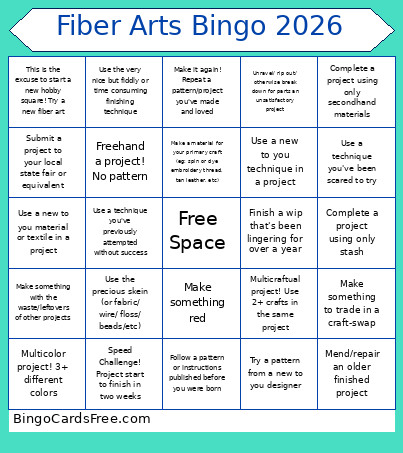 This Fiber Arts Bingo Cards Game contains following Words or Phrases: Complete a project using only secondhand materials, Complete a project using only stash, Finish a wip that's been lingering for over a year, Follow a pattern or instructions published before you were born, Freehand a project! No pattern, Make a material for your primary craft (eg: spin or dye embroidery thread, tan leather, etc), Make it again! Repeat a pattern/project you've made and loved, Make something red, Make something to trade in a craft-swap, Make something with the waste/leftovers of other projects, Mend/repair an older finished project, Multicolor project! 3+ different colors, Multicraftual project! Use 2+ crafts in the same project, Speed Challenge! Project start to finish in two weeks, Submit a project to your local state fair or equivalent, This is the excuse to start a new hobby square! Try a new fiber art, Try a pattern from a new to you designer, Unravel/ rip out/ otherwise break down for parts an unsatisfactory project, Use a new to you material or textile in a project, Use a new to you technique in a project, Use a technique you've been scared to try, Use a technique you've previously attempted without success, Use the precious skein (or fabric/ wire/ floss/ beads/etc), Use the very nice but fiddly or time consuming finishing technique.