Find a coworker that Bingo Cards - Print Free or Customize
Print free Find a coworker that bingo cards or personalize,
unlimited cards! Select from 42,200+ templates or use the bingo card generator.
Add numbers, words, photos, or mix them all.
Play using printed PDF, online bingo cards,
and the online bingo caller, or go hybrid.
About: This bingo card is all about sparking fun conversations and uncovering hidden talents or quirky facts among coworkers, especially those at DSHS. Perfect for team-building sessions, staff meetings, or new employee mixers, it encourages everyone to share personal tidbits and unique experiences, adding energy and connection to any workplace gathering.
How To: To save a printable PDF, click the Print button.
You can change the card count and other
printing settings on the Print tab.
Grid items and free space content can be edited on the Basic tab.
Appearance can be exactly customized on the
corresponding tabs, or you can quickly locate any setting
on the 🔍 tab.
How to play Find a coworker that Bingo Cards?
Virtual Caller: Click on the Play button above.
Paper Players: Print PDF bingo cards and physically mark the cards.
Virtual Players: Click on the Play button above, and then click on the 🎫 button.
Paper Caller: Print PDF calling list & calling slips and physically pick the slips.
Mixed Mode: Select any combination above.
For example, caller can be either Printed or Virtual.
And players can be Printed or Virtual or a combination of both.
Step-By-Step:
Start by getting the Find a coworker that PDF by clicking on the "Print" button above.
Open the PDF and print it.
For random drawing, you can print another copy of the call list, cut, fold and then draw them randomly at play time.
Cut the bingo cards at the cut marks if there are more than 1 bingo cards per page.
Distribute one card per player. For marking, you can use markers. Crayons are the cheapest.
Select one person to be the caller. If you are playing in a small group, the caller can as well play along with their own Bingo card.
The caller starts the game by randomly pulling an item from the call list and saying it to everyone.
The players look at their cards to see if they have the called word. If they do, they mark that word.
The first player to finish a horizontal, vertical, or a diagonal line of crossed items shouts "Bingo!" and wins the play.
The caller validates that the items marked form a correct line as per the Bingo card and call list.
You can play for multiple patterns or a full card blackout for a longer play.
This Find a coworker that Bingo Cards Game contains following Words or Phrases: Is an only Child, Loves UT Football, Has worked for DSHS for over 10 years, Can Juggle, Has the nearest birthday, Can solve a rubik's cube, Is left-handed, Has run a marathon, Is allergic to bananas, Has a nursing background, Knows a celebrity, Can speak more than two languages, Has never broken a bone, Can change a tire… without pulling up YouTube, Owns a pet other than a cat or dog, Has lived in more than three states, Knows the DSHS Mission Statement, Can name the 7 HSU associated inboxes, Does not drink coffee, Plays on a community sports team, Likes to craft, Hates to craft, Knows how to play a musical instrument, Is scared of heights, Has the closest birthday to yours, Bikes to work, Can't eat spicy food, Is wearing the same color as you, Gardens, Has a twin, Has gone skydiving, Prefers non-fiction over fiction, Prefers comic books over novels, Never remembers their password, Can drive a stick shift, Has caught a fish, Majored in a field not related to the HSU, Can do a backflip, Loves Trader Joes, Knows how to knit, Is a morning person, Has traveled abroad, Has the same fav food as you, Loves True Crime, Is a taurus, Has a collection hobby, Likes pineapple on pizza, Went to the movies this week, Is going to ACL, Knows an animal fun fact you don't know, Has had stitches, Has broken a bone in adulthood, Has read more than five books.

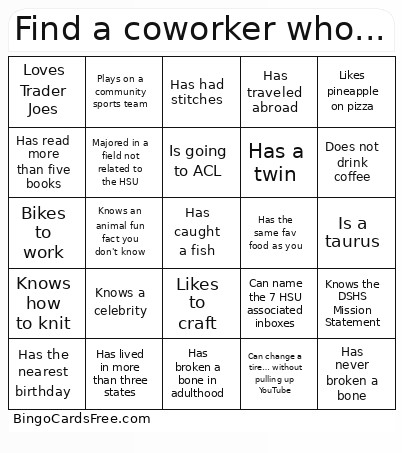 This Find a coworker that Bingo Cards Game contains following Words or Phrases: Is an only Child, Loves UT Football, Has worked for DSHS for over 10 years, Can Juggle, Has the nearest birthday, Can solve a rubik's cube, Is left-handed, Has run a marathon, Is allergic to bananas, Has a nursing background, Knows a celebrity, Can speak more than two languages, Has never broken a bone, Can change a tire… without pulling up YouTube, Owns a pet other than a cat or dog, Has lived in more than three states, Knows the DSHS Mission Statement, Can name the 7 HSU associated inboxes, Does not drink coffee, Plays on a community sports team, Likes to craft, Hates to craft, Knows how to play a musical instrument, Is scared of heights, Has the closest birthday to yours, Bikes to work, Can't eat spicy food, Is wearing the same color as you, Gardens, Has a twin, Has gone skydiving, Prefers non-fiction over fiction, Prefers comic books over novels, Never remembers their password, Can drive a stick shift, Has caught a fish, Majored in a field not related to the HSU, Can do a backflip, Loves Trader Joes, Knows how to knit, Is a morning person, Has traveled abroad, Has the same fav food as you, Loves True Crime, Is a taurus, Has a collection hobby, Likes pineapple on pizza, Went to the movies this week, Is going to ACL, Knows an animal fun fact you don't know, Has had stitches, Has broken a bone in adulthood, Has read more than five books.