🔍
Advertisement

Find a Coworker Who BINGO Cards - Print Free or Customize

Print free Find a Coworker Who BINGO cards or customize, unlimited prints! Select from 35,600+ designs or use the bingo card generator. Add numbers, phrases, images, or mix them all. Play using PDF printouts, digital bingo cards, and the digital bingo caller, or go hybrid.

Find a Coworker Who BINGO
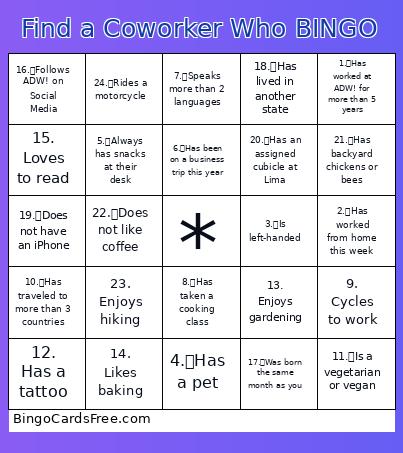
1. Has worked at ADW! for more than 5 years2. Has worked from home this week3. Is left-handed4. Has a pet5. Always has snacks at their desk
6. Has been on a business trip this year7. Speaks more than 2 languages8. Has taken a cooking class9. Cycles to work10. Has traveled to more than 3 countries
11. Is a vegetarian or vegan12. Has a tattoo13. Enjoys gardening14. Likes baking15. Loves to read
16. Follows ADW! on Social Media17. Was born the same month as you18. Has lived in another state19. Does not have an iPhone20. Has an assigned cubicle at Lima
21. Has backyard chickens or bees22. Does not like coffee23. Enjoys hiking24. Rides a motorcycle
This is shown at the top of the template and game pages.
Optional. If this template makes to the front page, you will be credited for creating it.
Shown at the top of each bingo card.

This can be text or an image. Images larger than 50 KB may be compressed and may lose transparency.
If words on a line are separated by this text, then:
  • Bingo card will only show the text on the right side of the separator.
  • The PDF call list will show the full text.
  • To disable this feature, clear this field.
Quiz Mode ON
Select which side of the quiz separator to show on the card preview on this page. When printing or playing, calling cards always show the right side only.
If words on a line are separated by this text, then:
  • The text on the right side of the separator will be spoken by the online game play.
  • Bingo card will only show the text on the left side of the separator.
  • The PDF call list will show the full text.
  • To disable this feature, clear this field.
Audio Mode ON
Use separate item lists for each column. This is useful for american traditional 75 ball number bingo or cards where each column should draw from a different set of items.
Enter numbers, words or phrases, each one on a new line. Up to 255 items are supported.

Items Per Column:
To specify items per column, eg for 75 ball bingo, turn ON the "Items Per Column" setting.
Sort   |   No Dups
Supports:
  1. Up to 99 images.
  2. Single or multiple image uploads.
  3. Up to 5 MB file size per image.
  4. You can use both Grid Items and Grid Images.
  5. Click an image or label to edit the label or delete the image.
  6. If an image background changes to white, remove transparency or reduce the image size to < 10KB.
    Choose whether image labels appear on bingo cards. Image labels are always shown on the calling card.
    Grid size in Columns x Rows format.
    Free space is usually the center square of the card. It is like a joker or a wild square, and counts towards the winning pattern.
    • Shows text or an image in the Free Space cell.
    • Make sure Free Space Cell is not set to "None".
    • To show text, enter text.
    • To show an image, click the button on the right and select an image.
    • If the image background changes to white, remove transparency or reduce the image size to < 10KB.
    Select Yes to generate unique random cards.

    If No is selected, all cards will have the same text in the same order, which might be useful in educational or quiz settings.
    Text is automatically resized to fit inside each cell. Shorter text may appear very large. Choose a smaller maximum font size to limit how large the text can get.
    Title text color.

    * Applicable when Card Title is text.
    Title background shape.

    * Requires Title Back Opacity to be > 0%.
    Title background opacity.

    * Requires Title Back Shape.
    Title background shape color.

    * Requires Title Back Shape.
    * Requires Title Back Opacity to be > 0%.
    Title background border color.

    * Requires Title Back Shape.
    * Requires Title Back Opacity to be > 0%.
    Grid Text color.
    Grid background color.
    Grid line color.
    • Background shape for cells.
    • Select a stock image or upload your own custom image.
    • You can use Cell Transparency setting to change how prominently the background shape shows.
    • If you select a shape other than Grid, you may have to increase Cell Padding if you want to fit the text inside the shape.
    • Don't see the selected image?
      Set Cell Transparency <50.
    Empty space inside each cell between border and text.
    Space between any 2 cells.
    0% makes grid background opaque. Higher setting makes grid background transparent allowing card background image or card background color to show.
    Outside border width.
    Card outside border color.

    * Requires Card Border Width > 0%
    Yes makes the card corners rounded.
    Empty space between card border and card contents.
    Card background color.
    • Background image for the whole card.
    • Select a stock image or upload your own custom image.
    • Use Card Transparency and Cell Transparency to control how much of the image shows through.
    Don't see the selected image?
    • Set Card Transparency >50.
    • Set Card Border Width >0 or Card Padding >0.
    • Set Cell Transparency >50.
    Select how the background image covers the whole card. You can also choose to repeat the image.
    Controls the transparency of the card background color. Higher values make the card background more transparent, allowing the card background image or outer background to show through.
    This mode uses rapid animations. It may cause dizziness, nausea, or trigger sensitive individuals. Please use responsibly.
    Warning! 
    Public: Anyone can see your card template, including search engines

    Private: Only you can see and edit the card template. You will need to be signed in.

    Click to Sign-Up « Free!!!

    Click to Sign-In
    Number of cards to generate and include in the Full PDF. The Preview button will always generate only 1 card.
    Choose whether to include a call list in the Full PDF. Grid prints the call list as a grid; List prints it as a text list.
    Printer paper size.
    Paper orientation for printing. Some card layouts may look better in portrait or landscape.
    Arrangement of cards on each page of paper.
    Horizontal margin on left and right sides of each card.
    Vertical margin on top and bottom sides of each card.
    Colors: Removes background to save ink for printing.

    B&W: Removes background & changes colors to black & white to save ink for printing.
    Select amount of empty space to keep in each cell for participants to write something.

    This feature is also called human bingo, people bingo, social bingo, get-to-know bingo or ice breaker bingo.
    Starting card number. Change if you need to reprint a set of cards starting with a specific card number.

    Note: If this is not 1, then call list (index card) will not be printed.
    Header height. Header is shown only when there is 1 or more characters.
    Instructions or any other message(s) at the top of each card.
    Footer height. Footer is shown only when there is 1 or more characters.
    Instructions or any other message(s) at the bottom of each card.
    All fonts support English.

    For non-English support in PDF, please try FreeSans, FreeSerif, DejaVuSans, DejaVuSerif or NotoSans

    Suggestions | Feedback | Bug

    Similar Bingo Cards: , ,

    About: This bingo card is perfect for an energetic office mixer or team-building event at ADW!, helping coworkers discover fun facts and hidden talents about each other. With a mix of quirky habits, interests, and unique experiences, this card sparks conversation and friendly competition, making it easy to break the ice and build connections among colleagues.

    How To: To get a printable PDF, click the Print button. You can modify the card quantity and other printing preferences on the Print tab. Grid items and free space content can be changed on the Basic tab. Appearance can be totally customized on the corresponding tabs, or you can easily find any option using the 🔍 tab.

    How to play Find a Coworker Who BINGO Cards?

    • Digital Caller: Click on the Play button above.
    • Paper Players: Print PDF bingo cards and physically mark the cards.
    • Digital Players: Click on the Play button above, and then click on the 🎫 button.
    • Paper Caller: Print PDF calling list & calling slips and physically choose the slips.
    • Mixed Mode: Select any combination above. For example, caller can be either Offline or Digital. And players can be Offline or Digital or a combo of both.

    Step-By-Step:

    1. Start by saving the Find a Coworker Who BINGO PDF by clicking on the "Print" button above.
    2. Open the PDF and print a hard copy.
    3. For random calling, you can print another copy of the call list, cut, fold and then draw them randomly at play time.
    4. Cut the bingo cards at the cut lines if there are more than 1 bingo cards per page.
    5. Distribute one card per player. For marking, you can use pens. Crayons cost the least.
    6. Select one person to be the caller. If you are playing in a small group, the caller may also play along with their own Bingo card.
    7. The caller begins the play by randomly picking an item from the call list and saying it to all players.
    8. The players look at their cards to see if they have the called word. If they do, they dab that word.
    9. The first player to finish a horizontal, vertical, or a diagonal line of marked items shouts "Bingo!" and wins the play.
    10. The caller verifies that the items crossed off form a correct line as per the Bingo card and call list.
    11. You can play for varied patterns or a full card blackout for an extended play.

    Find a Coworker Who BINGO CardsThis Find a Coworker Who BINGO Cards Game contains following Words or Phrases: 1. Has worked at ADW! for more than 5 years, 2. Has worked from home this week, 3. Is left-handed, 4. Has a pet, 5. Always has snacks at their desk, 6. Has been on a business trip this year, 7. Speaks more than 2 languages, 8. Has taken a cooking class, 9. Cycles to work, 10. Has traveled to more than 3 countries, 11. Is a vegetarian or vegan, 12. Has a tattoo, 13. Enjoys gardening, 14. Likes baking, 15. Loves to read, 16. Follows ADW! on Social Media, 17. Was born the same month as you, 18. Has lived in another state, 19. Does not have an iPhone, 20. Has an assigned cubicle at Lima, 21. Has backyard chickens or bees, 22. Does not like coffee, 23. Enjoys hiking, 24. Rides a motorcycle.

    Advertisement