Find someone... Bingo Cards - Print Free or Customize
Print free Find someone... bingo cards or personalize,
unlimited prints! Choose from 39,000+ templates or use the bingo card generator.
Add numbers, phrases, images, or all of them.
Play using PDF prints, online bingo cards,
and the online bingo caller, or mix physical and digital.
About: This bingo card is perfect for a wedding or large gathering where the goal is to spark fun conversations and help everyone get to know each other better. The mix of quirky talents, travel stories, family ties, and unique hobbies makes it great for guests from many backgrounds. Expect lots of laughs and interesting discoveries along the way!
How To: To get a PDF to print, click the Print button.
You can alter the card count and other
printing preferences on the Print tab.
Grid items and free space content can be changed on the Basic tab.
Appearance can be entirely personalized on the
corresponding tabs, or you can easily search any option
on the 🔍 tab.
How to play Find someone... Bingo Cards?
Printed Players: Print PDF bingo cards and physically write on the cards.
Digital Caller: Click on the Play button above.
Printed Caller: Print PDF calling list & calling slips and physically choose the slips.
Digital Players: Click on the Play button above, and then click on the 🎫 button.
Mixed Play: Choose any combination above.
For instance, caller can be either Offline or Digital.
And players can be Offline or Digital or a combination of both.
Step-By-Step:
Start by getting the Find someone... PDF by clicking on the "Print" button above.
Open the PDF and print it.
For random calling, you can print another copy of the call list, cut, fold and then draw them randomly at play time.
Cut the bingo cards at the cut lines if there are more than 1 bingo cards per page.
Give one card to each player. For marking, you can use markers. Crayons cost the least.
Choose one person to be the caller. If you are playing in a small group, the caller can as well play along with their own Bingo card.
The caller opens the game by randomly pulling an item from the call list and calling out it to all players.
The players check their cards to see if they have the called word. If they do, they mark that word.
The first player to finish a horizontal, vertical, or a diagonal line of marked items announces "Bingo!" and wins the play.
The caller confirms that the items marked form a proper line according to the Bingo card and call list.
You can play for different patterns or a full card blackout for an extended play.
This Find someone... Bingo Cards Game contains following Words or Phrases: who has a foreign partner, who loves to sew, who is a family member of the bride, who is a family member of the groom, who has worked in a bar or café, who can tell you about their favourite board game, who can tell you about their favourite recipe, who can tell you something about their tattoo, who rides a motorcycle, who has never been to the Netherlands, who you have never met before, who speaks three or more languages, who works/has worked at Elkjøp, who has lived abroad, who plays a musical instrument, who reads at least 10 books a year, who is a pair of siblings (two people), who is as tall as you, who is wearing the same colour clothes as you, who brought a fan today, who can tell you something about the bachelor/bachelorette parties, who has traveled to South America, who works in theatre, who works at the University of Notodden, who has run a half marathon, who has studied clay, who is a farmer, who has worked in a kindergarten, who has worked in the military, who has published a book, who was a classmate of Fredrik, who has organised a festival together with Fredrik, who has taken the hunter's test (jegerprøven), who has been Fredrik's boss, who plays tennis, who is engaged (to be married), who uses a bike to get to work, who can tell you something about your zodiac sign, who sings in a choir, who has been on a honeymoon to Egypt, who does frisbee golf, who makes national costumes (bunad /klederdracht), who has made birdhouses, who works with leather, who does figure skating, who has a velomobile, who is a district champion in swing, who does the traditional art of "steving", who Mascha is named after, who has worked as an au pair, who likes to solve sudoku puzzles.

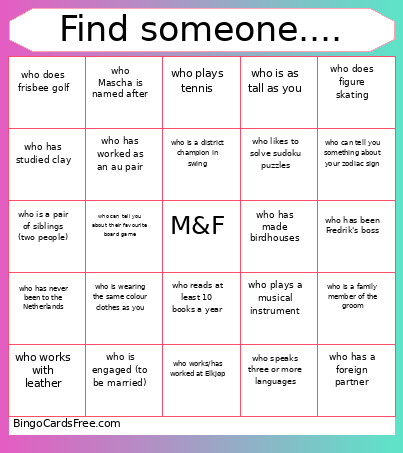 This Find someone... Bingo Cards Game contains following Words or Phrases: who has a foreign partner, who loves to sew, who is a family member of the bride, who is a family member of the groom, who has worked in a bar or café, who can tell you about their favourite board game, who can tell you about their favourite recipe, who can tell you something about their tattoo, who rides a motorcycle, who has never been to the Netherlands, who you have never met before, who speaks three or more languages, who works/has worked at Elkjøp, who has lived abroad, who plays a musical instrument, who reads at least 10 books a year, who is a pair of siblings (two people), who is as tall as you, who is wearing the same colour clothes as you, who brought a fan today, who can tell you something about the bachelor/bachelorette parties, who has traveled to South America, who works in theatre, who works at the University of Notodden, who has run a half marathon, who has studied clay, who is a farmer, who has worked in a kindergarten, who has worked in the military, who has published a book, who was a classmate of Fredrik, who has organised a festival together with Fredrik, who has taken the hunter's test (jegerprøven), who has been Fredrik's boss, who plays tennis, who is engaged (to be married), who uses a bike to get to work, who can tell you something about your zodiac sign, who sings in a choir, who has been on a honeymoon to Egypt, who does frisbee golf, who makes national costumes (bunad /klederdracht), who has made birdhouses, who works with leather, who does figure skating, who has a velomobile, who is a district champion in swing, who does the traditional art of "steving", who Mascha is named after, who has worked as an au pair, who likes to solve sudoku puzzles.