Find Someone Who Bingo Cards - Print Free or Customize
Print free Find Someone Who bingo cards or customize,
limitless cards! Choose from 41,500+ designs or use the bingo card generator.
Add numbers, phrases, photos, or all of them.
Play using printable PDF, online bingo cards,
and the online bingo caller, or go hybrid.
About: This bingo card is perfect for an Apple team social or retail staff mixer, packed with prompts that celebrate unique experiences and fun facts about working at Apple. It encourages teammates to share stories from across stores, roles, and product launches, adding a playful twist to connecting over company culture and those legendary blue shirts.
How To: To get a PDF to print, click the Print button.
You can change the number of cards and other
printing settings on the Print tab.
Grid items and free space text can be changed on the Basic tab.
Appearance can be entirely personalized on the
relevant tabs, or you can easily search any option
using the 🔍 tab.
How to play Find Someone Who Bingo Cards?
Printed Caller: Print PDF calling list & calling slips and physically draw the slips.
Online Players: Click on the Play button above, and then click on the 🎫 button.
Printed Players: Print PDF bingo cards and physically mark the cards.
Online Caller: Click on the Play button above.
Combo Play: Choose any combination above.
For instance, caller can be either Paper or Online.
And players can be Paper or Online or a combination of both.
Step-By-Step:
Start by saving the Find Someone Who PDF by clicking on the "Print" button above.
Open the PDF and print a hard copy.
For random drawing, you can print another copy of the call list, cut, fold and then pull them randomly at play time.
Cut the bingo cards at the cut lines if there are more than 1 bingo cards per page.
Give one card to each player. For marking, you can use crayons. Crayons cost the least.
Choose one person to be the caller. If you are playing in a small group, the caller may as well play along with their own Bingo card.
The caller opens the game by randomly picking an item from the call list and announcing it to everyone.
The players scan their cards to see if they have the announced word. If they do, they cross off that word.
The first player to complete a horizontal, vertical, or a diagonal line of marked items yells "Bingo!" and wins the play.
The caller confirms that the items crossed off form a proper line according to the Bingo card and call list.
You can play for varied patterns or a full card blackout for a longer play.
This Find Someone Who Bingo Cards Game contains following Words or Phrases: Won multiple F1 arcade games tonight., You've never met before., Has worked for Apple for 10+ years., Is in the same role as you., Started at Apple in a different state., Still has their blue shirt on (even if it's under a jacket)., Has a SIM ejector on them., Owns an TOTP card., Was hired in the past year., Has their pet as their phone wallpaper., Has their music/band on Apple Music., Had the first iPhone., Has worked in at least 3 different departments (PZ, Ops, RCC, GB, etc.)., Subscribes to Apple One., Owns an Apple Vision Pro., Has helped a celebrity in store., Know the general merchandising principle equation., Has 100% NPS Score right now., Is dressed up for the F1 theme., Has the Credo on their phone., Owns an iPhone, Watch, iPad, Mac, & AirPods., Is using a broken iPhone., Has been to Cupertino., Prefers a red or green shirt over blue., Has worked at RCC or AHA., Has worked in 3+ Apple stores., Knows the Apple Credo by heart., Has taught a Today@Apple class., Carries a 30-pin charger with them., Has taken more than 10,000 steps today., Checks their sleep score every day., Listened to Apple Music over 20,000 hours last year., Watches Severance., Has 2 OG HomePods as stereo speakers., Has taken 3 Today@Apple classes., Has an Android., Has a card with wireless CarPlay., Keeps a streak going of how many days they have closed their rings., Was a technician during the Battery program., Has repaired an iPhone 5., Has used an AirTag to find lost luggage., Has taken a hearing test on AirPods., Has the 20-year plaque., Uses the cook along feature on Apple News+., Has taken an Apple Fitness+ class..

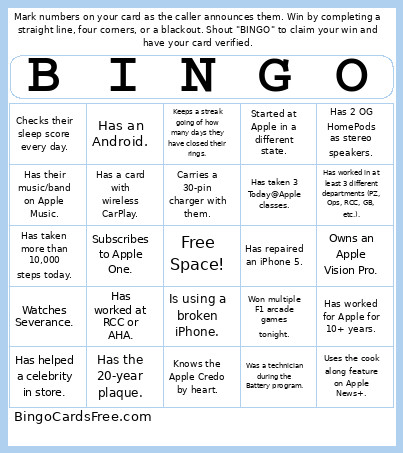 This Find Someone Who Bingo Cards Game contains following Words or Phrases: Won multiple F1 arcade games tonight., You've never met before., Has worked for Apple for 10+ years., Is in the same role as you., Started at Apple in a different state., Still has their blue shirt on (even if it's under a jacket)., Has a SIM ejector on them., Owns an TOTP card., Was hired in the past year., Has their pet as their phone wallpaper., Has their music/band on Apple Music., Had the first iPhone., Has worked in at least 3 different departments (PZ, Ops, RCC, GB, etc.)., Subscribes to Apple One., Owns an Apple Vision Pro., Has helped a celebrity in store., Know the general merchandising principle equation., Has 100% NPS Score right now., Is dressed up for the F1 theme., Has the Credo on their phone., Owns an iPhone, Watch, iPad, Mac, & AirPods., Is using a broken iPhone., Has been to Cupertino., Prefers a red or green shirt over blue., Has worked at RCC or AHA., Has worked in 3+ Apple stores., Knows the Apple Credo by heart., Has taught a Today@Apple class., Carries a 30-pin charger with them., Has taken more than 10,000 steps today., Checks their sleep score every day., Listened to Apple Music over 20,000 hours last year., Watches Severance., Has 2 OG HomePods as stereo speakers., Has taken 3 Today@Apple classes., Has an Android., Has a card with wireless CarPlay., Keeps a streak going of how many days they have closed their rings., Was a technician during the Battery program., Has repaired an iPhone 5., Has used an AirTag to find lost luggage., Has taken a hearing test on AirPods., Has the 20-year plaque., Uses the cook along feature on Apple News+., Has taken an Apple Fitness+ class..