
Baby shower Bingo Cards - Print Free or Customize
Print free Baby shower bingo cards or alter them, limitless prints! Pick from 42,600+ designs or use the bingo card generator. Add numbers, words, images, or any combination. Play using printed PDF, digital bingo cards, and the digital bingo caller, or combine all formats.
About: This bingo card is perfect for a Johnston County Junior Women's League gathering, whether it's a mixer, orientation, or annual retreat. The focus is on breaking the ice, making new friends, and discovering shared interests or experiences within the group. It's designed to spark real conversations and help both new and returning members feel more connected.
How To: To download a printable PDF, click the Print button. You can change the card count and other print settings on the Print tab. Grid items and free space text can be edited on the Basic tab. Appearance can be totally customized on the corresponding tabs, or you can easily search any option using the 🔍 tab.
How to play Baby shower Bingo Cards?
- Paper Players: Print PDF bingo cards and manually cross off the cards.
- Digital Caller: Click on the Play button above.
- Digital Players: Click on the Play button above, and then click on the 🎫 button.
- Paper Caller: Print PDF calling list & calling slips and manually pick the slips.
- Hybrid Mode: Choose any combination above. For instance, caller can be either Offline or Digital. And players can be Offline or Digital or a combination of both.
Step-By-Step:
- Start by downloading the Baby shower PDF by clicking on the "Print" button above.
- Open the PDF and print a hard copy.
- For random calling, you can print another copy of the call list, cut, fold and then draw them randomly at play time.
- Cut the bingo cards at the cut marks if there are more than 1 bingo cards per page.
- Give one card to each player. For marking, you can use pens. Crayons are the cheapest.
- Choose one person to be the caller. If you are playing in a small group, the caller may as well play along with their own Bingo card.
- The caller starts the game by randomly drawing an item from the call list and calling out it to everyone.
- The players check their cards to see if they have the announced word. If they do, they cross off that word.
- The first player to finish a horizontal, vertical, or a diagonal line of crossed items shouts "Bingo!" and wins the play.
- The caller verifies that the items crossed off form a correct line as per the Bingo card and call list.
- You can play for multiple patterns or a full card blackout for a longer play.
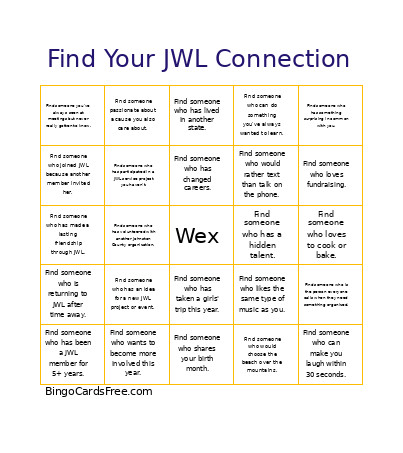 This Baby shower Bingo Cards Game contains following Words or Phrases: Find someone who is attending her first JWL meeting., Find someone who is returning to JWL after time away., Find someone who has been a JWL member for 5+ years., Find someone you didn't know before tonight., Find someone you've always seen at meetings but never really gotten to know., Find someone who can tell you why she originally joined JWL., Find someone who joined JWL because another member invited her., Find someone who has made a lasting friendship through JWL., Find someone who has served in a JWL leadership position., -c-, Find someone who would consider taking a leadership role in the future., Find someone interested in serving on the same committee as you., Find someone who has an idea for a new JWL project or event., Find someone who has participated in a JWL service project you haven't., Find someone who has a skill or talent JWL could use., Find someone who wants to become more involved this year., Find someone who has volunteered with another Johnston County organization., Find someone passionate about a cause you also care about., Find someone who believes JWL could address a community need you care about., -c-, Find someone who lives in a different Johnston County community than you., Find someone who works in a completely different profession from you., Find someone who owns or has owned a business., Find someone who has changed careers., Find someone who has lived in another state., Find someone who attended an HBCU., Find someone who has traveled somewhere you would love to visit., Find someone who has taken a girls' trip this year., Find someone who shares your birth month., -c-, Find someone who has the same favorite season as you., Find someone who likes the same type of music as you., Find someone who shares your favorite TV show or movie genre., Find someone who has a hidden talent., Find someone who can do something you've always wanted to learn., Find someone who has an unusual hobby., Find someone who is a morning person., Find someone who would rather text than talk on the phone., Find someone who would choose the beach over the mountains., -c-, Find someone who loves to cook or bake., Find someone who would rather decorate the event than plan it., Find someone who is the person everyone calls when they need something organized., Find someone who loves fundraising., Find someone who loves community service but hates being in the spotlight., Find someone whose personality is completely different from yours., Find someone who has something surprising in common with you., Find someone who can make you laugh within 30 seconds..