Print free bingo 1 cards or personalize,
unlimited prints! Pick from 41,500+ designs or use the bingo card generator.
Add numbers, phrases, photos, or any combination.
Play using printable PDF, digital bingo cards,
and the digital bingo caller, or mix physical and digital.
About: This bingo card captures the lively, unpredictable spirit of a youth fine arts or church talent competition. Perfect for participants, leaders, or supporters, it highlights everything from heartfelt performances and creative art to classic event mishaps and quirky moments. Get ready to spot unique talents, spontaneous fun, and those little things that make these gatherings unforgettable.
How To: To download a printable PDF, click the Print button.
You can alter the card quantity and other
print settings on the Print tab.
Grid items and free space content can be changed on the Basic tab.
Appearance can be totally personalized on the
relevant tabs, or you can quickly locate any option
using the 🔍 tab.
How to play Bingo 1 Cards?
Digital Players: Click on the Play button above, and then click on the 🎫 button.
Digital Caller: Click on the Play button above.
Printed Caller: Print PDF calling list & calling slips and physically choose the slips.
Printed Players: Print PDF bingo cards and physically write on the cards.
Mixed Play: Pick any combination above.
For instance, caller can be either Offline or Digital.
And players can be Offline or Digital or a combination of both.
Step-By-Step:
Start by saving the Bingo 1 PDF by clicking on the "Print" button above.
Open the PDF and print a hard copy.
For random calling, you can print another copy of the call list, cut, fold and then draw them randomly at play time.
Cut the bingo cards at the cut marks if there are greater than 1 bingo cards per page.
Distribute one card per player. For marking, you can use pens. Crayons are the cheapest.
Pick one person to be the caller. If you are playing in a small group, the caller can also play along with their own Bingo card.
The caller starts the play by randomly pulling an item from the call list and calling out it to everyone.
The players scan their cards to see if they have the called word. If they do, they mark that word.
The first player to complete a horizontal, vertical, or a diagonal line of crossed items yells "Bingo!" and wins the game.
The caller confirms that the items marked form a correct line as per the Bingo card and call list.
You can play for varied patterns or a full card blackout for a longer game.
This Bingo 1 Cards Game contains following Words or Phrases: Someone sings kpop demon hunters, Someone preaches on David and Goliath, There's a t shirt design with a pair of hands holding a cross, There's an art piece of a lion, There's an art piece of a tree, There's a Josiah queen song, There's a Brandon lake song, You hear the same song 3 times, Someone from bethalto gets merit, A human video gets merit, There's a medely for human video, There's a puppet song to goodbye yesterday, Someone preaches with John 3:16, You see a group sprinting, You see a group practicing in the hall, (Free space) p Chris stanley wears a hat, There's an instrument sitting abandoned somewhere, Someone does hard fought hallelujah, They go over schedule, You hear distant screaming, The judges have to switch out, There's a sign language song with a spoken verse, Someone uses a bucket as a drum, Photograph of a pet, Photograph of a body of water, A kid gets thrown, Someones name is mispronounced, P rachel stops and talks to 5plus people, You see someone listening at the door, You high five 10plus people, Someone is wearing a camp shirt.

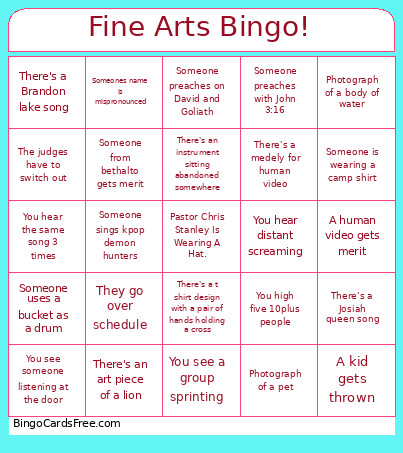 This Bingo 1 Cards Game contains following Words or Phrases: Someone sings kpop demon hunters, Someone preaches on David and Goliath, There's a t shirt design with a pair of hands holding a cross, There's an art piece of a lion, There's an art piece of a tree, There's a Josiah queen song, There's a Brandon lake song, You hear the same song 3 times, Someone from bethalto gets merit, A human video gets merit, There's a medely for human video, There's a puppet song to goodbye yesterday, Someone preaches with John 3:16, You see a group sprinting, You see a group practicing in the hall, (Free space) p Chris stanley wears a hat, There's an instrument sitting abandoned somewhere, Someone does hard fought hallelujah, They go over schedule, You hear distant screaming, The judges have to switch out, There's a sign language song with a spoken verse, Someone uses a bucket as a drum, Photograph of a pet, Photograph of a body of water, A kid gets thrown, Someones name is mispronounced, P rachel stops and talks to 5plus people, You see someone listening at the door, You high five 10plus people, Someone is wearing a camp shirt.