Print free LALALALALLA bingo cards or personalize,
unlimited cards! Choose from 42,200+ templates or use our bingo card generator.
Add numbers, phrases, photos, or all of them.
Play using printable PDF, digital bingo cards,
and our digital bingo caller, or combine all formats.
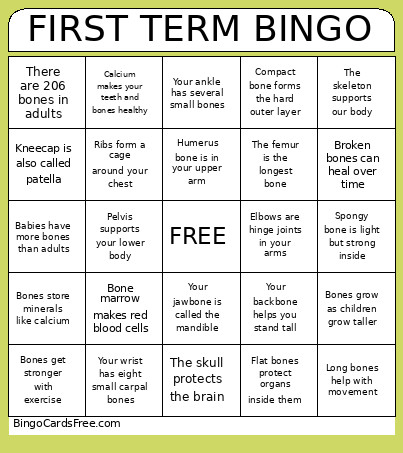
About: This bingo card is all about bones and the human skeleton, making it perfect for a classroom activity, science fair, or educational family night. It highlights fun and fascinating facts about bone structure, functions, and names, helping kids and adults alike learn about how our bodies work in an engaging way.
How To: To save a printable PDF, click the Print button.
You can adjust the card quantity and other
print options on the Print tab.
Grid items and free space text can be edited on the Basic tab.
Appearance can be fully customized on the
relevant tabs, or you can quickly search any option
using the 🔍 tab.
How to play LALALALALLA Bingo Cards?
Virtual Caller: Click on the Play button above.
Printed Players: Print PDF bingo cards and manually cross off the cards.
Virtual Players: Click on the Play button above, and then click on the 🎫 button.
Printed Caller: Print PDF calling list & calling slips and manually pick the slips.
Hybrid Play: Select any combination above.
For instance, caller can be either Offline or Virtual.
And players can be Offline or Virtual or a combo of both.
Step-By-Step:
Start by downloading the LALALALALLA PDF by clicking on the "Print" button above.
Open the PDF and print it.
For random calling, you can print another copy of the call list, cut, fold and then pull them randomly at play time.
Cut the bingo cards at the cut marks if there are greater than 1 bingo cards per page.
Give one card to each player. For marking, you can use pencils. Crayons are the cheapest.
Select one person to be the caller. If you are playing in a small group, the caller can also play along with their own Bingo card.
The caller starts the game by randomly pulling an item from the call list and announcing it to all players.
The players check their cards to see if they have the announced word. If they do, they dab that word.
The first player to complete a horizontal, vertical, or a diagonal line of crossed items announces "Bingo!" and wins the play.
The caller confirms that the items marked form a proper line according to the Bingo card and call list.
You can play for varied patterns or a full card blackout for a longer play.
This LALALALALLA Bingo Cards Game contains following Words or Phrases: Babies have more bones than adults, Bone marrow makes red blood cells, Bones get stronger with exercise, Bones grow as children grow taller, Bones make blood cells inside them, Bones store minerals like calcium, Broken bones can heal over time, Calcium makes your teeth and bones healthy, Compact bone forms the hard outer layer, Elbows are hinge joints in your arms, Flat bones protect organs inside them, Hands have many small bones, Humerus bone is in your upper arm, Joints connect two or more bones, Joints let you bend and twist, Kneecap is also called patella, Long bones help with movement, Muscles attach to bones by tendons, Pelvis supports your lower body, Ribs form a cage around your chest, Shoulder blades are called scapulae, Spongy bone is light but strong inside, The femur is the longest bone, The skeleton supports our body, The skull protects the brain, There are 206 bones in adults, Your ankle has several small bones, Your backbone helps you stand tall, Your jawbone is called the mandible, Your wrist has eight small carpal bones.

 This LALALALALLA Bingo Cards Game contains following Words or Phrases: Babies have more bones than adults, Bone marrow makes red blood cells, Bones get stronger with exercise, Bones grow as children grow taller, Bones make blood cells inside them, Bones store minerals like calcium, Broken bones can heal over time, Calcium makes your teeth and bones healthy, Compact bone forms the hard outer layer, Elbows are hinge joints in your arms, Flat bones protect organs inside them, Hands have many small bones, Humerus bone is in your upper arm, Joints connect two or more bones, Joints let you bend and twist, Kneecap is also called patella, Long bones help with movement, Muscles attach to bones by tendons, Pelvis supports your lower body, Ribs form a cage around your chest, Shoulder blades are called scapulae, Spongy bone is light but strong inside, The femur is the longest bone, The skeleton supports our body, The skull protects the brain, There are 206 bones in adults, Your ankle has several small bones, Your backbone helps you stand tall, Your jawbone is called the mandible, Your wrist has eight small carpal bones.