Print free Flerf bingo cards or personalize,
limitless prints! Pick from 41,500+ templates or use the bingo card generator.
Add numbers, words, pictures, or mix them all.
Play using printable PDF, virtual bingo cards,
and the virtual bingo caller, or go hybrid.
About: Get ready for a wild ride through the quirks and classic moves of internet debates with this bingo card. Perfect for viewers or moderators of flat earth livestreams, comment sections, or reaction videos, this card highlights all the signature responses, comebacks, and grammar goofs you’re likely to spot from repeat personalities in the community.
How To: To save a PDF to print, click the Print button.
You can alter the card quantity and other
print options on the Print tab.
Grid items and free space text can be changed on the Basic tab.
Appearance can be completely customized on the
relevant tabs, or you can easily search any setting
using the 🔍 tab.
How to play Flerf Bingo Cards?
Printed Players: Print PDF bingo cards and manually cross off the cards.
Virtual Players: Click on the Play button above, and then click on the 🎫 button.
Virtual Caller: Click on the Play button above.
Printed Caller: Print PDF calling list & calling slips and manually select the slips.
Hybrid Mode: Pick any combination above.
For example, caller can be either Offline or Virtual.
And players can be Offline or Virtual or a combination of both.
Step-By-Step:
Start by downloading the Flerf PDF by clicking on the "Print" button above.
Open the PDF and print a hard copy.
For random calling, you can print another copy of the call list, cut, fold and then draw them randomly at play time.
Cut the bingo cards at the cut marks if there are greater than 1 bingo cards per page.
Distribute one card per player. For marking, you can use pencils. Crayons are the cheapest.
Pick one person to be the caller. If you are playing in a small group, the caller may also play along with their own Bingo card.
The caller opens the play by randomly picking an item from the call list and saying it to everyone.
The players scan their cards to see if they have the announced word. If they do, they cross off that word.
The first player to finish a horizontal, vertical, or a diagonal line of crossed items announces "Bingo!" and wins the game.
The caller validates that the items marked form a proper line as per the Bingo card and call list.
You can play for varied patterns or a full card blackout for an extended game.
This Flerf Bingo Cards Game contains following Words or Phrases: Calling Hal Mctoon, Calling the globe a cult, Incorrect grammar, Incorrect spelling, Wrong there/their/they're, Wrong your/you're, Responding to a good piece of evidence with no or something similar, Avoiding a question, Lying about how he destroyed Scimandan, Will Duffy, Dave Mckeegan, or MCToon, Comparing the globe to Nazis, All maps are flat, Making a community post on his channel about the video, Using the Pauljohnson account, Using the Theboss account, Using the TJ account, It's not about me/us, Ending a sentence with da, I don't need any proof, You guys don't have any proof, Exclusively hurling insults, Baselessly claiming that they've won, Wow, you've made x amount of dollars on this video, Incorrectly accusing someone of using a sock account, I own u, Projecting, Forgetting about punctuation when attempting to form complete sentences, Calling MCToon Mcweasel, Perfectly proving a point brought up in the video, Showing that he didn't even attempt to press play on the video, Commenting with one of his accounts and then switching mid-thread, You're nothing without me, Repeats himself, Repeat of a called bingo space, Crying and bullying simultaneously, Calling someone bitche, Using the victim card, Denying the whole MCToon humiliation (infamously referred to as PENSACOLA), Saying that an experiment or observation was fraudulent, particularly TFE, Implying that the globe is not used for navigation, Claiming that flat earth belief is growing, Getting pissed about bingo.

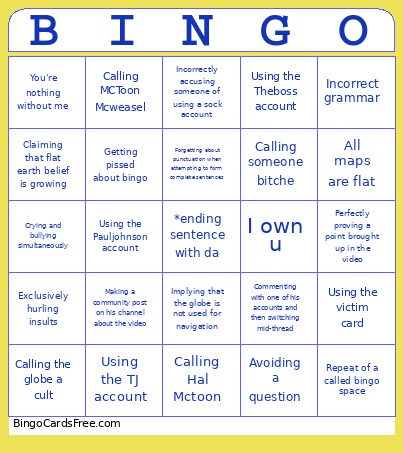 This Flerf Bingo Cards Game contains following Words or Phrases: Calling Hal Mctoon, Calling the globe a cult, Incorrect grammar, Incorrect spelling, Wrong there/their/they're, Wrong your/you're, Responding to a good piece of evidence with no or something similar, Avoiding a question, Lying about how he destroyed Scimandan, Will Duffy, Dave Mckeegan, or MCToon, Comparing the globe to Nazis, All maps are flat, Making a community post on his channel about the video, Using the Pauljohnson account, Using the Theboss account, Using the TJ account, It's not about me/us, Ending a sentence with da, I don't need any proof, You guys don't have any proof, Exclusively hurling insults, Baselessly claiming that they've won, Wow, you've made x amount of dollars on this video, Incorrectly accusing someone of using a sock account, I own u, Projecting, Forgetting about punctuation when attempting to form complete sentences, Calling MCToon Mcweasel, Perfectly proving a point brought up in the video, Showing that he didn't even attempt to press play on the video, Commenting with one of his accounts and then switching mid-thread, You're nothing without me, Repeats himself, Repeat of a called bingo space, Crying and bullying simultaneously, Calling someone bitche, Using the victim card, Denying the whole MCToon humiliation (infamously referred to as PENSACOLA), Saying that an experiment or observation was fraudulent, particularly TFE, Implying that the globe is not used for navigation, Claiming that flat earth belief is growing, Getting pissed about bingo.