
Football Bingo per Game Cards - Print Free or Customize
Print free Football bingo per Game cards or customize, limitless prints! Select from 41,900+ designs or use our bingo card generator. Add numbers, phrases, images, or mix them all. Play using PDF prints, digital bingo cards, and our digital bingo caller, or go hybrid.
About: This bingo card is tailor-made for football fans who love the excitement and unpredictability of game day. Packed with dramatic plays, quirky penalties, and rare moments, it's perfect for watch parties or friendly gatherings during big NFL or college games. Whether you’re a hardcore strategist or just there for the fun, this card keeps everyone watching every snap.
How To: To download a printable PDF, click the Print button. You can change the card quantity and other printing options on the Print tab. Grid items and free space content can be changed on the Basic tab. Appearance can be entirely personalized on the relevant tabs, or you can easily find any option using the 🔍 tab.
How to play Football Bingo per Game Cards?
- Online Caller: Click on the Play button above.
- Paper Players: Print PDF bingo cards and manually write on the cards.
- Online Players: Click on the Play button above, and then click on the 🎫 button.
- Paper Caller: Print PDF calling list & calling slips and manually select the slips.
- Combo Mode: Select any combination above. For example, caller can be either Offline or Online. And players can be Offline or Online or a combination of both.
Step-By-Step:
- Start by getting the Football Bingo per Game PDF by clicking on the "Print" button above.
- Open the PDF and print a hard copy.
- For random drawing, you can print another copy of the call list, cut, fold and then pick them randomly at play time.
- Cut the bingo cards at the cut lines if there are more than 1 bingo cards per page.
- Distribute one card per player. For marking, you can use crayons. Crayons cost the least.
- Select one person to be the caller. If you are playing in a small group, the caller can as well play along with their own Bingo card.
- The caller initiates the play by randomly picking an item from the call list and calling out it to everyone.
- The players scan their cards to see if they have the announced word. If they do, they dab that word.
- The first player to finish a horizontal, vertical, or a diagonal line of marked items shouts "Bingo!" and wins the play.
- The caller verifies that the items marked form a proper line according to the Bingo card and call list.
- You can play for different patterns or a full card blackout for an extended play.
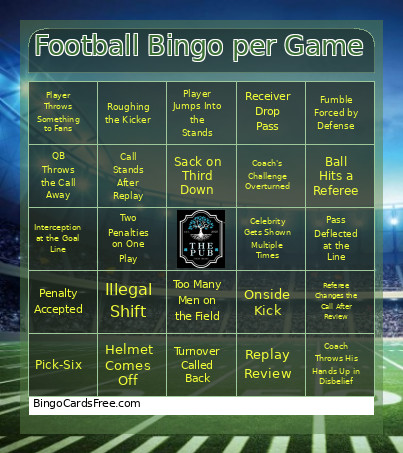 This Football Bingo per Game Cards Game contains following Words or Phrases: Ball Gets Stuck Somewhere, Ball Hits a Referee, Blocked Field Goal, Blocked Punt, Call Stands After Replay, Catch Along the Sideline, Celebrity Gets Shown Multiple Times, Coach Loses His Challenge, Coach Runs Onto the Field, Coach Throws His Hands Up in Disbelief, Coach Wins His Challenge, Coach's Challenge Overturned, Defensive Pass Interference on Third Down, Defensive Touchdown, Diving Catch, Field Goal Hits the Crossbar, Field Goal Hits the Upright, Fourth-Down Conversion Inside the 10, Fourth-Down Stop, Fumble at the Goal Line, Fumble Forced by Defense, Fumble Inside the Red Zone, Fumble on the Final Play of a Half, Fumble Recovery, Helmet Comes Off, Illegal Formation, Illegal Shift, Intentional Grounding, Interception at the Goal Line, Interception in the Red Zone, Mic'd-Up Player Shown, Missed Extra Point, Offensive Pass Interference, Offsetting Penalties, One-Handed Catch, Onside Kick, Pass Deflected at the Line, Penalty Accepted, Penalty Declined, Penalty on a Touchdown Play, Pick-Six, Player Accidentally Celebrates Too Early, Player Argues with a Referee, Player Argues with a Teammate, Player Gets Checked by Trainer, Player Gets Flagged for Celebration, Player Jumps Into the Stands, Player Loses His Helmet, Player Throws Something to Fans, Players Get Into Shoving Match, Players Start Shoving, QB Throws the Call Away, Receiver Drop Pass, Receiver Gets Hit Immediately After Catch, Referee Changes the Call After Review, Referee Says "After Further Review", Replay Review, Replay Takes More Than 2 Minutes, Roughing the Kicker, Roughing the Passer, Sack for 10+ Yards, Sack on Third Down, Safety, Successful Two-Point Conversion, Tackle Behind the Line of Scrimmage, Too Many Men on the Field, Touchdown Called Back, Turnover Called Back, Two Penalties on One Play, Two-Point Conversion Attempt.