Print free Friend bingo cards or modify,
unlimited cards! Select from 42,200+ designs or use our bingo card generator.
Add numbers, words, images, or all of them.
Play using printable PDF, virtual bingo cards,
and our virtual bingo caller, or go hybrid.
About: This bingo card is brimming with quirky, hyper-specific experiences and personality traits, perfect for breaking the ice at a funny get-together or party among friends in Baltimore or creative city types. Its tone is playful and offbeat, making it ideal for groups who love pop culture references, niche interests, and celebrating everyone’s weird little claims to fame.
How To: To get a PDF to print, click the Print button.
You can adjust the card count and other
print preferences on the Print tab.
Grid items and free space text can be changed on the Basic tab.
Appearance can be completely personalized on the
corresponding tabs, or you can quickly locate any setting
using the 🔍 tab.
How to play Friend Bingo Cards?
Printed Caller: Print PDF calling list & calling slips and manually select the slips.
Virtual Players: Click on the Play button above, and then click on the 🎫 button.
Printed Players: Print PDF bingo cards and manually cross off the cards.
Virtual Caller: Click on the Play button above.
Hybrid Play: Select any combination above.
For instance, caller can be either Paper or Virtual.
And players can be Paper or Virtual or a combo of both.
Step-By-Step:
Start by downloading the Friend Bingo PDF by clicking on the "Print" button above.
Open the PDF and print it.
For random calling, you can print another copy of the call list, cut, fold and then pick them randomly at play time.
Cut the bingo cards at the cut marks if there are more than 1 bingo cards per page.
Distribute one card per player. For marking, you can use pencils. Crayons cost the least.
Select one person to be the caller. If you are playing in a small group, the caller can as well play along with their own Bingo card.
The caller opens the game by randomly drawing an item from the call list and saying it to all players.
The players check their cards to see if they have the announced word. If they do, they mark that word.
The first player to finish a horizontal, vertical, or a diagonal line of marked items yells "Bingo!" and wins the play.
The caller verifies that the items crossed off form a proper line as per the Bingo card and call list.
You can play for varied patterns or a full card blackout for a longer play.
This Friend Bingo Cards Game contains following Words or Phrases: Remembers the tv show Perfect Strangers, Owns a Zojirushi rice cooker, Hates olives, Hates Pizza, Lives in Baltimore, never been to Federal Hill, Lives in Baltimore, never been to Fells Point, Can climb stairs two at a time, Knows their sun, moon, and rising signs without hesitation, Only drinks tea, never coffee, Has an ASL name sign, Takes tea with milk and sugar, Has had a lemon stick, Has skated at Shake & Bake, Has knitted a PetiteKnit pattern, Has at least 3 enemies and can name them, Owns a printer and prints things from home, Has been on the local news, Has been pooped on by a bird, Has seen neither Moonlight nor La La Land, A rat from the street has briefly grazed their foot, Doesn't like cheese (not vegan, just doesn't like it), Has cast a magic spell in earnest, Owns Pokemon cards they keep in a binder, Is a cat person, Is a dog person, Is a Phish person, Hates ice cream, Plays alto saxophone, Has been in a hot air balloon, Has four or more sibling, Was born in the same month as you, Decorates INSIDE their home for halloween, Listens to Who? Weekly, No longer has an appendix, Owns an ice cream maker, Can list the United States in alphabetical order, Is a notary public, Has a crush (who is it???), Is a proud Disney Adult, Has zero unread emails, Favorite bagel is "plain", Can't think of the last time they wore a hat, Has seen or met a ghost, Can proudly cook like 3 things, Has slept outside this year, Has won more than $20 on a scratch off, Can explain what kintsugi is, Doesn't like sports, not even tennis or something, Was the subject of or placed a Craigslist missed connection, Can't parallel park, Can blow smoke rings.

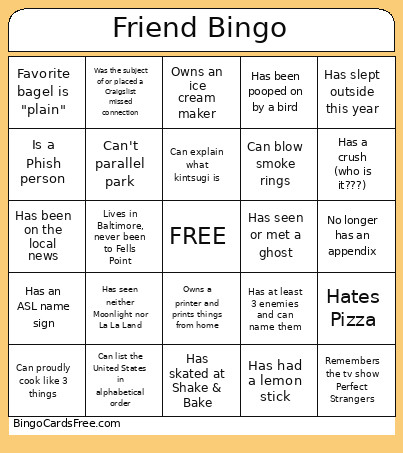 This Friend Bingo Cards Game contains following Words or Phrases: Remembers the tv show Perfect Strangers, Owns a Zojirushi rice cooker, Hates olives, Hates Pizza, Lives in Baltimore, never been to Federal Hill, Lives in Baltimore, never been to Fells Point, Can climb stairs two at a time, Knows their sun, moon, and rising signs without hesitation, Only drinks tea, never coffee, Has an ASL name sign, Takes tea with milk and sugar, Has had a lemon stick, Has skated at Shake & Bake, Has knitted a PetiteKnit pattern, Has at least 3 enemies and can name them, Owns a printer and prints things from home, Has been on the local news, Has been pooped on by a bird, Has seen neither Moonlight nor La La Land, A rat from the street has briefly grazed their foot, Doesn't like cheese (not vegan, just doesn't like it), Has cast a magic spell in earnest, Owns Pokemon cards they keep in a binder, Is a cat person, Is a dog person, Is a Phish person, Hates ice cream, Plays alto saxophone, Has been in a hot air balloon, Has four or more sibling, Was born in the same month as you, Decorates INSIDE their home for halloween, Listens to Who? Weekly, No longer has an appendix, Owns an ice cream maker, Can list the United States in alphabetical order, Is a notary public, Has a crush (who is it???), Is a proud Disney Adult, Has zero unread emails, Favorite bagel is "plain", Can't think of the last time they wore a hat, Has seen or met a ghost, Can proudly cook like 3 things, Has slept outside this year, Has won more than $20 on a scratch off, Can explain what kintsugi is, Doesn't like sports, not even tennis or something, Was the subject of or placed a Craigslist missed connection, Can't parallel park, Can blow smoke rings.