Print free FY1 bingo cards or modify,
unlimited prints! Pick from 42,200+ designs or use our bingo card generator.
Add numbers, phrases, pictures, or any combination.
Play using printed PDF, digital bingo cards,
and our digital bingo caller, or mix physical and digital.
About: This bingo card perfectly captures the highs and lows of life as a junior doctor on the wards. Designed with a knowing wink, it highlights those shared moments and everyday mishaps that bring doctors together. Ideal for medical staff socials, team bonding or induction days, it’s a lighthearted way to celebrate the reality of hospital medicine.
How To: To save a PDF to print, click the Print button.
You can change the number of cards and other
printing preferences on the Print tab.
Grid items and free space text can be edited on the Basic tab.
Appearance can be entirely personalized on the
corresponding tabs, or you can quickly locate any setting
using the 🔍 tab.
How to play FY1 Bingo Cards?
Printed Players: Print PDF bingo cards and physically write on the cards.
Virtual Players: Click on the Play button above, and then click on the 🎫 button.
Virtual Caller: Click on the Play button above.
Printed Caller: Print PDF calling list & calling slips and physically draw the slips.
Mixed Mode: Select any combination above.
For instance, caller can be either Printed or Virtual.
And players can be Printed or Virtual or a mix of both.
Step-By-Step:
Start by saving the FY1 Bingo PDF by clicking on the "Print" button above.
Open the PDF and print a hard copy.
For random drawing, you can print another copy of the call list, cut, fold and then draw them randomly at play time.
Cut the bingo cards at the cut marks if there are more than 1 bingo cards per page.
Give one card to each player. For marking, you can use crayons. Crayons are the cheapest.
Select one person to be the caller. If you are playing in a small group, the caller can as well play along with their own Bingo card.
The caller starts the game by randomly pulling an item from the call list and announcing it to all players.
The players scan their cards to see if they have the called word. If they do, they dab that word.
The first player to finish a horizontal, vertical, or a diagonal line of marked items shouts "Bingo!" and wins the play.
The caller verifies that the items marked form a correct line as per the Bingo card and call list.
You can play for multiple patterns or a full card blackout for a longer play.
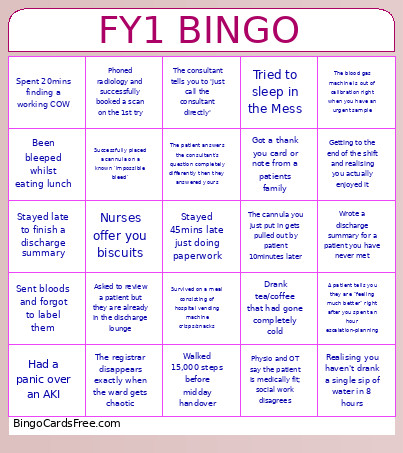
This FY1 Bingo Cards Game contains following Words or Phrases: Stayed late to finish a discharge summary, Had a panic over an AKI, Sent bloods and forgot to label them, Been bleeped whilst eating lunch, Spent 20mins finding a working COW, -c-, Successfully placed a cannula on a known 'impossible bleed', Asked to review a patient but they are already in the discharge lounge, The registrar disappears exactly when the ward gets chaotic, Nurses offer you biscuits, Phoned radiology and successfully booked a scan on the 1st try, -c-, Stayed 45mins late just doing paperwork, Survived on a meal consisting of hospital vending machine crisps/snacks, Walked 15,000 steps before midday handover, The consultant tells you to 'just call the consultant directly', The patient answers the consultant's question completely differently then they answered yours, -c-, The cannula you just put in gets pulled out by patient 10minutes later, Physio and OT say the patient is medically fit; social work disagrees, Drank tea/coffee that had gone completely cold, Got a thank you card or note from a patients family, Tried to sleep in the Mess, -c-, Wrote a discharge summary for a patient you have never met, The blood gas machine is out of calibration right when you have an urgent sample, A patient tells you they are "feeling much better" right after you spent an hour escalation-planning, Realising you haven't drank a single sip of water in 8 hours, Getting to the end of the shift and realising you actually enjoyed it.

 This FY1 Bingo Cards Game contains following Words or Phrases: Stayed late to finish a discharge summary, Had a panic over an AKI, Sent bloods and forgot to label them, Been bleeped whilst eating lunch, Spent 20mins finding a working COW, -c-, Successfully placed a cannula on a known 'impossible bleed', Asked to review a patient but they are already in the discharge lounge, The registrar disappears exactly when the ward gets chaotic, Nurses offer you biscuits, Phoned radiology and successfully booked a scan on the 1st try, -c-, Stayed 45mins late just doing paperwork, Survived on a meal consisting of hospital vending machine crisps/snacks, Walked 15,000 steps before midday handover, The consultant tells you to 'just call the consultant directly', The patient answers the consultant's question completely differently then they answered yours, -c-, The cannula you just put in gets pulled out by patient 10minutes later, Physio and OT say the patient is medically fit; social work disagrees, Drank tea/coffee that had gone completely cold, Got a thank you card or note from a patients family, Tried to sleep in the Mess, -c-, Wrote a discharge summary for a patient you have never met, The blood gas machine is out of calibration right when you have an urgent sample, A patient tells you they are "feeling much better" right after you spent an hour escalation-planning, Realising you haven't drank a single sip of water in 8 hours, Getting to the end of the shift and realising you actually enjoyed it.