Print free game time bingo cards or modify,
unlimited prints! Pick from 42,200+ designs or use our bingo card generator.
Add numbers, words, images, or all of them.
Play using PDF prints, virtual bingo cards,
and our virtual bingo caller, or combine all formats.
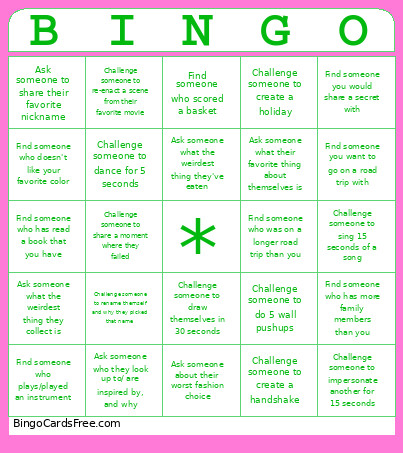
About: This bingo card is all about breaking the ice and building connections in a fun, interactive way. It's perfect for social gatherings, youth group events, or team-building sessions where you want people to open up, get moving, and learn quirky facts about each other. Expect lots of laughs, spontaneous challenges, and great conversation starters.
How To: To save a printable PDF, click the Print button.
You can alter the card count and other
print preferences on the Print tab.
Grid items and free space text can be added on the Basic tab.
Appearance can be totally customized on the
corresponding tabs, or you can easily locate any setting
on the 🔍 tab.
How to play game time Bingo Cards?
Digital Caller: Click on the Play button above.
Paper Caller: Print PDF calling list & calling slips and manually select the slips.
Digital Players: Click on the Play button above, and then click on the 🎫 button.
Paper Players: Print PDF bingo cards and manually cross off the cards.
Combo Play: Select any combination above.
For example, caller can be either Printed or Digital.
And players can be Printed or Digital or a combo of both.
Step-By-Step:
Start by downloading the game time PDF by clicking on the "Print" button above.
Open the PDF and print it.
For random calling, you can print another copy of the call list, cut, fold and then pull them randomly at play time.
Cut the bingo cards at the cut marks if there are more than 1 bingo cards per page.
Distribute one card per player. For marking, you can use pens. Crayons are the cheapest.
Select one person to be the caller. If you are playing in a small group, the caller can as well play along with their own Bingo card.
The caller opens the play by randomly drawing an item from the call list and saying it to everyone.
The players scan their cards to see if they have the announced word. If they do, they dab that word.
The first player to finish a horizontal, vertical, or a diagonal line of marked items shouts "Bingo!" and wins the game.
The caller checks that the items marked form a correct line as per the Bingo card and call list.
You can play for different patterns or a full card blackout for a longer game.
This game time Bingo Cards Game contains following Words or Phrases: Find someone you would share a secret with, Challenge someone to sing 15 seconds of a song, Find someone who was on a longer road trip than you, Ask someone about their worst fashion choice, Challenge someone to dance for 5 seconds, Ask someone what the weirdest thing they've eaten, Find someone who scored a basket, Challenge someone to draw themselves in 30 seconds, Find someone who has more family members than you, Ask someone what the weirdest thing they collect is, Challenge someone to impersonate another for 15 seconds, Find someone who plays/played an instrument, Challenge someone to do 5 wall pushups, Ask someone who they look up to/ are inspired by, and why, Find someone who doesn't like your favorite color, Ask someone to share their favorite nickname, Challenge someone to create a handshake, Challenge someone to create a holiday, Find someone who has read a book that you have, Ask someone what their favorite thing about themselves is, Find someone you want to go on a road trip with, Challenge someone to share a moment where they failed, Challenge someone to rename themself and why they picked that name, Challenge someone to re-enact a scene from their favorite movie.

 This game time Bingo Cards Game contains following Words or Phrases: Find someone you would share a secret with, Challenge someone to sing 15 seconds of a song, Find someone who was on a longer road trip than you, Ask someone about their worst fashion choice, Challenge someone to dance for 5 seconds, Ask someone what the weirdest thing they've eaten, Find someone who scored a basket, Challenge someone to draw themselves in 30 seconds, Find someone who has more family members than you, Ask someone what the weirdest thing they collect is, Challenge someone to impersonate another for 15 seconds, Find someone who plays/played an instrument, Challenge someone to do 5 wall pushups, Ask someone who they look up to/ are inspired by, and why, Find someone who doesn't like your favorite color, Ask someone to share their favorite nickname, Challenge someone to create a handshake, Challenge someone to create a holiday, Find someone who has read a book that you have, Ask someone what their favorite thing about themselves is, Find someone you want to go on a road trip with, Challenge someone to share a moment where they failed, Challenge someone to rename themself and why they picked that name, Challenge someone to re-enact a scene from their favorite movie.