Print free George’s Card bingo or customize,
limitless prints! Select from 41,500+ designs or use the bingo card generator.
Add numbers, phrases, photos, or all of them.
Play using PDF printouts, virtual bingo cards,
and the virtual bingo caller, or mix physical and digital.
About: This bingo card captures the inside jokes, quirks, and hilarious mishaps of a tight-knit friend group or online community. Perfect for a reunion, gaming session, or casual hangout, it’s packed with relatable moments about unexpected discoveries, playful teasing, and classic antics that only your circle truly gets. Get ready to shout "bingo" as familiar chaos unfolds!
How To: To get a printable PDF, click the Print button.
You can adjust the card quantity and other
print settings on the Print tab.
Grid items and free space text can be added on the Basic tab.
Appearance can be highly personalized on the
relevant tabs, or you can easily find any setting
on the 🔍 tab.
How to play George’s Card Bingo?
Virtual Caller: Click on the Play button above.
Paper Caller: Print PDF calling list & calling slips and manually pick the slips.
Paper Players: Print PDF bingo cards and manually write on the cards.
Virtual Players: Click on the Play button above, and then click on the 🎫 button.
Mixed Play: Pick any combination above.
For example, caller can be either Printed or Virtual.
And players can be Printed or Virtual or a combo of both.
Step-By-Step:
Start by downloading the George’s Card PDF by clicking on the "Print" button above.
Open the PDF and print it.
For random drawing, you can print another copy of the call list, cut, fold and then draw them randomly at play time.
Cut the bingo cards at the cut marks if there are more than 1 bingo cards per page.
Give one card to each player. For marking, you can use markers. Crayons cost the least.
Pick one person to be the caller. If you are playing in a small group, the caller may also play along with their own Bingo card.
The caller starts the game by randomly picking an item from the call list and announcing it to everyone.
The players scan their cards to see if they have the announced word. If they do, they dab that word.
The first player to complete a horizontal, vertical, or a diagonal line of marked items shouts "Bingo!" and wins the game.
The caller confirms that the items crossed off form a proper line as per the Bingo card and call list.
You can play for varied patterns or a full card blackout for a longer game.
This George’s Card Bingo Game contains following Words or Phrases: Anson Moans by Accident when frustrated in a game, Anson rekindles a love for an old game he played, Britt cosplays a meme character, Britt finds out something that she thought had a different meaning all her life, Domo gets his drivers license, Domo says something to piss Isaiah off, Elise and Joey post something unhinged of themselves again, Emy posts funny art involving the Lads, Evelyn makes fun of Anson for forgetting his sisters name, Giovanni finds a new hater at his fish shop, Hayden replies to a random post on discord thats not from Gio or an event, Isaiah screams at a race he was watching in the call, Jesse buys something random that makes no sense, Jesse puts on his headphones at a social gathering, Joey Hides food in his hoodie to a social gathering, Johnny breaks one of his personals in paintball, Johnny gets more than 2 tattoos this year, Luis does a vocal stim, Luis starts a new project and doesn't finish it and instead moves on to a new one, Marc posts a concert that someone else already posted and tagged him in, Mike loses something and it gets found in a stupid spot, Nhat joins the call randomly and says nothing before leaving, Onion finds a new Character to Horny Post about, Onion watches a kid show and live streams it, Travis buys a new vehicle with a manual transmission.

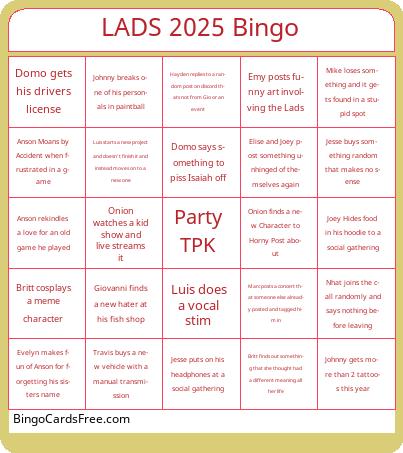 This George’s Card Bingo Game contains following Words or Phrases: Anson Moans by Accident when frustrated in a game, Anson rekindles a love for an old game he played, Britt cosplays a meme character, Britt finds out something that she thought had a different meaning all her life, Domo gets his drivers license, Domo says something to piss Isaiah off, Elise and Joey post something unhinged of themselves again, Emy posts funny art involving the Lads, Evelyn makes fun of Anson for forgetting his sisters name, Giovanni finds a new hater at his fish shop, Hayden replies to a random post on discord thats not from Gio or an event, Isaiah screams at a race he was watching in the call, Jesse buys something random that makes no sense, Jesse puts on his headphones at a social gathering, Joey Hides food in his hoodie to a social gathering, Johnny breaks one of his personals in paintball, Johnny gets more than 2 tattoos this year, Luis does a vocal stim, Luis starts a new project and doesn't finish it and instead moves on to a new one, Marc posts a concert that someone else already posted and tagged him in, Mike loses something and it gets found in a stupid spot, Nhat joins the call randomly and says nothing before leaving, Onion finds a new Character to Horny Post about, Onion watches a kid show and live streams it, Travis buys a new vehicle with a manual transmission.