Get To Know You Bingo Cards - Print Free or Customize
Print free Get To Know You bingo cards or personalize,
limitless prints! Pick from 41,500+ designs or use our bingo card generator.
Add numbers, phrases, images, or any combination.
Play using PDF prints, online bingo cards,
and our online bingo caller, or combine all formats.
About: This bingo card is a fun way to break the ice at church camps, youth group retreats, or Fellowship events. The mix of personal experiences, quirky talents, and faith-based trivia keeps everyone engaged and chatting. It’s perfect for helping attendees learn more about each other and spark new conversations in a relaxed, upbeat setting.
How To: To save a PDF to print, click the Print button.
You can change the number of cards and other
print settings on the Print tab.
Grid items and free space text can be changed on the Basic tab.
Appearance can be completely customized on the
relevant tabs, or you can easily locate any preference
using the 🔍 tab.
How to play Get To Know You Bingo Cards?
Online Caller: Click on the Play button above.
Paper Players: Print PDF bingo cards and manually scratch the cards.
Paper Caller: Print PDF calling list & calling slips and manually draw the slips.
Online Players: Click on the Play button above, and then click on the 🎫 button.
Hybrid Play: Pick any combination above.
For instance, caller can be either Paper or Online.
And players can be Paper or Online or a mix of both.
Step-By-Step:
Start by getting the Get To Know You Bingo PDF by clicking on the "Print" button above.
Open the PDF and print it.
For random drawing, you can print another copy of the call list, cut, fold and then pull them randomly at play time.
Cut the bingo cards at the cut lines if there are greater than 1 bingo cards per page.
Give one card to each player. For marking, you can use crayons. Crayons are the cheapest.
Pick one person to be the caller. If you are playing in a small group, the caller can as well play along with their own Bingo card.
The caller starts the play by randomly drawing an item from the call list and calling out it to everyone.
The players look at their cards to see if they have the announced word. If they do, they dab that word.
The first player to complete a horizontal, vertical, or a diagonal line of crossed items shouts "Bingo!" and wins the game.
The caller confirms that the items marked form a proper line as per the Bingo card and call list.
You can play for varied patterns or a full card blackout for an extended game.
This Get To Know You Bingo Cards Game contains following Words or Phrases: Someone who has more than three siblings, Some who has been out of the country, Someone who is engaged or married, A sixth grader, Someone with size 11 shoes, Someone who has been to 3+ winter retreats, Someone who has been on TV, Someone who knows what year Fellowship was founded, Someone who can recite John 3:16, Someone who has lived in a state other than Kentucky, Someone who can do a cartwheel, Someone who can whistle, Someone who has a dog, Someone who has ridden a horse, A student who has a job, Someone who goes to a Christian school, Someone who knows Kyle's middle name, Someone who's never been to Crossings before, Someone who knows another language, Someone who has played on a volleyball team, Someone who has been in a band, Someone who has been in a theater performance, Someone who has gone hunting, Someone who has met a celebrity, Someone who can use chopsticks, Someone who has curly hair, Someone who prefers cats to dogs, Someone who has broken a bone, Someone who has been on a mission trip, Someone who can play an instrument, Someone who has a pet that's not a dog, Someone who prefers coffee over soda, Someone who has been camping, Someone who can name the 12 disciples, Someone who can solve a Rubiks Cube, Someone who owns Crocs, Someone who likes pineapple on pizza, Someone who rides a unicycle, Someone who has been to a concert, Someone who has been to the beach, Someone who knows a magic trick.

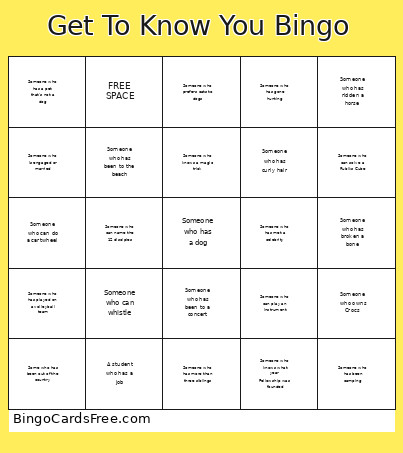 This Get To Know You Bingo Cards Game contains following Words or Phrases: Someone who has more than three siblings, Some who has been out of the country, Someone who is engaged or married, A sixth grader, Someone with size 11 shoes, Someone who has been to 3+ winter retreats, Someone who has been on TV, Someone who knows what year Fellowship was founded, Someone who can recite John 3:16, Someone who has lived in a state other than Kentucky, Someone who can do a cartwheel, Someone who can whistle, Someone who has a dog, Someone who has ridden a horse, A student who has a job, Someone who goes to a Christian school, Someone who knows Kyle's middle name, Someone who's never been to Crossings before, Someone who knows another language, Someone who has played on a volleyball team, Someone who has been in a band, Someone who has been in a theater performance, Someone who has gone hunting, Someone who has met a celebrity, Someone who can use chopsticks, Someone who has curly hair, Someone who prefers cats to dogs, Someone who has broken a bone, Someone who has been on a mission trip, Someone who can play an instrument, Someone who has a pet that's not a dog, Someone who prefers coffee over soda, Someone who has been camping, Someone who can name the 12 disciples, Someone who can solve a Rubiks Cube, Someone who owns Crocs, Someone who likes pineapple on pizza, Someone who rides a unicycle, Someone who has been to a concert, Someone who has been to the beach, Someone who knows a magic trick.