Girl’s Camp 2026 Bingo Cards - Print Free or Customize
Print free Girl’s Camp 2026 bingo cards or customize,
limitless cards! Select from 42,200+ designs or use our bingo card generator.
Add numbers, phrases, pictures, or all of them.
Play using printed PDF, digital bingo cards,
and our digital bingo caller, or go hybrid.
About: This bingo card is perfect for a church youth camp or girls’ camp, focused on kindness, gratitude, and spiritual growth in the great outdoors. The activities encourage connection with others, care for nature, expressing faith, and self-reflection. It’s a fun way to inspire meaningful moments and build friendships during a memorable camp experience.
How To: To get a printable PDF, click the Print button.
You can alter the number of cards and other
print preferences on the Print tab.
Grid items and free space text can be added on the Basic tab.
Appearance can be highly personalized on the
corresponding tabs, or you can easily find any setting
using the 🔍 tab.
How to play Girl’s Camp 2026 Bingo Cards?
Digital Caller: Click on the Play button above.
Digital Players: Click on the Play button above, and then click on the 🎫 button.
Printed Caller: Print PDF calling list & calling slips and physically pick the slips.
Printed Players: Print PDF bingo cards and physically write on the cards.
Hybrid Mode: Choose any combination above.
For example, caller can be either Offline or Digital.
And players can be Offline or Digital or a mix of both.
Step-By-Step:
Start by downloading the Girl’s Camp 2026 PDF by clicking on the "Print" button above.
Open the PDF and print it.
For random calling, you can print another copy of the call list, cut, fold and then draw them randomly at play time.
Cut the bingo cards at the cut lines if there are greater than 1 bingo cards per page.
Give one card to each player. For marking, you can use crayons. Crayons are the cheapest.
Choose one person to be the caller. If you are playing in a small group, the caller can also play along with their own Bingo card.
The caller starts the game by randomly pulling an item from the call list and announcing it to all players.
The players check their cards to see if they have the announced word. If they do, they mark that word.
The first player to finish a horizontal, vertical, or a diagonal line of marked items announces "Bingo!" and wins the game.
The caller validates that the items crossed off form a proper line according to the Bingo card and call list.
You can play for varied patterns or a full card blackout for an extended game.
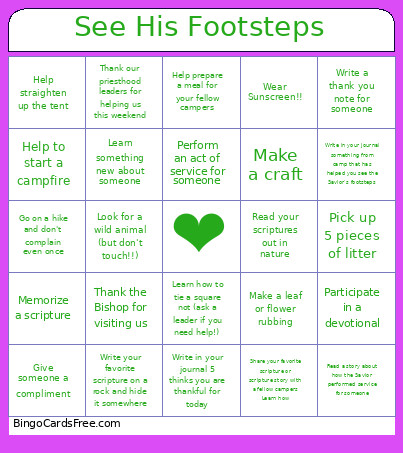
This Girl’s Camp 2026 Bingo Cards Game contains following Words or Phrases: Write a thank you note for someone, Pick up 5 pieces of litter, Read your scriptures out in nature, Write in your journal 5 thinks you are thankful for today, Learn something new about someone, Perform an act of service for someone, Help prepare a meal for your fellow campers, Learn how to tie a square not (ask a leader if you need help!), Participate in a devotional, Memorize a scripture, Read a story about how the Savior performed service for someone, Give someone a compliment, Make a leaf or flower rubbing, Write your favorite scripture on a rock and hide it somewhere, Help to start a campfire, Help straighten up the tent, Share your favorite scripture or scripture story with a fellow campers Learn how, Wear Sunscreen!!, Go on a hike and don't complain even once, Make a craft, Write in your journal something from camp that has helped you see the Savior's footsteps, Look for a wild animal (but don't touch!!), Thank the Bishop for visiting us, Thank our priesthood leaders for helping us this weekend.

 This Girl’s Camp 2026 Bingo Cards Game contains following Words or Phrases: Write a thank you note for someone, Pick up 5 pieces of litter, Read your scriptures out in nature, Write in your journal 5 thinks you are thankful for today, Learn something new about someone, Perform an act of service for someone, Help prepare a meal for your fellow campers, Learn how to tie a square not (ask a leader if you need help!), Participate in a devotional, Memorize a scripture, Read a story about how the Savior performed service for someone, Give someone a compliment, Make a leaf or flower rubbing, Write your favorite scripture on a rock and hide it somewhere, Help to start a campfire, Help straighten up the tent, Share your favorite scripture or scripture story with a fellow campers Learn how, Wear Sunscreen!!, Go on a hike and don't complain even once, Make a craft, Write in your journal something from camp that has helped you see the Savior's footsteps, Look for a wild animal (but don't touch!!), Thank the Bishop for visiting us, Thank our priesthood leaders for helping us this weekend.