Gnomeo and Juliet Bingo Cards - Print Free or Customize
Print free Gnomeo and Juliet bingo cards or adjust them,
limitless cards! Pick from 41,500+ templates or use our bingo card generator.
Add numbers, words, pictures, or any combination.
Play using printed PDF, online bingo cards,
and our online bingo caller, or go hybrid.
About: This bingo card is perfect for fans of the playful and quirky world of "Gnomeo & Juliet." With nods to Shakespeare, garden antics, and clever humor, it’s a fun addition to movie nights or themed parties. Expect plenty of laughs as you spot classic references, wild gnome moments, and surprising twists hidden in every scene.
How To: To get a printable PDF, click the Print button.
You can alter the number of cards and other
print options on the Print tab.
Grid items and free space text can be changed on the Basic tab.
Appearance can be completely personalized on the
corresponding tabs, or you can quickly locate any option
using the 🔍 tab.
How to play Gnomeo and Juliet Bingo Cards?
Printed Caller: Print PDF calling list & calling slips and manually select the slips.
Printed Players: Print PDF bingo cards and manually write on the cards.
Online Caller: Click on the Play button above.
Online Players: Click on the Play button above, and then click on the 🎫 button.
Mixed Play: Choose any combination above.
For instance, caller can be either Offline or Online.
And players can be Offline or Online or a combo of both.
Step-By-Step:
Start by saving the Gnomeo and Juliet PDF by clicking on the "Print" button above.
Open the PDF and print a hard copy.
For random drawing, you can print another copy of the call list, cut, fold and then pick them randomly at play time.
Cut the bingo cards at the cut marks if there are greater than 1 bingo cards per page.
Distribute one card per player. For marking, you can use pens. Crayons cost the least.
Choose one person to be the caller. If you are playing in a small group, the caller can as well play along with their own Bingo card.
The caller initiates the game by randomly pulling an item from the call list and saying it to all players.
The players check their cards to see if they have the called word. If they do, they cross off that word.
The first player to finish a horizontal, vertical, or a diagonal line of marked items announces "Bingo!" and wins the play.
The caller confirms that the items crossed off form a correct line as per the Bingo card and call list.
You can play for multiple patterns or a full card blackout for an extended play.
This Gnomeo and Juliet Bingo Cards Game contains following Words or Phrases: Shakespeare reference, A gnome gets broken, Lawn mower race!, Juliet climbs somewhere she shouldn't, Gnomeo and Juliet lock eyes for the first time, "Gnomeo!", Gnome disguise, Elton John, The flamingo cries, The red and blue rivalry is mentioned, A character says something weirdly suggestive for a kids' movie, Gnomeo rides something like it's a horse, A plant pot gets knocked over, Juliet's dad gets overprotective, The flamingo talks about his lost love, Someone uses gardening tools as weapons, "Gnomeo, Gnomeo, wherefore art thou Gnomeo?", A scene takes place in the human world, Someone gets covered in mud, A Shakespeare statue appears, A joke about being ceramic or fragile, Someone says something in slow motion, Gnomeo sneaks into enemy territory, The neighbors' gardens are compared, Gnomeo and Juliet almost get caught together, Someone shatters dramatically, The frog character makes a joke about love, The gnomes freeze when a human appears, Someone mistakes a lawn ornament for a person, Gnomeo gets exiled or runs away, A gnome says something too British, A joke about being short or tiny, The flamingo dances, Juliet wears her ninja outfit, A sprinkler goes off at the worst time, Gnomeo gets a pep talk, The frog gives romantic advice, Someone yells "Attack!", A slow-motion dramatic moment happens, Gnomeo and Juliet kiss, Someone fakes their death, The humans are oblivious to chaos, The garden gets destroyed, Gnome ass.

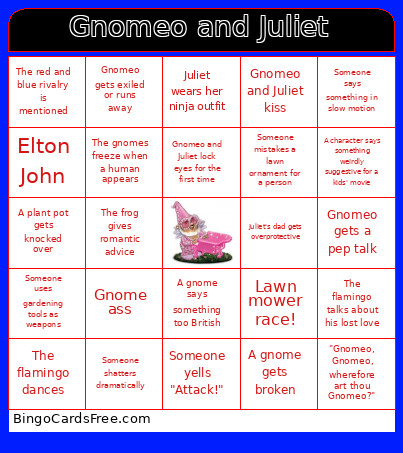 This Gnomeo and Juliet Bingo Cards Game contains following Words or Phrases: Shakespeare reference, A gnome gets broken, Lawn mower race!, Juliet climbs somewhere she shouldn't, Gnomeo and Juliet lock eyes for the first time, "Gnomeo!", Gnome disguise, Elton John, The flamingo cries, The red and blue rivalry is mentioned, A character says something weirdly suggestive for a kids' movie, Gnomeo rides something like it's a horse, A plant pot gets knocked over, Juliet's dad gets overprotective, The flamingo talks about his lost love, Someone uses gardening tools as weapons, "Gnomeo, Gnomeo, wherefore art thou Gnomeo?", A scene takes place in the human world, Someone gets covered in mud, A Shakespeare statue appears, A joke about being ceramic or fragile, Someone says something in slow motion, Gnomeo sneaks into enemy territory, The neighbors' gardens are compared, Gnomeo and Juliet almost get caught together, Someone shatters dramatically, The frog character makes a joke about love, The gnomes freeze when a human appears, Someone mistakes a lawn ornament for a person, Gnomeo gets exiled or runs away, A gnome says something too British, A joke about being short or tiny, The flamingo dances, Juliet wears her ninja outfit, A sprinkler goes off at the worst time, Gnomeo gets a pep talk, The frog gives romantic advice, Someone yells "Attack!", A slow-motion dramatic moment happens, Gnomeo and Juliet kiss, Someone fakes their death, The humans are oblivious to chaos, The garden gets destroyed, Gnome ass.