
watch party Bingo Cards - Print Free or Customize
Print free watch party bingo cards or modify, unlimited prints! Select from 41,500+ templates or use our bingo card generator. Add numbers, phrases, pictures, or all of them. Play using printable PDF, digital bingo cards, and our digital bingo caller, or go hybrid.
About: This bingo card is perfect for breaking the ice and sparking conversations at a lively networking event, especially one with a travel, sports, or RPOA community vibe. It encourages guests to share stories about their experiences, passions, and adventures—making it ideal for fostering new connections and creating memorable moments among both newcomers and seasoned attendees.
How To: To download a printable PDF, click the Print button. You can adjust the number of cards and other printing preferences on the Print tab. Grid items and free space content can be added on the Basic tab. Appearance can be exactly personalized on the corresponding tabs, or you can easily find any option on the 🔍 tab.
How to play watch party Bingo Cards?
- Online Players: Click on the Play button above, and then click on the 🎫 button.
- Paper Players: Print PDF bingo cards and physically scratch the cards.
- Paper Caller: Print PDF calling list & calling slips and physically choose the slips.
- Online Caller: Click on the Play button above.
- Mixed Mode: Choose any combination above. For example, caller can be either Offline or Online. And players can be Offline or Online or a combo of both.
Step-By-Step:
- Start by getting the watch party PDF by clicking on the "Print" button above.
- Open the PDF and print a hard copy.
- For random drawing, you can print another copy of the call list, cut, fold and then draw them randomly at play time.
- Cut the bingo cards at the cut lines if there are more than 1 bingo cards per page.
- Distribute one card per player. For marking, you can use pens. Crayons are the cheapest.
- Choose one person to be the caller. If you are playing in a small group, the caller may also play along with their own Bingo card.
- The caller opens the game by randomly drawing an item from the call list and announcing it to everyone.
- The players check their cards to see if they have the announced word. If they do, they mark that word.
- The first player to finish a horizontal, vertical, or a diagonal line of marked items shouts "Bingo!" and wins the game.
- The caller checks that the items crossed off form a proper line as per the Bingo card and call list.
- You can play for different patterns or a full card blackout for an extended game.
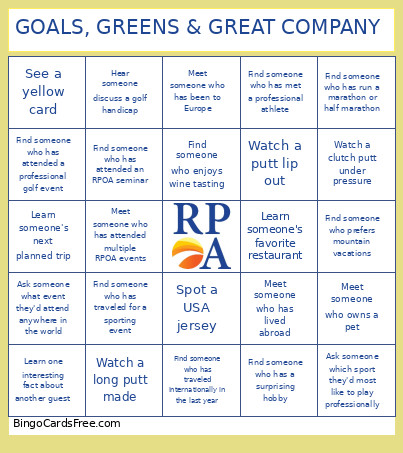 This watch party Bingo Cards Game contains following Words or Phrases: Meet someone attending their first RPOA event, Meet someone you haven't met before tonight, Learn someone's favorite vacation destination, Find someone who has lived in another state, Find someone who has worked in their industry for 20+ years, Meet someone who has attended multiple RPOA events, Learn someone's dream retirement destination, Find someone who enjoys golfing, Find someone who follows soccer, Find someone who has attended a professional sporting event this year, Learn someone's favorite hobby, Meet someone who owns a pet, Find someone who has run a marathon or half marathon, Meet someone who enjoys cooking, Learn someone's favorite restaurant, Find someone who enjoys traveling internationally, Meet someone who has visited more than five countries, Learn about someone's bucket-list trip, Find someone celebrating a recent milestone, Meet someone who was invited by a referral, Find someone who has attended a World Cup watch party before, Learn one interesting fact about another guest, Find someone who has visited a national park, Meet someone who has lived abroad, Find someone who enjoys wine tasting, Find someone who has traveled internationally in the last year, Meet someone who has been to Australia, Meet someone who has been to Europe, Find someone who has visited a World Cup host country, Learn someone's favorite city they've visited, Find someone who prefers beach vacations, Find someone who prefers mountain vacations, Meet someone who has taken a cruise, Find someone who has traveled for a sporting event, Learn someone's next planned trip, Find someone who speaks another language, Meet someone who has traveled solo, Find someone who has visited all 50 states, Find someone who has a passport currently in use, Meet someone who has flown internationally in the last 12 months, Hear someone say "GOAL!", Team USA scores, Someone predicts the final score correctly, Spot a USA jersey, Spot someone wearing red, white, or blue, Watch a replay of a scoring opportunity, Hear a discussion about the World Cup, Someone explains an offside rule, See a corner kick, See a yellow card, Hear a crowd chant on TV, Watch a save by the goalkeeper, Hear someone say "That should have been a goal", Spot someone cheering for Australia, Watch a penalty kick, See a player celebrating a goal, Hear someone mention a favorite soccer player, Watch a dramatic near miss, See a player take a free kick, Hear applause after a big play, Someone says "Nice putt", See a birdie, Watch a long putt made, Watch a golfer hit from a bunker, Hear someone discuss a golf handicap, Find someone who has played golf this year, See a golfer celebrating, Watch a difficult recovery shot, Hear someone mention a favorite golfer, Watch a putt lip out, Hear a golf clap, See a birdie putt attempt, Hear someone say "That's a tough course", Spot someone wearing golf attire, Watch a player hit the fairway, See a golfer save par, Hear someone explain a golf rule, Watch a highlight replay, Hear someone say "Fore!", Watch a clutch putt under pressure, Take a selfie with another guest, Take a group photo, Introduce two people who haven't met, Share a toast with another guest, Learn someone's favorite sports team, Find someone who shares your hometown, Learn someone's favorite TV show, Find someone who enjoys live music, Meet someone who enjoys volunteering, Learn someone's hidden talent, Find someone who enjoys pickleball, Meet someone who enjoys hiking, Learn someone's favorite local business, Find someone who has attended an RPOA seminar, Meet someone who has a summer travel plan, Find someone who has attended a professional golf event, Find someone who has attended a professional soccer match, Learn someone's favorite sports memory, Meet someone who knows another guest from outside of RPOA, Find someone who has a birthday this month, Learn one item on someone's bucket list, Ask someone where they'd retire tomorrow if they could, Find someone who has visited their dream destination, Learn someone's best travel tip, Ask someone which sport they'd most like to play professionally, Learn someone's first job, Find someone who has a surprising hobby, Learn someone's favorite family tradition, Ask someone for their best restaurant recommendation, Learn one thing someone is looking forward to this year, Find someone who has met a professional athlete, Learn someone's favorite place they've ever lived, Ask someone what event they'd attend anywhere in the world, Learn someone's most memorable vacation story, Find someone who has accomplished a lifelong goal.