
Grace Sanctuary Bingo Cards - Print Free or Customize
Print free Grace Sanctuary bingo cards or customize, unlimited cards! Pick from 41,900+ templates or use the bingo card generator. Add numbers, words, photos, or any combination. Play using printed PDF, virtual bingo cards, and the virtual bingo caller, or combine all formats.
About: This bingo card is perfect for lively icebreaker events or social gatherings, designed to spark conversations and help people discover quirky habits and fun facts about each other. It mixes lifestyle choices, personal preferences, skills, and life experiences in a lighthearted way, making it ideal for team-building sessions, community meetups, or parties where you want to break the ice fast.
How To: To get a PDF to print, click the Print button. You can change the number of cards and other printing preferences on the Print tab. Grid items and free space text can be edited on the Basic tab. Appearance can be entirely personalized on the relevant tabs, or you can quickly locate any setting using the 🔍 tab.
How to play Grace Sanctuary Bingo Cards?
- Printed Players: Print PDF bingo cards and physically scratch the cards.
- Online Caller: Click on the Play button above.
- Printed Caller: Print PDF calling list & calling slips and physically pick the slips.
- Online Players: Click on the Play button above, and then click on the 🎫 button.
- Mixed Play: Choose any combination above. For instance, caller can be either Printed or Online. And players can be Printed or Online or a combination of both.
Step-By-Step:
- Start by getting the Grace Sanctuary Bingo PDF by clicking on the "Print" button above.
- Open the PDF and print it.
- For random calling, you can print another copy of the call list, cut, fold and then draw them randomly at play time.
- Cut the bingo cards at the cut lines if there are greater than 1 bingo cards per page.
- Distribute one card per player. For marking, you can use pencils. Crayons cost the least.
- Choose one person to be the caller. If you are playing in a small group, the caller can as well play along with their own Bingo card.
- The caller begins the play by randomly pulling an item from the call list and saying it to all players.
- The players scan their cards to see if they have the called word. If they do, they dab that word.
- The first player to finish a horizontal, vertical, or a diagonal line of marked items shouts "Bingo!" and wins the play.
- The caller validates that the items marked form a correct line as per the Bingo card and call list.
- You can play for varied patterns or a full card blackout for an extended play.
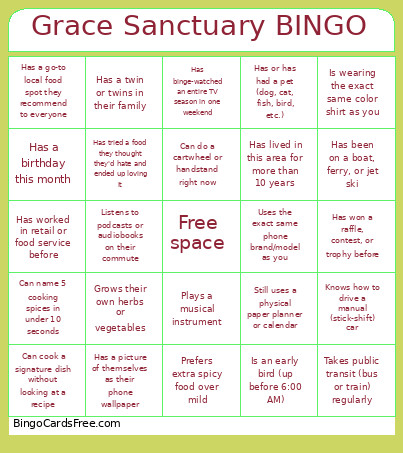 This Grace Sanctuary Bingo Cards Game contains following Words or Phrases: Is an early bird (up before 6:00 AM), Is a night owl (stays up past midnight), Does NOT drink coffee, Still uses a physical paper planner or calendar, Has lost their phone or keys in the last week, Wears socks to bed, Has a birthday this month, Shares your birth month, Is currently wearing something red, yellow, or green, Is wearing the exact same color shirt as you, Prefers savory snacks over sweet snacks, Prefers extra spicy food over mild, Can cook a signature dish without looking at a recipe, Bakes bread or sweet treats from scratch, Grows their own herbs or vegetables, Has tried a food they thought they'd hate and ended up loving it, Has a go-to local food spot they recommend to everyone, Can name 5 cooking spices in under 10 seconds, Plays a musical instrument, Knows how to play chess, Plays in a rec league (bowling, soccer, softball, basketball, etc.), Has completed a 5K, walkathon, or race, Can do a cartwheel or handstand right now, Is a left-handed writer, Loves board games or card games, Can juggle 3 items for at least 5 seconds, Can whistle a full song clearly, Has won a raffle, contest, or trophy before, Speaks or understands two or more languages, Was born in a different state or country than where they live now, Has taken a road trip longer than 8 hours, Has been camping in a tent in the last year, Has been on a boat, ferry, or jet ski, Takes public transit (bus or train) regularly, Knows how to drive a manual (stick-shift) car, Has lived in this area for less than 1 year, Has lived in this area for more than 10 years, Has met a celebrity, athlete, or musician in person, Has been on TV, the news, or in a video online, Has binge-watched an entire TV season in one weekend, Listens to podcasts or audiobooks on their commute, Has a picture of themselves as their phone wallpaper, Can tell a genuinely good joke on the spot, Has never broken a single bone, Is an only child, Has an older brother or older sister, Has or has had a pet (dog, cat, fish, bird, etc.), Has a twin or twins in their family, Has worked in retail or food service before, Uses the exact same phone brand/model as you.