
Graduation Bingo Cards - Print Free or Customize
Print free Graduation bingo cards or customize, limitless prints! Choose from 41,500+ designs or use our bingo card generator. Add numbers, phrases, pictures, or any combination. Play using printable PDF, virtual bingo cards, and our virtual bingo caller, or combine all formats.
About: This bingo card is a fun and lighthearted way to capture the chaos, heartfelt moments, and quirky details that make graduation ceremonies so memorable. Perfect for students, families, or faculty attending a commencement, it adds extra excitement by encouraging everyone to spot and celebrate the unexpected—whether it's bold fashion choices, tech hiccups, or hilarious crowd reactions.
How To: To download a printable PDF, click the Print button. You can modify the card quantity and other printing preferences on the Print tab. Grid items and free space content can be added on the Basic tab. Appearance can be entirely personalized on the relevant tabs, or you can quickly search any preference using the 🔍 tab.
How to play Graduation Bingo Cards?
- Paper Players: Print PDF bingo cards and physically cross off the cards.
- Virtual Players: Click on the Play button above, and then click on the 🎫 button.
- Virtual Caller: Click on the Play button above.
- Paper Caller: Print PDF calling list & calling slips and physically pick the slips.
- Mixed Play: Select any combination above. For example, caller can be either Offline or Virtual. And players can be Offline or Virtual or a combo of both.
Step-By-Step:
- Start by getting the Graduation Bingo PDF by clicking on the "Print" button above.
- Open the PDF and print a hard copy.
- For random drawing, you can print another copy of the call list, cut, fold and then draw them randomly at play time.
- Cut the bingo cards at the cut marks if there are more than 1 bingo cards per page.
- Distribute one card per player. For marking, you can use markers. Crayons cost the least.
- Select one person to be the caller. If you are playing in a small group, the caller may also play along with their own Bingo card.
- The caller begins the play by randomly picking an item from the call list and announcing it to all players.
- The players look at their cards to see if they have the called word. If they do, they cross off that word.
- The first player to complete a horizontal, vertical, or a diagonal line of crossed items announces "Bingo!" and wins the play.
- The caller validates that the items marked form a proper line according to the Bingo card and call list.
- You can play for different patterns or a full card blackout for an extended play.
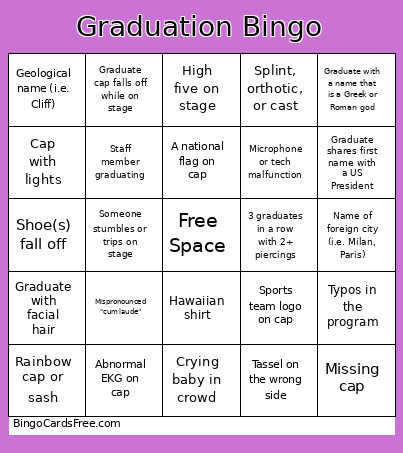 This Graduation Bingo Cards Game contains following Words or Phrases: Someone in crowd yells a curse word (i.e. "Fuck yeah"), "That's my baby" yelled from the crowd, Speaker says "you are the leaders of tomorrow", 3 or more cords, 3 or more hair colors, 3 graduates in a row with 2+ piercings, Goth make up, Student waves or blows a kiss to the video camera, Bow tie, iPad or tablet on stage, Biblical name (i.e. Genesis), Camouflage clothing, Hawaiian shirt, Torn or distressed jeans, Missing cap, Day of the week name (i.e. Wednesday), Face mask, Disney character name (i.e. Ariel, Remy), Graduate with 4+ names, Military rank name (i.e. Major, Sergeant), Splint, orthotic, or cast, Color name (i.e. White), Fishnets, Furry or fuzzy cap, Name of foreign city (i.e. Milan, Paris), Rainbow cap or sash, Name of US city (i.e. Boston), Someone stumbles or trips on stage, Not enough chairs, Speaker says "move mountains", Tongue out on stage, Name of profession (i.e. Carpenter, Mason), Someone yawning on video feed, Animal name (i.e. Duckworth), Food name (i.e. Burger/Berger), Geological name (i.e. Cliff), Season name (i.e. Winter, Summer), Cowboy boots, Faculty high-five or hug graduate, Sideways or side-leaning cap, Directional name (i.e. West, East), Phonetic alphabet name (i.e. Charlie, Echo), Pregnant graduate, Name of Colorado city/town (i.e. Aurora, Parker), Staff member graduating, Country name (i.e. China), 4 or more facial piercings, 6+ inch heels, A national flag on cap, Abnormal EKG on cap, Air horn in the crowd, Auto tech student in shop clothes or with oil-stained hands, Awkward silence or pause during ceremony, Bedazzled or glitter cap, Bedazzled or glitter shoes, Cabinet member sneezes, Cap thrown into the air/crowd, Cap with lights, Child of faculty or staff graduating, Clear high heels, Crying baby in crowd, Crying on stage, Dancing on stage, Fist pump while on stage, Flowers on cap, Graduate with facial hair, Graduates with 2 degrees or certificates, High five on stage, Metal sign/Devil's Horns while on stage, Microphone or tech malfunction, Nursing student with a real stethoscope, Mispronounced name, Peace sign while on stage, Pet picture on cap, Political statement or symbol on cap, Reference or symbol to climate change, Religious symbol on cap, Selfie on stage, Service dog, Service mini horse, Shoe(s) fall off, Silly nickname yelled from crowd, Snaps instead of clapping, Mispronounced "cum laude", Someone screams "our flag was still there" during anthem, Someone using commencement program as a fan, Speaker drinks water during speech, Speaker thanks parent(s), Speaker uses the word "Legacy", Sports team logo on cap, Spot someone who fell asleep during ceremony, Someone with a sunburn, Someone with an eye patch, Graduate brings their child on stage, Graduate cap falls off while on stage, Graduate eating during ceremony, Graduate shares first name with a US President, Graduate skips photo line, Graduate wearing a lei, Graduate wearing chucks, Graduate wearing flip-flops, Graduate with a name that is a flower or plant (i.e. Rose), Graduate with a name that is a Greek or Roman god, Graduate with a name that is a mineral or gem (i.e. Ruby), Graduate with a name that is a US state (i.e. Indiana), Graduate with two first names, Graduate yells at crowd from stage, Sunglasses on stage, Puma on cap, 3+ cosmo students in a row wearing a white dress, Tassel on the wrong side, Sandals with straps that wrap up, at least to mid-calf, Butt-length hair, Typos in the program, War-related statement or symbol on cap, Wardrobe malfunction.