Guardians of the Galaxy Vibes Bingo Cards - Print Free or Customize
Print free Guardians of the Galaxy Vibes bingo cards or customize,
limitless cards! Select from 41,500+ templates or use our bingo card generator.
Add numbers, words, photos, or mix them all.
Play using printable PDF, virtual bingo cards,
and our virtual bingo caller, or mix physical and digital.
About: This bingo card is all about celebrating classic rock, soul, and feel-good anthems that span decades. Its upbeat, nostalgic vibe makes it a perfect fit for music trivia nights, retro-themed parties, or gatherings of Guardians of the Galaxy fans. Players can bond over legendary hits and hidden gems as they race to complete their cards.
How To: To download a PDF to print, click the Print button.
You can change the number of cards and other
print preferences on the Print tab.
Grid items and free space text can be edited on the Basic tab.
Appearance can be fully personalized on the
corresponding tabs, or you can easily find any preference
on the 🔍 tab.
How to play Guardians of the Galaxy Vibes Bingo Cards?
Paper Caller: Print PDF calling list & calling slips and manually pick the slips.
Digital Players: Click on the Play button above, and then click on the 🎫 button.
Digital Caller: Click on the Play button above.
Paper Players: Print PDF bingo cards and manually scratch the cards.
Combo Mode: Pick any combination above.
For example, caller can be either Printed or Digital.
And players can be Printed or Digital or a mix of both.
Step-By-Step:
Start by saving the Guardians of the Galaxy Vibes PDF by clicking on the "Print" button above.
Open the PDF and print it.
For random calling, you can print another copy of the call list, cut, fold and then pull them randomly at play time.
Cut the bingo cards at the cut lines if there are greater than 1 bingo cards per page.
Distribute one card per player. For marking, you can use markers. Crayons are the cheapest.
Pick one person to be the caller. If you are playing in a small group, the caller may also play along with their own Bingo card.
The caller begins the game by randomly pulling an item from the call list and saying it to everyone.
The players check their cards to see if they have the called word. If they do, they mark that word.
The first player to finish a horizontal, vertical, or a diagonal line of marked items yells "Bingo!" and wins the play.
The caller checks that the items marked form a correct line according to the Bingo card and call list.
You can play for varied patterns or a full card blackout for a longer play.
This Guardians of the Galaxy Vibes Bingo Cards Game contains following Words or Phrases: Blue Swede, Björn Skifs - Hooked On A Feeling, Raspberries - Go All The Way, Norman Greenbaum - Spirit in the Sky, The Jackson 5 - I Want You Back, The Runaways - Cherry Bomb, The Five Stairsteps - O-o-h Child, Marvin Gaye, Tammi Terrell - Ain't No Mountain High Enough, Sweet - Fox On The Run, Aliotta Haynes Jeremiah - Lake Shore Drive, Sam Cooke - Bring It On Home to Me, Glen Campbell - Southern Nights, The All-American Rejects - Get This, Jack Burns - Let Go Your Love, Looking Glass - Brandy (You're a Fine Girl), Jay & The Americans - Come A Little Bit Closer, Silver - Wham Bam Shang-A-Lang, Yusuf / Cat Stevens - Father And Son, The Sneepers, David Hasselhoff - Guardians Inferno, Elton John - Crocodile Rock, Queen - Don't Stop Me Now, The Spinners - The Rubberband Man, Three Dog Night - Joy To The World, James Gang - Funk #49, Vernon Trumbull & His Kinsmen - I Ride Alone, Neon Echoes - Right For You, James Gang - Walk Away, Sour Ops - Opting Out, Radiohead - Creep, The Sea Monks, Johnny Sapphire - MOR, Rainbow - Since You Been Gone, Eddy and the Dirty Boys - Undefeated, Kasador - DC & The PC Punks, The Flaming Lips - Do You Realize??, Kory and the Fireflies - Let It Shine, Cordell Winter - Don't Make A Sound, EHAMIC - Koinu no Carnival, Alice Cooper - I'm Always Chasing Rainbows, The Mowgli's - San Francisco, Blue Eyes Black - Rum Drinking Mermaid, X - Poor Girl, Lines in the Sky - Up, You Citizen - Kindly Be Cruel, The Replacements - I Will Dare, The Not Bobs - Paul's Bicep, Redbone - Come and Get Your Love.

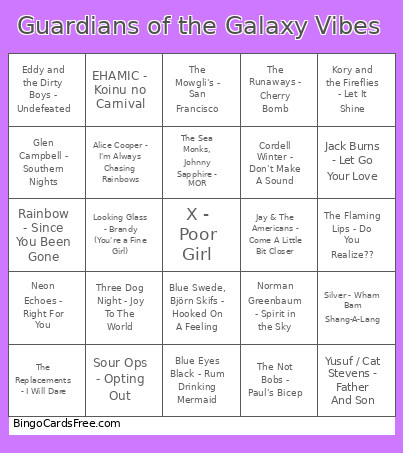 This Guardians of the Galaxy Vibes Bingo Cards Game contains following Words or Phrases: Blue Swede, Björn Skifs - Hooked On A Feeling, Raspberries - Go All The Way, Norman Greenbaum - Spirit in the Sky, The Jackson 5 - I Want You Back, The Runaways - Cherry Bomb, The Five Stairsteps - O-o-h Child, Marvin Gaye, Tammi Terrell - Ain't No Mountain High Enough, Sweet - Fox On The Run, Aliotta Haynes Jeremiah - Lake Shore Drive, Sam Cooke - Bring It On Home to Me, Glen Campbell - Southern Nights, The All-American Rejects - Get This, Jack Burns - Let Go Your Love, Looking Glass - Brandy (You're a Fine Girl), Jay & The Americans - Come A Little Bit Closer, Silver - Wham Bam Shang-A-Lang, Yusuf / Cat Stevens - Father And Son, The Sneepers, David Hasselhoff - Guardians Inferno, Elton John - Crocodile Rock, Queen - Don't Stop Me Now, The Spinners - The Rubberband Man, Three Dog Night - Joy To The World, James Gang - Funk #49, Vernon Trumbull & His Kinsmen - I Ride Alone, Neon Echoes - Right For You, James Gang - Walk Away, Sour Ops - Opting Out, Radiohead - Creep, The Sea Monks, Johnny Sapphire - MOR, Rainbow - Since You Been Gone, Eddy and the Dirty Boys - Undefeated, Kasador - DC & The PC Punks, The Flaming Lips - Do You Realize??, Kory and the Fireflies - Let It Shine, Cordell Winter - Don't Make A Sound, EHAMIC - Koinu no Carnival, Alice Cooper - I'm Always Chasing Rainbows, The Mowgli's - San Francisco, Blue Eyes Black - Rum Drinking Mermaid, X - Poor Girl, Lines in the Sky - Up, You Citizen - Kindly Be Cruel, The Replacements - I Will Dare, The Not Bobs - Paul's Bicep, Redbone - Come and Get Your Love.